Best Jira Open Source in 2026: Practical Comparison Guide
Choosing Jira Open Source Tools? Compare 5 options by fit, deployment, pricing, and tradeoffs. Read the guide before you decide.
When Jira starts feeling crowded with plugins, workflows, and settings to maintain, finding a simpler fit can be harder than expected. This guide compares jira open source options Redmine, Taiga, GitLab, and Tuleap, plus ONES.com, a commercial alternative for teams considering a unified platform.
You’ll see how the tools differ in issue tracking, agile planning, development workflows, and deployment, so you can weigh open-source flexibility against broader features. Start with what matters most to your team: access to the source code, control over hosting, or fewer disconnected tools.
Quick Summary
For a strictly open-source Jira replacement, compare Redmine, Taiga, GitLab, and Tuleap against your team’s workflow and hosting needs. ONES.com is not open source, but it is worth considering if you want a unified platform with self-hosting options.
Redmine suits configurable issue tracking, Taiga offers focused Scrum and Kanban, GitLab connects planning with code delivery, and Tuleap provides broader application lifecycle management. Start by deciding whether source availability or an integrated feature set matters more.
- Choose Redmine for adaptable issue tracking and a large plugin ecosystem.
- Choose Taiga for straightforward agile boards and sprint planning.
- Choose GitLab when project tracking needs to sit close to repositories and CI/CD.
- Choose Tuleap for structured agile execution and lifecycle management.
- Consider ONES.com if you need broad project and development management, flexible deployment, and fewer separate tools.
How We Evaluate and Select These Tools
A Jira replacement has to do more than display a backlog. I compare each option against daily planning work, reporting needs, hosting constraints, and the effort required to move existing projects.
- Project and agile tracking: We look at how clearly teams can manage issues, backlogs, sprints, boards, and cross-project work.
- Workflow customization: We consider configurable statuses, fields, permissions, and automation without assuming every team wants to maintain plugins.
- Reporting and visibility: We assess whether teams can spot delivery progress, blockers, and risks using built-in reports or practical integrations.
- Deployment and control: We distinguish hosted services from self-managed options and note when private or air-gapped deployment is available.
- Migration fit: We consider how much work may be needed to move issues, users, workflows, attachments, and integrations.
- Cost and operating effort: We weigh license costs alongside hosting, administration, upgrades, and any paid extensions.
Top Jira Open Source Options Shortlist
These five options cover different tradeoffs: open-source flexibility, agile focus, development integration, and broader management capabilities.
- ONES.com — A commercial, unified management platform for teams that value flexible deployment and integrated project and development workflows over an open-source license.
- Redmine — A self-hosted, open-source issue tracker that teams can adapt with custom fields, workflows, and plugins.
- Taiga — An open-source agile project management tool centered on Scrum and Kanban boards.
- GitLab — A software development platform with project planning and issue tracking connected to repositories and delivery workflows.
- Tuleap — An open-source application lifecycle management platform combining agile planning, tracking, and development processes.

Jira Open Source Comparison Table
| Tool | Best For | Deployment | Pricing | Key Feature | Free Plan |
|---|
| ONES.com | Teams seeking unified project and software development management with flexible hosting | Cloud, On-Premise, Private Cloud, Air-gapped | Free plan for up to 30 seats; contact the vendor for paid-plan pricing | Requirements, tasks, workflows, reporting, knowledge, and delivery governance in one platform | Yes, up to 30 seats |
| Redmine | Teams needing configurable, self-hosted issue tracking | Self-hosted; hosted services may be available through providers | Open-source software; hosting and maintenance may add costs | Issue tracking with custom fields, time tracking, and plugin options | Yes, self-hosted |
| Taiga | Agile teams that want focused Scrum and Kanban planning | Cloud and self-hosted options | Open-source self-hosting; hosted plans may be paid | Backlogs, sprints, and Kanban boards | Yes, self-hosted; hosted limits depend on plan |
| GitLab | Development teams connecting planning with code delivery | GitLab.com and self-managed | Free tier with paid tiers for additional capabilities | Issue tracking and agile planning alongside repositories and CI/CD | Yes |
| Tuleap | Teams needing integrated agile planning and application lifecycle management | Cloud and self-hosted options | Community options and paid offerings; confirm current plan details with the vendor | Agile boards, tracking, and lifecycle management capabilities | Yes, community option |
“Open source” does not mean every deployment or support option is free. Check current plan limits, hosting costs, and extension requirements before comparing total cost.
Detailed Reviews of the Best Jira Open Source Options in 2026
Product Overview

ONES.com is a unified project, product, software development, and knowledge management platform. In a search for Jira open source, it is worth considering as a Jira alternative for teams that want project tracking and agile execution in one connected system, even though it is not an open-source distribution. The platform keeps requirements, tasks, workflows, reporting, team knowledge, and delivery updates together, giving teams a shared place to plan work and follow it through review and release.
That joined-up approach can help when a team’s Jira setup has grown across multiple plugins, spreadsheets, and separate documentation tools. You can manage backlogs, sprints, project progress, and risks while connecting work to the knowledge and decisions behind it. ONES.com also supports Cloud, On-Premise, Private Cloud, and air-gapped deployment, with feature parity between cloud and self-hosted versions.
Why It Was Selected
ONES.com belongs in a practical Jira alternative comparison because it covers more than issue tracking. It supports agile planning, customizable workflows, reporting, collaboration, and project governance in a single platform. For example, a product team can track a requirement from intake to sprint delivery, give engineering and QA a shared view of its status, and retain review notes and delivery evidence alongside the work.
It is especially relevant for organizations that need control over where project data is hosted or want to reduce the number of separate tools used to manage delivery. Teams comparing it with open-source options should distinguish platform fit from licensing model: ONES.com is a commercial platform, not a community-maintained open-source codebase.
Core Capabilities
- Pain: Backlog items lack clear acceptance criteria. Capability: Manage requirements with custom fields and workflows. Result: Teams can make scope and ownership clearer before work enters a sprint.
- Pain: Large requests are difficult to estimate and assign. Capability: Break work into tasks and connect them to requirements and projects. Result: Contributors get actionable work with visible context.
- Pain: Sprint progress is scattered across tickets and status meetings. Capability: Track tasks, sprints, and project progress in shared views. Result: Teams can spot blocked work and status changes sooner.
- Pain: Project risks surface late. Capability: Use progress and risk visibility with built-in reporting. Result: Leads have a clearer basis for prioritizing follow-up.
- Pain: Standard issue states do not match how a team works. Capability: Configure workflows, fields, and automation. Result: The system can reflect review gates and handoffs without relying solely on manual tracking.
- Pain: Decisions and technical guidance are separated from delivery work. Capability: Connect project collaboration with knowledge-base support. Result: Team members can find relevant context while managing work.
- Pain: Review coordination creates delays near release. Capability: Coordinate reviews and collaboration within project workflows. Result: Owners can see what needs attention and keep delivery moving.
- Pain: Distributed or regulated teams have deployment constraints. Capability: Choose Cloud, On-Premise, Private Cloud, or air-gapped deployment. Result: Teams can align hosting with organizational requirements while retaining feature parity across cloud and self-hosted versions.
Pros
- Combines project tracking, agile execution, reporting, workflows, and knowledge support.
- Custom workflows and fields can reflect different teams’ delivery practices.
- Built-in reporting, automation, and risk visibility support day-to-day project oversight.
- Offers cloud and self-hosted deployment choices, including air-gapped environments.
- A free plan is available for teams of up to 30 seats.
Cons
ONES.com is a commercial platform rather than an open-source codebase. If publicly available source code or community-managed licensing is a firm requirement, verify that distinction early in your comparison. Teams moving from another project system should also map their workflows, fields, and reports before migration so they can recreate the views and handoffs they rely on.
Pricing
ONES.com offers a Free plan for up to 30 seats. Paid pricing depends on the plan and deployment needs, so check the current pricing information on the ONES.com website for an accurate quote. Cloud and self-hosted versions have feature parity, with deployment choice determined by your hosting and data-control requirements.
Best For
ONES.com is best for teams looking for a capable Jira alternative that brings agile project tracking, workflow customization, reporting, and team knowledge into one environment. It is a strong fit for organizations seeking fewer disconnected tools, configurable delivery processes, or on-premise, private-cloud, or air-gapped deployment. If your shortlist requires open-source software specifically, weigh that licensing requirement alongside ONES.com’s broader project-management capabilities and deployment flexibility.
Redmine
Product Overview
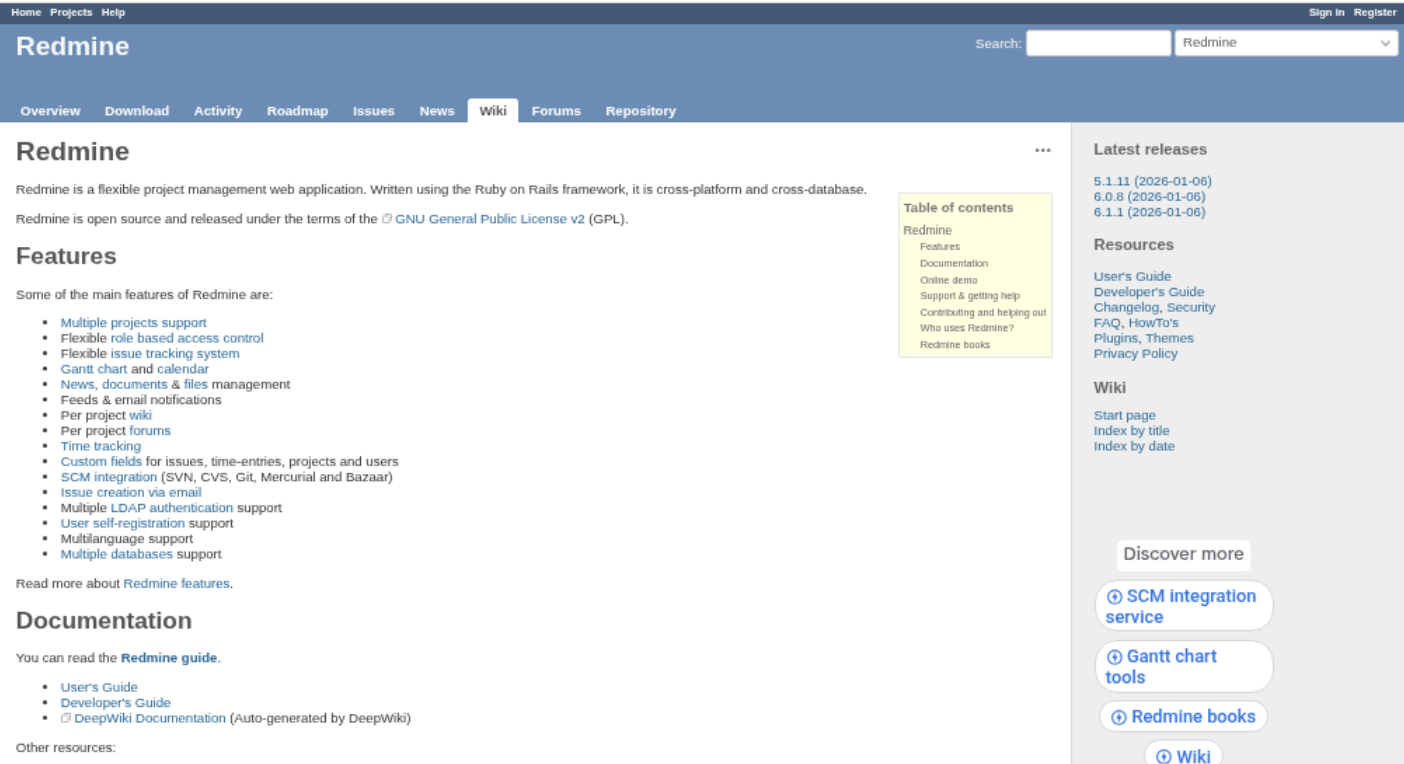
Redmine is a mature, open-source project and issue tracker that you can host on your own infrastructure. It gives teams a central place to record work, manage project access, track issues, and document decisions. For teams looking for a Jira open-source alternative, Redmine is a practical option when flexibility and control matter more than a polished, all-in-one agile experience.
Why It Was Selected
Redmine earns a place in this comparison because it covers core project tracking without a per-seat license and can be adapted to different teams. It suits organizations that want to manage projects on their own servers, use familiar issue-based workflows, and extend the platform as needs change. Its long history and broad plugin ecosystem also make it a recognizable starting point for teams assessing a move away from Jira.
Core Capabilities
Redmine organizes work into projects and issues, with configurable trackers, statuses, priorities, assignees, and custom fields. Roles and permissions help control what different team members can see and change. Teams can use Gantt charts and calendars for schedule visibility, log time against issues, and maintain project documentation in a built-in wiki. Repository integrations and a REST API can connect Redmine with development tools, though setup may require technical effort.
Agile execution is possible, but teams should check the available functionality carefully: sprint boards and richer backlog workflows often depend on plugins rather than a cohesive out-of-the-box agile suite. Reporting covers common project and issue views, but teams needing advanced dashboards or portfolio-level analytics may need additional tools or customization.
Pros
Redmine is free to use under an open-source license, self-hostable, and configurable across projects. Its issue tracking, permissions, custom fields, time tracking, wiki, and plugin options support a range of practical workflows. For teams with technical administrators, it can provide useful control over hosting and data without requiring a commercial subscription for the core software.
Cons
The interface and day-to-day experience can feel dated beside modern project platforms. Plugin-dependent agile features create maintenance work and may introduce compatibility concerns during upgrades. Setup, integrations, reporting improvements, and ongoing administration can require in-house technical skills. Jira migration is not necessarily a simple import: teams should plan to map fields and workflows, validate attachments and history, and test what data can be preserved before switching.
Pricing
Redmine itself is free and open source. Budget for hosting, administration, implementation, and any paid plugins or external support. Those costs vary with infrastructure and the level of customization your team needs.
Best For
Redmine is best for technically capable teams that want self-hosted issue and project tracking, can work with a more utilitarian interface, and are comfortable configuring workflows or maintaining plugins. It is less suited to teams expecting polished agile planning and rich reporting to be ready without setup.
Taiga
Product Overview
Taiga is an open-source project management platform built around Scrum and Kanban. It gives agile teams a place to manage backlogs, plan sprints, track issues, and follow work on boards. As a Jira alternative, it is most appealing when you want core agile tracking without committing to a large, highly configurable enterprise suite.
Why It Was Selected
Taiga earns a place in a Jira open-source comparison because it offers a recognizable agile workflow and can be self-hosted. A small product team can organize user stories, estimate work, run sprint planning, and review progress without adopting a broad set of unrelated features. Its open-source edition also gives teams more control over where the application runs than a cloud-only service.
Core Capabilities
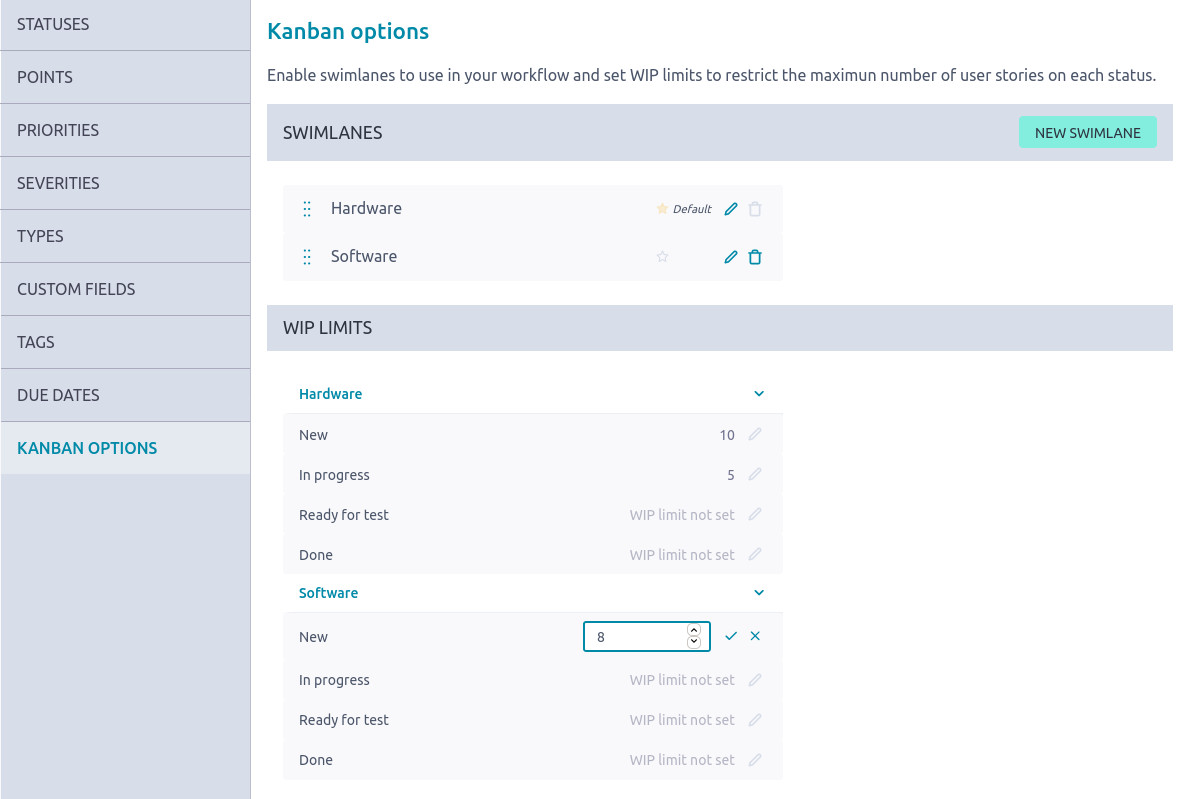
Taiga supports Scrum backlogs and sprint planning, including user stories, tasks, and issue tracking. Teams can use Kanban boards to visualize work in progress and move items through defined stages. Project dashboards and sprint-level charts help teams review delivery pace and spot work that is falling behind. Taiga also includes configurable project settings and collaboration features, so teams can adapt parts of their process without building a custom application.
For a straightforward Jira migration, the main question is how much existing process you need to preserve. Taiga can cover common agile planning patterns, but migrating tickets alone will not automatically reproduce every custom field, automation, permission rule, report, or integration from a mature Jira setup. Test representative projects before committing, especially if your team depends on complex workflows or detailed historical reporting.
Pros
Taiga’s biggest advantage is its focused, approachable agile toolkit. Scrum and Kanban support suit teams that want to plan and track work in one place, while self-hosting gives technical teams deployment control. The open-source option can also reduce licensing costs for organizations willing to operate the software themselves.
Cons
Taiga is less suited to organizations that need deep workflow customization, extensive automation, or highly tailored portfolio reporting. Self-hosting adds responsibility for upgrades, backups, security, and availability. Its integration and migration options may also require extra work if your Jira environment contains years of custom configuration or depends on a large app ecosystem.
Pricing
The self-hosted open-source edition is available at no software license cost, though hosting and administration still require resources. Taiga also offers hosted options; check its current plans for limits and pricing, since these can change.
Best For
Taiga is a good fit for small to midsize agile teams that want a focused Scrum or Kanban tracker, prefer open-source software, and can manage self-hosting or accept a hosted plan. It is a less natural fit when Jira’s custom workflows, integrations, and reporting are central to daily operations.
GitLab
Product Overview
GitLab combines software development project tracking with source control, CI/CD, security, and deployment tools. Its open-source roots and self-managed option make it worth considering when you want to keep project work close to code and delivery pipelines. It is not a one-to-one Jira replacement: GitLab’s planning tools are most useful when the team already works in GitLab, and its full commercial platform is not entirely open source.
Why It Was Selected
GitLab is a practical choice for this comparison because it can cover issue tracking and agile execution without requiring a separate development platform. A team can create issues, organize them on boards, plan milestones, and connect work to merge requests and releases. That connection is useful when a project lead needs to see whether a ticket is merely assigned or has actually moved through code review and delivery.
Core Capabilities
Issues support descriptions, labels, assignees, due dates, and discussion. Issue boards provide a visual way to track work through stages, while milestones help group issues around releases or deadlines. Depending on the GitLab edition and plan, teams can also use additional planning features such as epics and roadmaps. Repository links and CI/CD pipelines tie planning to implementation and testing, and built-in charts and analytics offer some visibility into workload and progress.
Workflow customization is available through labels, board lists, templates, and configurable issue processes, but it does not match the depth of a dedicated project-management system for every organization. Teams should check which planning and reporting features are available in their intended edition before migrating.
Pros
- Connects issues, code, reviews, pipelines, and releases in one environment.
- Boards and milestones support common agile planning needs.
- Self-managed deployment gives teams more control over hosting and data.
- A Free tier lets teams evaluate core collaboration and tracking workflows.
Cons
- Project tracking is less compelling if developers do not already use GitLab.
- Some advanced planning, governance, and analytics capabilities depend on paid tiers.
- Its workflow and reporting options may feel limited for business teams or complex portfolio planning.
- Self-managed installations require staff to handle upgrades, backups, security, and infrastructure.
- Moving existing Jira projects may require mapping fields, workflows, permissions, and history; expect migration work rather than a perfect automatic copy.
Pricing
GitLab offers a Free tier for GitLab.com and self-managed use, with paid Premium and Ultimate plans priced by seat. Exact features and prices can change, so compare the current plan matrix against your required boards, reporting, governance, and hosting needs. Self-hosting also carries infrastructure and administration costs.
Best For
GitLab is best for engineering-led teams that want project tracking tied closely to repositories and CI/CD, and that can work within its planning model. If you mainly need a flexible Jira-style tracker for teams across many departments, validate reporting, customization, and migration requirements in a pilot before committing.
Tuleap
Product Overview
Tuleap is an open-source software development management platform that brings project tracking, agile planning, requirements, testing, and code collaboration into one environment. It can serve as an open-source option for teams looking beyond Jira, particularly when they want more than a ticket board. Tuleap is available as a self-managed Community Edition and through paid Enterprise offerings.
Why It Was Selected
Tuleap stands out for combining flexible work tracking with broader application lifecycle management. A team can plan a sprint, manage requirements and defects, coordinate testing, and link project work with code repositories. That breadth can reduce the need to stitch together separate tools, though it also means the platform takes more effort to configure than a lightweight issue tracker.
Core Capabilities
Tuleap supports Scrum and Kanban planning, backlogs, sprints, task boards, and project dashboards. Its tracker system lets teams define work items, fields, permissions, and workflow transitions for different processes, such as feature delivery or defect handling. Built-in reporting helps teams monitor project activity and progress, while requirements and test management support traceability from planned work through verification. Repository integrations include Git and Subversion, allowing teams to connect development work with project records.
For example, a QA team can track a defect through triage, assignment, fix, and verification using a tailored workflow, then review related testing and project information in the same environment. That flexibility is useful when teams have established processes, but it requires thoughtful setup and governance.
Pros
The open-source Community Edition gives teams the option to self-host and inspect or adapt the platform. Tuleap offers substantial workflow customization, agile planning, reporting, and requirements and test management in a single suite. Its range of capabilities makes it a practical fit for organizations that want project tracking connected to the wider software delivery process.
Cons
Tuleap’s breadth can make initial configuration and onboarding feel demanding, especially for teams that only need basic issue tracking. Administrators may need to spend time designing trackers, permissions, and workflows before the setup feels natural. Self-hosting also brings infrastructure, upgrades, backups, and maintenance responsibilities. Teams moving from Jira should plan to map fields, statuses, permissions, and reports, then validate the migrated data; they should not assume every custom workflow will transfer unchanged.
Pricing
The Community Edition is free and self-managed. Paid Enterprise options provide commercial plans, with pricing dependent on the selected offering and deployment. Check Tuleap’s current pricing directly for seat limits, support coverage, and cloud availability, since plan details can change.
Best For
Tuleap is best for software teams that want an open-source project management platform with customizable agile execution and lifecycle capabilities beyond tickets and sprint boards. It is less suitable if you want a minimal tracker, a quick setup with little administration, or a low-effort migration that preserves every existing Jira customization automatically.
How to Choose the Right Jira Open Source
Begin with the constraint that would be hardest to change later: source access, hosting control, development integrations, or the amount of workflow administration your team can handle.
- Pick Redmine if self-hosted issue tracking and customization matter most, and your team can maintain plugins and upgrades.
- Pick Taiga if your main need is a clean Scrum or Kanban workflow rather than a broad enterprise platform.
- Pick GitLab if developers already use it and you want issues and planning near repositories and CI/CD. Check whether its project features cover non-development teams too.
- Pick Tuleap if you want agile execution within a wider lifecycle management environment and can accommodate its administration needs.
- Consider ONES.com if you are open to a commercial platform and need cloud, on-premise, private cloud, or air-gapped deployment with feature parity across cloud and self-hosted versions.
Before committing, test one representative project. Include a real workflow, a report your team uses, and a sample migration of issues, attachments, and user roles. That small trial can reveal plugin or integration gaps early.
Selection Summary and Final Recommendation
For teams that require open-source software, Redmine, Taiga, GitLab, and Tuleap each offer a different balance of flexibility, agile focus, and development integration. The best fit depends on your existing tools and who will maintain the system.
If open-source licensing is not a requirement, ONES.com adds another path: a unified management platform with a 30-seat free plan and cloud or self-managed deployment choices. Compare it against your actual workflow and migration needs rather than treating it as an open-source product.
Shortlist two options, verify the features your team relies on, and run a small migration test before moving every project.
FAQs About Jira Open Source
Which option is best if I need a self-hosted, open-source Jira replacement?
Redmine is a practical starting point for configurable issue tracking, while Taiga focuses on Scrum and Kanban. Tuleap offers broader lifecycle management, and GitLab may fit best when planning should connect closely to software development.
Is ONES.com open source?
No. ONES.com is a commercial platform with a free plan for up to 30 seats. It offers cloud, on-premise, private cloud, and air-gapped deployment options.
Can I migrate Jira workflows and issues directly to another tool?
Migration support varies by product and by the data involved. Test issues, users, attachments, custom fields, workflows, and integrations with a representative project before planning a full move.
Should I choose GitLab if my team already uses it for code?
It can be a good fit when developers need issues and agile planning close to repositories and CI/CD. Check whether its planning and reporting features also meet the needs of non-development stakeholders.
What should I compare beyond the license price?
Include hosting, administration, upgrades, support, plugins, integrations, and migration work. A free self-hosted tool can still require substantial setup and ongoing maintenance.