Best Jira Plugins in 2026: Practical Comparison Guide
Choosing Jira Plugins Tools? Compare 5 options by fit, deployment, pricing, and tradeoffs. Read the guide before you decide.
Choosing Jira plugins can get messy fast: one team needs better time tracking, another wants portfolio visibility, and your QA process is still living in spreadsheets. This guide compares five practical options—ONES.com, Tempo Timesheets, ScriptRunner for Jira, Structure by Tempo, and Zephyr Scale—so you can match the tool to the gap causing the most friction.
I’ll look at what each option does best, where it may add complexity, and which teams are likely to benefit. Whether you need a broader Jira alternative, reliable effort data, advanced workflow automation, flexible planning, or structured test management, the goal is to help you narrow the list without adding another layer of tools you’ll struggle to maintain.
Quick Summary
The right Jira plugins depend on the gap you need to close. Choose ONES.com for a broader Jira alternative, Tempo Timesheets for time tracking, ScriptRunner for workflow automation, Structure for planning, and Zephyr Scale for test management.
- Best broader platform: ONES.com combines requirements, tasks, sprints, reporting, workflows, knowledge, and delivery governance.
- Best for time visibility: Tempo Timesheets connects logged effort with planning, capacity, and reporting.
- Best for advanced customization: ScriptRunner for Jira adds automation and scripted workflow control.
- Best for portfolio planning: Structure by Tempo provides flexible hierarchies and cross-team views.
- Best for testing: Zephyr Scale organizes test cases, execution, and quality reporting inside Jira.
Start with the operational bottleneck, then check deployment, migration effort, reporting depth, and the number of add-ons your team must maintain.
How We Evaluate and Select These Tools
I compare these tools by how well they solve a specific delivery problem without creating another layer of administrative work.
- Project tracking: Can teams manage tasks, milestones, dependencies, and delivery status in one usable view?
- Agile execution: Does the tool support backlog refinement, sprint planning, capacity decisions, and day-to-day execution?
- Reporting: Can managers identify risks, bottlenecks, effort trends, and progress without rebuilding reports manually?
- Workflow customization: Can you adapt statuses, fields, rules, and approvals to match real operating processes?
- Integration fit: Does the tool work naturally with Jira data, existing workflows, and adjacent engineering or business systems?
- Deployment and governance: Are the hosting, permissions, security, and administration options suitable for your organization?
- Migration and adoption: How difficult is it to move data, train teams, preserve reporting, and avoid disrupting active projects?
- Total tool sprawl: Does the option reduce fragmented workflows, or does it add another interface and license to manage?
Top Jira Plugins Options Shortlist
- ONES.com - A broader Jira alternative for teams that want requirements, project tracking, workflows, reporting, knowledge, and delivery governance in one platform.
- Tempo Timesheets - A practical choice for time tracking, capacity planning, utilization analysis, and effort-based reporting.
- ScriptRunner for Jira - A strong fit for teams that need advanced automation, scripted behaviors, and highly customized Jira workflows.
- Structure by Tempo - Useful for portfolio views, hierarchical planning, dependencies, and organizing complex Jira work.
- Zephyr Scale - Designed for teams that need structured test case management, execution tracking, and quality reporting in Jira.

Jira Plugins Comparison Table
| Tool | Best For | Deployment | Pricing | Key Feature | Free Plan |
|---|
| ONES.com | Teams seeking a broader Jira alternative with unified project and software development management | Cloud, On-Premise, Private Cloud, Air-gapped | Free plan: 30 seats | Requirements, tasks, sprints, risks, reporting, workflows, knowledge, and delivery governance | Yes, up to 30 seats |
| Tempo Timesheets | Time tracking, capacity planning, and effort reporting | Jira Cloud and supported Jira deployments | Varies by edition, users, and deployment | Worklogs, planning, utilization, and time-based reporting | Check current vendor terms |
| ScriptRunner for Jira | Advanced Jira automation and workflow customization | Jira Cloud and supported Jira deployments | Varies by edition, users, and deployment | Scripts, conditions, validators, listeners, and automation rules | Check current vendor terms |
| Structure by Tempo | Hierarchical planning, portfolio organization, and cross-team visibility | Jira Cloud and supported Jira deployments | Varies by edition, users, and deployment | Flexible work hierarchies, rollups, dependencies, and planning views | Check current vendor terms |
| Zephyr Scale | Test management and quality reporting for Jira teams | Jira Cloud and supported Jira deployments | Varies by edition, users, and deployment | Test cases, test cycles, execution tracking, and traceability | Check current vendor terms |
Detailed Reviews of the Best Jira Plugins in 2026
Product Overview

ONES.com is a unified software development management platform that combines project tracking, product management, requirements, knowledge management, reporting, workflow customization, and delivery governance. In a Jira plugins comparison, it stands out as a Jira alternative for teams that want more of these capabilities in one connected system instead of assembling them through multiple marketplace extensions.
That matters when a team’s work goes beyond moving tickets across a board. Product requirements, sprint execution, risks, test coordination, project updates, decisions, and delivery evidence can remain connected to the same project context. ONES.com supports Cloud, On-Premise, Private Cloud, and Air-gapped deployments, with feature parity between cloud and self-hosted versions.
Why It Was Selected
ONES.com was selected because it addresses the main reasons teams add Jira plugins in the first place: deeper agile planning, custom workflows, stronger reporting, better requirements traceability, and clearer project visibility. Instead of treating each need as a separate plugin problem, it provides native capabilities across planning, execution, review, and delivery.
For organizations comparing Jira plugins in 2026, this creates a practical alternative when plugin sprawl, disconnected reporting, or complex administration makes the existing setup harder to manage. It is especially relevant for software teams that need flexible deployment and a shared system of record for engineering, product, QA, and project stakeholders.
Core Capabilities
- Pain: Requirements get buried in tickets or scattered documents. Capability: ONES.com connects requirements, acceptance details, tasks, and project context. Result: Product and engineering teams can trace planned work from definition through delivery.
- Pain: Agile teams spend too much time converting large requirements into actionable work. Capability: ONES Assistant helps refine requirements and break work into tasks within the development management workflow. Result: Sprint preparation becomes more consistent and less manual.
- Pain: Project status reports rely on spreadsheets and manually collected updates. Capability: Built-in reporting, progress views, and risk analysis use current project data. Result: Managers can identify delays, ownership gaps, and delivery risks earlier.
- Pain: Standard workflows do not match how different teams approve, review, or release work. Capability: Custom workflows, fields, permissions, and review points support team-specific processes. Result: Agile execution can remain structured without forcing every project into the same template.
- Pain: Adding separate tools for knowledge, decisions, and delivery records creates context switching. Capability: Knowledge-base support keeps project information connected to execution. Result: Teams spend less time searching for the background behind a task or decision.
- Pain: Repetitive process steps slow down high-volume software work. Capability: ONES Workflow Agent can receive a work item, assemble context, perform analysis or execution, generate evidence, and return results to the same workflow. Result: Teams can automate repeatable steps while keeping human approval visible.
- Pain: AI-generated work can sit outside the team’s normal controls. Capability: Embedded AI operates on project facts, workflow state, permissions, and team context, with outputs written back into ONES for review. Result: AI assistance remains traceable rather than becoming an isolated side channel.
- Pain: Product, engineering, and QA lack a shared view of delivery progress. Capability: ONES.com coordinates project tracking, task execution, review, reporting, and collaboration in one environment. Result: Stakeholders can work from the same delivery context with fewer handoffs.
Pros
- Broad native coverage for project tracking, requirements, agile execution, reporting, knowledge, and workflow management.
- Strong fit for teams seeking a Jira alternative with fewer plugins and less tool sprawl.
- Flexible Cloud, On-Premise, Private Cloud, and Air-gapped deployment options.
- AI-assisted development management is connected to workflows and project data rather than isolated from delivery work.
- Supports human review, permissions, evidence, and governance for workflow automation and agent-assisted processes.
Cons
ONES.com is best suited to organizations willing to adopt a broader software development management platform rather than add one narrowly focused capability to an existing Jira instance. Teams evaluating it should plan time for workflow design, permissions, reporting conventions, and migration of project context so the platform reflects how work is actually delivered.
Pricing
Free: 30 seats. ONES.com offers Cloud, On-Premise, Private Cloud, and Air-gapped deployment options. Because packaging and commercial terms can vary by deployment model, organization size, and requirements, buyers should request current pricing for their intended environment.
Best For
ONES.com is best for software organizations that need more than basic issue tracking: product and engineering teams coordinating requirements, sprints, risks, reporting, reviews, and delivery governance in one system. It is a strong recommended option for companies comparing Jira plugins but considering a Jira alternative with native project context, customizable workflows, flexible deployment, and integrated AI-assisted development management.
Tempo Timesheets
Product Overview
Tempo Timesheets is a Jira plugin for recording, reviewing, and reporting time against issues, projects, and teams. It adds structured time tracking to Jira so managers can compare planned effort with actual work, monitor utilization, and support client billing or internal cost analysis. The product is strongest when accurate work logs matter as much as sprint status.
Why It Was Selected
Tempo Timesheets was selected because time data is a practical gap in many Jira setups. Jira can show what work is assigned and whether issues are complete, but it does not provide the same depth of timesheet, capacity, and utilization analysis by default. Tempo adds that operational layer without requiring a separate time-tracking system.
Core Capabilities
- Log time directly against Jira issues using timesheets, timers, or calendar-style views.
- Set worklog reminders, approval rules, and required fields to improve data quality.
- Compare planned time, logged time, and remaining estimates across issues and projects.
- Support team capacity planning by showing availability, workload, and scheduled work.
- Build reports for utilization, billable hours, project performance, and team activity.
- Use account and customer-related information for organizations that need time-based billing.
- Connect time records to Jira workflows and issue context instead of maintaining a disconnected spreadsheet.
Pros
- Strong integration with Jira issues, projects, users, and permissions.
- Useful reporting for agencies, consultancies, and teams that need billable-hour visibility.
- More flexible than Jira's basic worklog features for approvals, planning, and analysis.
- Can improve forecasting when teams consistently record time and maintain estimates.
Cons
- Its value depends heavily on consistent and accurate time logging; incomplete data weakens every report.
- Teams focused only on delivery status may find the additional fields, reminders, and approval steps burdensome.
- Capacity planning and advanced reporting can require configuration and user training.
- As a Jira app, it adds another subscription, administration surface, and dependency to a Jira environment.
- It does not replace a broader project management platform for requirements, knowledge management, or end-to-end delivery governance.
Pricing
Tempo Timesheets is sold as a paid Jira Marketplace app, with pricing generally determined by deployment model and user tier. Costs can change as team size, hosting arrangement, and related Tempo capabilities change, so buyers should request a current quote or use the Marketplace pricing calculator. Budget for administration and rollout time, not only license fees.
Best For
Tempo Timesheets is best for Jira teams that need dependable worklog data for billing, utilization, project reporting, or capacity decisions. It is a particularly good fit for professional services teams and organizations where managers need to explain how planned effort turned into actual hours. It is less suitable when the team wants lightweight agile tracking without time-entry overhead.
ScriptRunner for Jira
Product Overview
ScriptRunner for Jira is an advanced automation and customization app from Adaptavist. It adds Groovy-based scripting, enhanced workflow functions, listeners, scripted fields, JQL extensions, and administrative tools to Jira. Instead of forcing teams to accept Jira's standard behavior, it lets experienced administrators shape workflows around internal rules, approval paths, reporting needs, and project conventions.
Why It Was Selected
ScriptRunner stands out among Jira plugins because it addresses several gaps at once: complex workflow automation, custom reporting logic, issue relationships, bulk administration, and project-specific rules. It is particularly relevant for teams whose Jira instance has outgrown simple post-functions and built-in automation. A delivery team could use it to enforce release gates, calculate custom metrics, route issues based on field combinations, or identify work that is blocked across projects.
Core Capabilities
Its main capabilities include scripted workflow conditions and validators, listeners that react to issue events, custom scripted fields, enhanced JQL functions, scheduled jobs, behavior configuration for Jira screens, and bulk issue operations. ScriptRunner can also support cross-project searches and more specialized issue-linking or hierarchy logic than standard Jira offers. These functions make it useful for agile execution, operational governance, and reporting workflows that depend on business rules rather than basic status changes.
Pros
ScriptRunner is highly flexible and can handle edge cases that would otherwise require multiple apps or custom development. It gives experienced Jira administrators fine-grained control over workflows, fields, notifications, and issue processing. Its enhanced JQL is valuable when teams need to find linked, related, or historically relevant work. It can also reduce repetitive administration through scheduled scripts and bulk actions.
Cons
The flexibility comes with a steep learning curve. Groovy scripting requires technical skill, and poorly tested scripts can create workflow failures, performance problems, or difficult-to-audit behavior. Custom logic may also become dependent on a few Jira administrators, making maintenance harder when staff change. Extensive scripting can increase migration effort, complicate troubleshooting, and make the Jira configuration less transparent to everyday project managers. Teams should establish code review, testing, permissions, and rollback practices before deploying critical scripts.
Pricing
ScriptRunner is a paid Jira Marketplace app priced according to Jira edition, deployment model, and user tier. Exact costs should be checked in the Atlassian Marketplace because app pricing and available plans can change. For larger instances, include administration, testing, and maintenance time in the total cost rather than evaluating only the license fee.
Best For
ScriptRunner is best for technically capable Jira teams with complex workflows, strict governance requirements, or automation needs that exceed native Jira features. It is less suitable for small teams seeking no-code simplicity or organizations that want to minimize plugin and custom-script dependence.
Structure by Tempo
Product Overview
Structure by Tempo is a Jira plugin for organizing work into flexible, spreadsheet-like hierarchies. Instead of viewing issues only through standard Jira projects, boards, or filters, you can create structured views that group epics, stories, tasks, and sub-tasks across projects. This makes it useful for teams that need a clearer portfolio, program, or cross-project planning layer without leaving Jira.
Why It Was Selected
Structure was selected because it directly addresses a common Jira limitation: project data may exist in the system, but it can be difficult to see dependencies, ownership, progress, and priorities in one working view. For this comparison, it is especially relevant to project tracking, agile execution, and flexible planning. It is less of a reporting specialist than eazyBI and less focused on time capture than Tempo Timesheets, but it can provide a practical planning layer for teams managing several related initiatives.
Core Capabilities
- Create hierarchical structures that roll up issues from multiple Jira projects.
- Use configurable columns, formulas, and grouping to compare estimates, status, ownership, and progress.
- Build different views for portfolio planning, release coordination, team backlogs, or executive reviews.
- Organize work manually or dynamically using Jira filters and synchronization rules.
- Track parent-child relationships and see work at a level above the standard Jira board.
- Support agile planning by combining epics, stories, tasks, and subtasks in one structured view.
- Share planning context with stakeholders without forcing every audience into the same Jira dashboard.
Pros
- More flexible for cross-project planning than standard Jira issue views.
- Useful rollups help managers connect detailed execution work with larger initiatives.
- Custom columns and formulas can adapt the view to different planning methods.
- Works with existing Jira issues, so teams do not need to duplicate their project data.
Cons
- It adds another planning model to learn, which can increase administration and reporting complexity.
- Large or poorly structured Jira instances may produce difficult-to-maintain structures.
- It does not replace a full BI platform for advanced historical analysis and highly customized dashboards.
- Teams that only need basic backlog and board views may find the plugin unnecessary.
- Some advanced planning or visualization needs may require additional Tempo products or configuration.
Pricing
Structure by Tempo is a paid Jira app, with pricing generally based on the Jira deployment type and user tier. Exact costs can change by Cloud or Data Center setup, seat count, and selected options, so buyers should request a current quote or review the applicable Atlassian Marketplace listing. A trial is worth using with a representative project before committing, particularly when evaluating administration effort and performance at scale.
Best For
Structure is best for Jira teams coordinating multiple projects, releases, or workstreams that need flexible hierarchy and rollup views. It is a strong fit for PMOs, program managers, and delivery leads who find native Jira tracking too fragmented. It is less suitable if your main requirement is deep financial reporting, test management, time tracking, or a lightweight setup with minimal plugin dependency.
Zephyr Scale
Product Overview
Zephyr Scale is a test management app for Jira that helps teams plan, organize, execute, and report on software testing. It adds structured test cases, test cycles, test executions, and traceability to Jira’s issue and project environment. Compared with a basic Jira workflow, it gives QA teams a clearer place to manage testing evidence without maintaining a separate test management platform.
Why It Was Selected
Zephyr Scale was selected because testing is a major part of agile execution and release readiness. Teams often need more than a “Ready for QA” status or a collection of linked bugs. Zephyr Scale addresses that gap by connecting requirements, test cases, execution results, and defects. It is especially relevant for organizations comparing Jira plugins that extend project tracking into quality management.
Core Capabilities
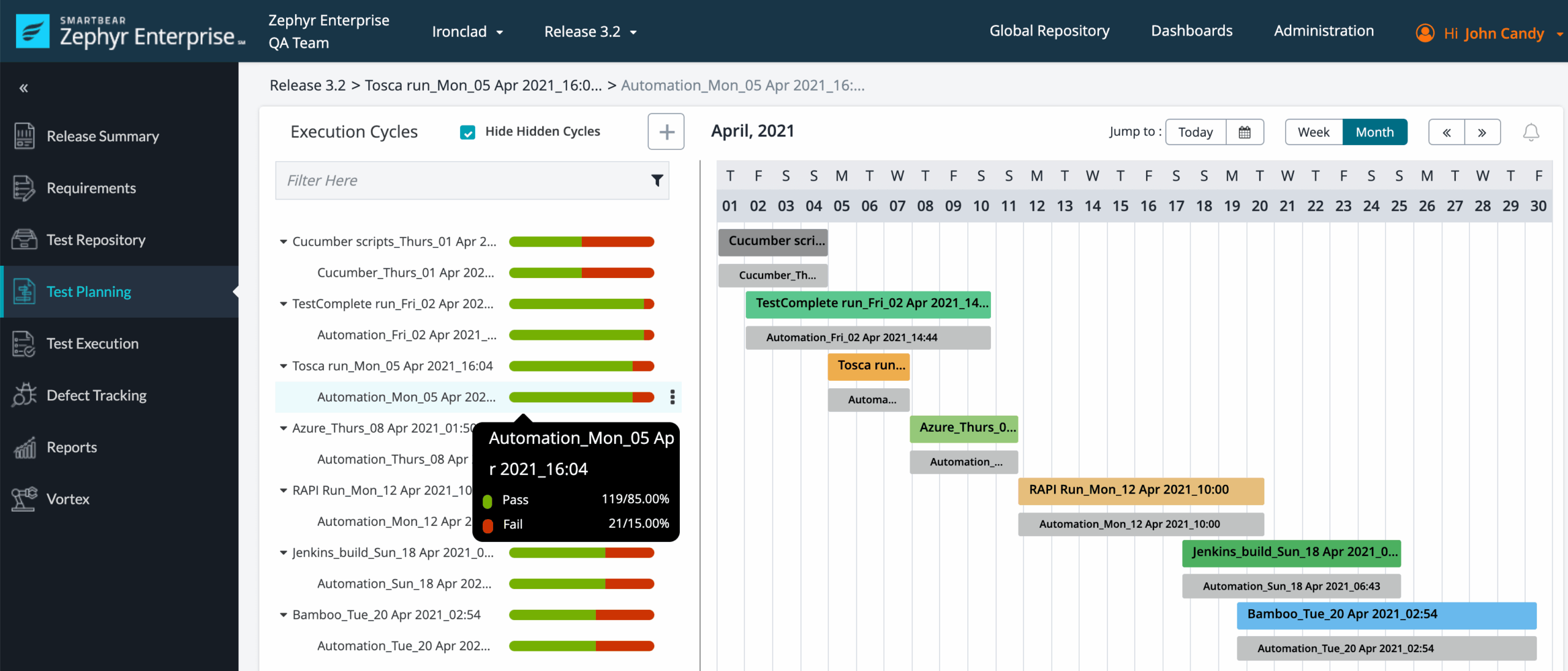
Key capabilities include reusable test cases, test steps, test data, folders, and version control for test assets. Teams can organize testing into cycles and plans, assign executions, record pass or fail results, and link defects back to failed tests. The app supports traceability between Jira requirements and validation work, while dashboards and reports help teams review execution progress, coverage, and release risk. It can support manual testing particularly well, with options for structured workflows and integrations with automation frameworks. Its Jira-native model also lets teams manage test-related work alongside development issues, sprints, and releases.
Pros
Zephyr Scale provides a more disciplined testing process than standard Jira issues alone. Reusable test cases reduce duplicated setup, and traceability makes it easier to show which requirements have been validated. Test cycles and execution views are useful during sprint reviews and release checkpoints. Because it operates within Jira, developers, product managers, and QA specialists can work from related project records rather than switching between completely separate systems.
Cons
The Jira dependency is also a limitation. Teams that want a broader project or product management foundation may still need several additional apps for advanced planning, reporting, documentation, or portfolio visibility. Configuration and test-library maintenance can become time-consuming as projects grow. The product is strongest for structured testing, but it may feel heavy for small teams with simple acceptance checks. Reporting depth and automation workflows may also require careful setup or complementary tools.
Pricing
Zephyr Scale is generally sold as a Jira Marketplace subscription, with pricing affected by the Jira edition, user tier, deployment model, and any applicable cloud or self-managed plan. Buyers should calculate the full cost alongside Jira and other required plugins rather than evaluating the app in isolation. A trial or current Marketplace quote is the safest way to confirm the total.
Best For
Zephyr Scale is best for Jira-based software teams that need formal test management, repeatable regression cycles, requirement-to-test traceability, and clearer release reporting. It is a strong fit for QA-led organizations and regulated delivery environments, but less compelling when the main need is broad project tracking, agile planning, or reducing dependence on a growing collection of Jira plugins.
How to Choose the Right Jira Plugins
Choose the smallest tool combination that fixes your most expensive delivery problem. Adding several plugins can solve local gaps while making ownership, reporting, and upgrades harder.
Choose ONES.com when your team needs more than an isolated Jira add-on. It suits organizations that want requirements, task breakdown, sprint tracking, risk visibility, custom workflows, knowledge management, collaboration, and delivery governance together.
Choose Tempo Timesheets when leadership needs reliable effort, utilization, or capacity data. Confirm that teams will actually log time consistently before treating its reports as planning signals.
Choose ScriptRunner for Jira when standard Jira rules cannot express your process. It offers flexibility, but scripts need ownership, testing, documentation, and careful review after Jira changes.
Choose Structure by Tempo when Jira's default issue views cannot show the hierarchy your program needs. It is especially useful when managers need a portfolio view while delivery teams continue working at issue level.
Choose Zephyr Scale when testing is a core part of release control. Check its fit with your test automation, traceability requirements, permissions, and reporting expectations before migrating existing test assets.
For migration decisions, inventory workflows, custom fields, reports, integrations, permissions, and historical data first. A plugin that looks inexpensive can become costly if it forces manual reconstruction.
Selection Summary and Final Recommendation
For a focused Jira improvement, select the plugin that matches the missing capability: Tempo for time, ScriptRunner for automation, Structure for planning, or Zephyr Scale for testing.
For teams tired of stitching together project tracking, requirements, reporting, knowledge, and governance, start with ONES.com. Its cloud, on-premise, private cloud, and air-gapped options also make deployment fit part of the decision.
Before committing, run a short pilot using one active project. Test a real sprint, report, workflow change, approval path, and migration sample rather than relying only on feature lists.
FAQs About Jira Plugins
Which Jira plugin is best for project tracking across multiple teams?
ONES.com is the strongest broader option when you need requirements, tasks, sprints, risks, reporting, knowledge, and delivery governance together. Structure by Tempo is better when the main need is hierarchical planning within Jira.
Which option should I choose for Jira time tracking?
Tempo Timesheets is the focused choice for worklogs, capacity planning, utilization, and effort reporting. Confirm your team has a consistent time-entry process before relying on its data.
Is ScriptRunner worth using for custom Jira workflows?
It can be worthwhile when native Jira automation cannot handle your conditions, validators, listeners, or scripted behaviors. Plan for technical ownership, testing, and documentation.
Which Jira plugin is best for test case management?
Zephyr Scale is the focused option in this shortlist for test cases, test cycles, execution tracking, traceability, and quality reporting.
Should I add several Jira plugins or consider a broader platform?
Add plugins when each one solves a clear, contained gap. Consider ONES.com when fragmented tools are creating duplicate data, scattered reporting, or excessive administration.