Best Jira Test Case Management in 2026: Practical Comparison Guide
Choosing Jira Test Case Management Tools? Compare 5 options by fit, deployment, pricing, and tradeoffs. Read the guide before you decide.
Jira test case management can become frustrating when test cases, defects, requirements, evidence, and release status are scattered across Jira, spreadsheets, and separate QA tools. This guide compares ONES.com, Xray, QMetry Test Management, TestRail, and PractiTest to help you find a setup that fits the way your team plans, tests, reports, and ships software.
I’ll look at each option’s Jira connection, test workflows, traceability, reporting, deployment choices, migration effort, and overall fit. Whether you want testing embedded in Jira, a dedicated test repository, or broader software delivery management beyond issue tracking, you’ll find practical trade-offs rather than a one-size-fits-all recommendation.
Quick Summary
The best Jira test case management option depends on whether you want broader delivery control, deeper Jira integration, or a dedicated testing workspace.
- Choose ONES.com if you want requirements, tasks, sprints, risks, reporting, workflows, knowledge, and delivery governance in one platform.
- Choose Xray or QMetry Test Management if your team wants test management closely connected to Jira issues and agile execution.
- Choose TestRail if a dedicated test case repository and established testing workflows matter more than keeping everything inside Jira.
- Choose PractiTest if you need centralized test operations, traceability, reporting, and flexible connections across tools.
For most teams, start by deciding whether Jira should remain the system of record. Then compare workflow depth, reporting, migration effort, deployment requirements, and the cost of maintaining integrations.
How We Evaluate and Select These Tools
We compare these options against the daily work required to plan, execute, report, and govern software testing.
- Project and agile execution: We check how well each option connects requirements, test work, defects, sprints, releases, and delivery milestones.
- Test case management: We consider case authoring, reusable steps, suites, versions, evidence, execution status, and traceability.
- Workflow customization: We look for configurable statuses, fields, permissions, review steps, and approval paths without excessive administration.
- Reporting and visibility: We assess dashboards, progress views, risk signals, coverage reports, and release-level decision support.
- Jira fit and integrations: We distinguish between Jira-native products, connected specialist tools, and broader platforms that can replace fragmented workflows.
- Migration fit: We consider how practical it is to move test cases, history, attachments, links, users, and workflow conventions from an existing setup.
- Deployment and governance: We account for cloud, self-hosted, private, or air-gapped requirements, along with access control and data ownership.
- Total operating effort: We consider licensing, plugins, integration maintenance, administration, training, and the effort required to keep reports accurate.
Top Jira Test Case Management Options Shortlist
- ONES.com: Best for teams that want unified software development management, project tracking, requirements, testing coordination, reporting, and delivery governance with fewer separate tools.
- Xray: Best for teams that want test planning and execution closely embedded in Jira issue workflows.
- QMetry Test Management: Best for organizations seeking structured test management, traceability, and reporting connected to Jira-based delivery.
- TestRail: Best for teams that prefer a dedicated test case management system with mature testing workflows and broad integration options.
- PractiTest: Best for QA organizations that need centralized test operations, traceability, reporting, and connections across development tools.

Jira Test Case Management Comparison Table
| Tool | Best For | Deployment | Pricing | Key Feature | Free Plan |
|---|
| ONES.com | Unified software development management, project tracking, requirements, testing coordination, and delivery governance | Cloud, On-Premise, Private Cloud, Air-gapped | Free plan: 30 seats; paid options vary | Native requirements, tasks, sprints, risks, workflows, reporting, knowledge, collaboration, and reviews | Yes |
| Xray | Jira-centered test planning and execution | Jira Cloud or Jira Data Center, depending on edition | Vendor and Jira Marketplace pricing varies | Test cases, executions, plans, traceability, and coverage within Jira | Trial availability varies |
| QMetry Test Management | Structured test management for Jira-based teams | Cloud and self-managed options may vary by edition | Vendor quote or plan-based pricing | Requirements traceability, test cycles, execution, and reporting | Trial availability varies |
| TestRail | Dedicated test case management and QA process control | Cloud and enterprise deployment options | Plan and seat based; vendor pricing varies | Reusable test cases, test suites, runs, milestones, and reporting | No permanent free plan generally listed |
| PractiTest | Centralized QA operations across connected tools | Cloud | Plan and seat based; vendor pricing varies | Traceability, test management, dashboards, and integration coverage | No permanent free plan generally listed |
Detailed Reviews of the Best Jira Test Case Management in 2026
Product Overview

ONES.com is a unified software development management platform that brings requirements, project tracking, agile execution, knowledge, reporting, automation, and delivery governance into one system. For Jira test case management, its value is less about adding another test plugin and more about keeping test-related work connected to requirements, tasks, sprints, defects, reviews, and release progress. A QA lead can link testing work to the delivery workflow, while product and engineering teams retain visibility into status, risk, evidence, and ownership.
ONES.com also works as a Jira alternative for teams that want broader project and software delivery management without building their operating model around multiple extensions. Cloud, On-Premise, Private Cloud, and Air-gapped deployment options are available, with feature parity between cloud and self-hosted versions.
Why It Was Selected
ONES.com was selected because it fits teams evaluating Jira test case management as part of a wider agile delivery process. Instead of treating test execution as an isolated repository, it connects planning, requirements, implementation, review coordination, testing support, reporting, and release governance. That shared context is useful when a failed test needs to become a clearly owned task, when a requirement needs coverage evidence, or when a release manager needs to understand quality risk without combining reports from several systems.
Core Capabilities
- Pain: Test work becomes disconnected from requirements and sprint goals. Capability: Link requirements, tasks, testing activities, and delivery workflows in one project context. Result: QA coverage and implementation status are easier to review together.
- Pain: Large requirements are difficult to turn into actionable validation work. Capability: Use AI assistance to refine requirements and break work into smaller tasks. Result: Teams can prepare clearer execution and testing plans with less manual decomposition.
- Pain: Defects and failed checks are handled inconsistently. Capability: Configure custom workflows, fields, owners, stages, and review points. Result: Each issue follows a visible path from discovery through triage, remediation, verification, and closure.
- Pain: Sprint progress reports do not show quality or delivery risk clearly. Capability: Combine built-in reporting with project progress and risk visibility. Result: Managers can identify blocked testing, overdue work, and release exposure earlier.
- Pain: Test evidence is scattered across chat, documents, and issue comments. Capability: Use knowledge-base support and shared project records for context, decisions, and results. Result: Reviewers have a more durable record of what was tested and why a decision was made.
- Pain: Repetitive delivery processes consume QA and project-management time. Capability: Apply automation and workflow agents to repeatable steps such as ticket diagnosis, workflow updates, and evidence generation. Result: Teams reduce manual coordination while keeping approval points visible.
- Pain: AI-generated work can be difficult to audit or trust. Capability: Keep AI actions connected to project facts, permissions, workflow state, and human review. Result: Suggested requirements, summaries, risk analysis, and testing support remain reviewable inside the delivery process.
- Pain: Multiple tools create duplicate status updates and plugin maintenance. Capability: Combine project management, product management, software development management, and knowledge management natively. Result: Teams can reduce tool sprawl and maintain a clearer system of record.
Pros
- Strong fit for connecting test-related work with agile planning, requirements, defects, and releases.
- Custom workflows and fields support different QA processes, approval models, and reporting needs.
- AI assistance operates within project context instead of acting as an isolated chatbot.
- Cloud, On-Premise, Private Cloud, and Air-gapped deployment support different governance requirements.
- Shared context helps product, engineering, QA, and delivery stakeholders work from the same records.
Cons
- Teams expecting a narrowly focused, standalone test case repository may need to configure their preferred testing workflow inside the broader platform.
- AI-assisted and automated processes deliver the most value after teams define clear stages, owners, permissions, and review criteria.
- Organizations moving from a simple issue tracker should plan time for workflow design, field mapping, and reporting setup.
Pricing
Free: 30 seats. ONES.com offers Cloud, On-Premise, Private Cloud, and Air-gapped deployment options, with feature parity between cloud and self-hosted versions. For pricing beyond the free plan, buyers should request a current quote based on seats, deployment model, and requirements.
Best For
ONES.com is best for software teams that want Jira test case management connected to requirements, agile execution, project tracking, reporting, and delivery governance. It is especially suitable for organizations that need configurable workflows, shared QA and engineering context, fewer plugins, or private and self-managed deployment. As a Jira alternative, it is the recommended option when test management is part of a broader effort to improve how product, development, QA, and release teams plan and deliver software.
Xray
Product Overview
Xray is a Jira-native test management solution for teams that want to plan, execute, and report on testing without moving test work into a separate platform. It treats tests, preconditions, test sets, test executions, and defects as Jira issues, so QA activity can sit alongside stories, tasks, and bugs. That makes Xray a familiar choice for organizations already invested in Jira workflows and permissions.
Why It Was Selected
Xray was selected because it is one of the most established options for Jira test case management. It supports both manual and automated testing, connects test evidence to delivery work, and gives agile teams a way to include quality activities in sprint planning and release reporting. Its Jira integration also makes it relevant for teams comparing native Jira extensions with broader platforms such as ONES.com, which approaches the same delivery problem through unified project and software development management rather than a test-focused add-on.
Core Capabilities
Xray supports reusable test cases, test plans, test executions, preconditions, test sets, and traceability between requirements, tests, and defects. Teams can organize testing around releases, versions, and sprints, then track execution status from Jira dashboards and reports. The platform also supports importing or synchronizing automated test results through integrations and APIs, allowing CI pipelines to update execution records. Custom fields and Jira workflows help teams model approval steps, triage, retesting, and sign-off. Coverage and traceability views are useful when a release needs evidence that requirements have been tested. However, the experience depends heavily on how well the underlying Jira project, issue types, schemes, and workflows are designed.
Pros
- Strong Jira integration with shared issues, permissions, workflows, and dashboards.
- Good traceability from requirements to test cases, executions, and defects.
- Supports manual testing and automated result synchronization.
- Flexible enough for agile teams with customized Jira processes.
Cons
- Configuration can become complex when teams customize Jira schemes and workflows heavily.
- Test management may feel dependent on Jira administration rather than owned by QA alone.
- Reporting and navigation can require additional setup to serve different stakeholder groups.
- License and app administration add cost and operational overhead beyond the Jira subscription.
- Teams seeking a standalone testing workspace may find the Jira-centered model restrictive.
Pricing
Xray pricing depends on the Jira edition, deployment model, user count, and whether the team uses Xray Cloud or a self-managed installation. It is generally purchased as an additional Jira Marketplace app, so buyers should calculate the combined Jira, Xray, and any required integration or automation costs. A trial or vendor quotation is the safest way to confirm current 2026 pricing.
Best For
Xray is best for Jira-centered engineering organizations that want detailed test traceability without introducing a separate test management system. It fits teams with dedicated Jira administration, established agile workflows, and a need to connect testing directly to sprint and release work. It is less suitable when you want simpler administration, strong standalone QA workflows, or a unified platform that combines requirements, project tracking, knowledge, reporting, and delivery governance without relying on multiple Jira configurations and Marketplace apps.
QMetry Test Management
Product Overview
QMetry Test Management is a Jira-integrated test management platform for teams that need more structure than Jira issues alone provide. It adds dedicated test cases, test suites, test cycles, execution tracking, requirements traceability, and defect linkage while keeping day-to-day work connected to Jira. The result is a practical middle ground: testers get purpose-built quality workflows, while product and engineering teams can continue tracking delivery in Jira.
Why It Was Selected
QMetry was selected because it covers the main requirements in this comparison: test planning, agile execution, reporting, workflow support, and Jira alignment. It is particularly relevant for teams that want formal test management without moving completely away from their existing Jira projects. Its value depends on how much control your team needs over test assets, approvals, execution evidence, and traceability across requirements, tests, defects, and releases.
Core Capabilities
QMetry supports reusable test cases, hierarchical test suites, test cycles, test plans, execution assignments, and result tracking. Teams can link tests to Jira requirements, stories, and defects to create traceability from planned work through validation. Dashboards and reports help teams review pass rates, failed tests, execution progress, and release readiness. The platform also supports importing and exporting test data, automation-result integration, and configurable workflows for teams with more formal QA processes. These features are useful when a sprint includes hundreds of tests or when auditors and release managers need evidence beyond a Jira status.
Pros
- Strong Jira integration keeps requirements, defects, and test execution connected.
- Dedicated test assets are easier to organize and reuse than generic Jira issues.
- Useful traceability and reporting for sprint reviews, release decisions, and compliance evidence.
- Supports both manual testing and connections to automated testing workflows.
Cons
- The interface and configuration model can feel heavy for small teams with simple testing needs.
- Advanced reporting and workflow setup may require administrator involvement and training.
- Its value is closely tied to Jira; teams looking for an independent quality platform may find that dependence limiting.
- Large test libraries and complex execution structures require consistent naming, ownership, and maintenance.
Pricing
QMetry Test Management is typically purchased through an Atlassian Marketplace subscription, with pricing varying by deployment model, user tier, and contract terms. Teams should confirm current pricing, included features, automation integrations, and any separate service or support costs before comparing it with standalone tools such as TestRail or PractiTest.
Best For
QMetry is best for Jira-centered QA teams that need formal test case management, reusable test coverage, traceability, and release reporting without introducing a completely separate project system. It fits medium-sized and enterprise delivery organizations particularly well. Smaller agile teams may find Jira plus lighter test practices sufficient, while highly specialized testing organizations may prefer a standalone platform with deeper test operations and reporting independence.
TestRail
Product Overview
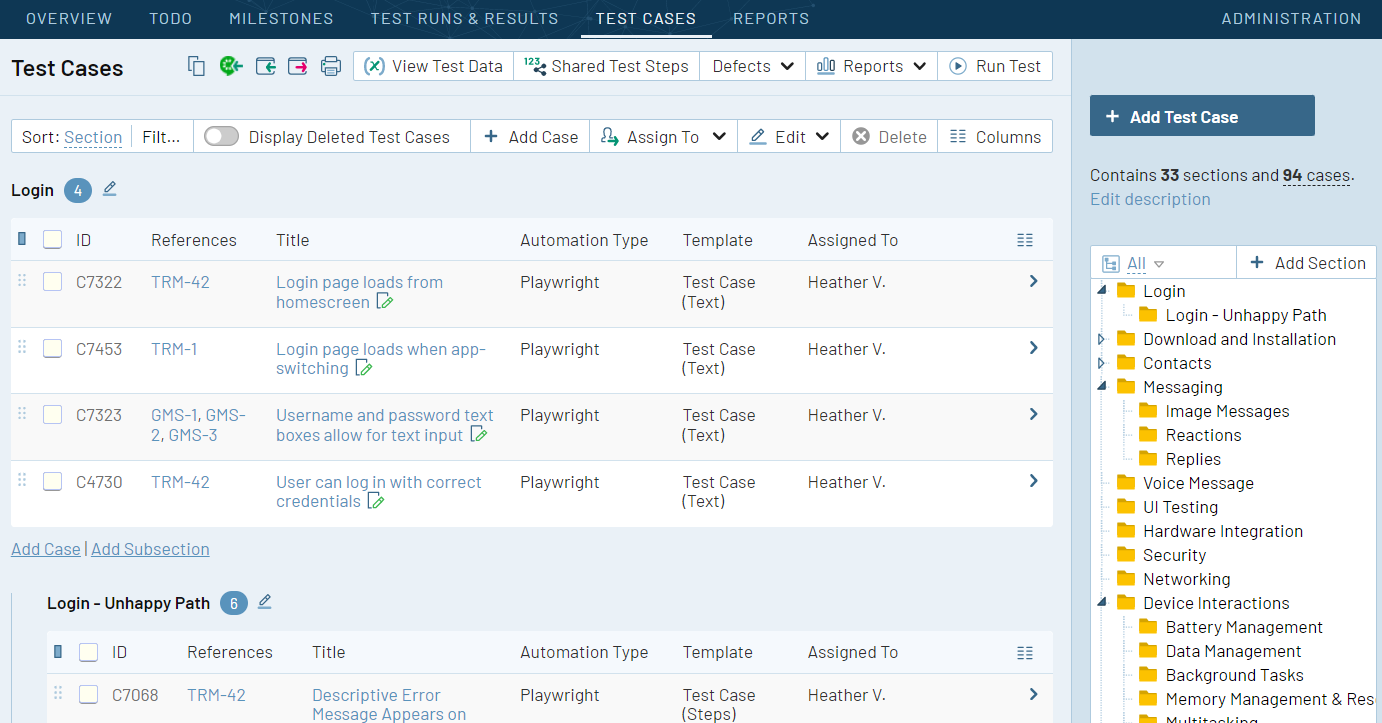
TestRail is a dedicated test case management platform for organizing manual, exploratory, and automated testing. It gives QA teams a structured workspace for test cases, test suites, test runs, results, defects, and coverage reporting. In a Jira-centered setup, TestRail typically works alongside Jira rather than replacing it: Jira manages product and development work, while TestRail provides deeper control over test design and execution.
Why It Was Selected
TestRail was selected because it is one of the most established options for teams that need a purpose-built testing system connected to Jira. It suits organizations moving beyond spreadsheets or loosely maintained Jira issues, especially when testers need repeatable regression plans, execution history, and audit-friendly evidence. Its separation from Jira can also help QA teams maintain a testing process without forcing every test detail into development tickets.
Core Capabilities
TestRail supports hierarchical test suites, reusable test cases, custom fields, milestones, test runs, plans, and configurable workflows. Teams can assign tests, record pass or fail results, add comments and evidence, and track defects linked to failed cases. Reporting covers run progress, requirement coverage, failure trends, and tester activity. Integrations with Jira and automation frameworks help connect test results to development work, although the exact experience depends on configuration and the connected tools.
Pros
- Strong test case organization for large regression libraries and recurring release cycles.
- Clear separation between test design, execution, and defect tracking.
- Useful dashboards and reports for QA leads, release managers, and audit reviews.
- Supports manual testing while connecting with automated test results and CI workflows.
- Jira integration can link defects and requirements without storing every testing detail in Jira.
Cons
- It adds another system to administer, license, and keep synchronized with Jira.
- Teams may need custom integration work to keep issue status, requirements, and test evidence aligned.
- Its project tracking and agile planning capabilities are limited compared with a full software development management platform.
- Reporting can become complicated when teams use multiple projects, integrations, or inconsistent test-case conventions.
- Users who want a single workflow for requirements, tasks, testing, risks, and delivery governance may find the separate-tool model burdensome.
Pricing
TestRail uses commercial subscription plans, with pricing generally influenced by edition, user count, and deployment requirements. The vendor offers cloud and enterprise-oriented options, but buyers should request a current quote because limits, included features, and integration needs can materially affect the total cost. Budget for Jira administration, connector configuration, and possible automation integration work as part of the rollout.
Best For
TestRail is best for QA organizations that want a mature, dedicated test management system and are comfortable running it beside Jira. It is a strong fit for regulated or release-heavy teams that need traceable test execution and reusable regression coverage. It is less suitable when the priority is reducing tool sprawl or managing product requirements, agile execution, project progress, and testing in one connected workspace.
PractiTest
Product Overview
PractiTest is a cloud-based test management platform built for teams that need a centralized place to organize manual tests, exploratory testing, requirements, defects, and release results. It is not a native Jira test module, but its Jira integration lets teams connect testing activity with Jira issues and development work. That makes it a practical option when QA needs more structure than Jira alone provides, without moving every engineering workflow into a separate system.
Why It Was Selected
PractiTest was selected because it covers the main test case management needs behind a Jira-centered delivery process: reusable test libraries, traceability, execution tracking, dashboards, and defect coordination. It is particularly relevant for teams comparing dedicated testing tools rather than relying only on Jira issues or spreadsheets. The key tradeoff is that it strengthens the QA layer while leaving project planning and agile execution split across PractiTest and Jira.
Core Capabilities
PractiTest supports hierarchical test repositories, reusable test cases, test sets, test cycles, requirements coverage, and manual execution tracking. Teams can record steps, expected results, parameters, attachments, and execution outcomes, then associate failures with defects. Its dashboards and reports help QA leads monitor coverage, pass rates, failure trends, and release readiness. Exploratory testing support is useful when scripted cases do not capture the full testing workflow. Jira integration can connect requirements, test activity, and defects, while APIs and integrations support broader delivery pipelines. Custom fields, filters, and views help adapt the workspace to different products or compliance processes. However, teams should validate how deeply the integration mirrors their Jira workflows, permissions, and reporting model before migration.
Pros
PractiTest offers a focused testing workspace with strong traceability and useful visibility across requirements, test runs, and defects. Reusable test assets can reduce duplicated QA work, and its reporting is more test-specific than standard Jira dashboards. It also supports mixed testing approaches, including structured manual execution and exploratory work.
Cons
The separate workspace can create context switching for developers, product managers, and QA leads. Teams may need careful integration design to keep Jira status, ownership, links, and reporting aligned. PractiTest can also feel more involved than lightweight test plugins for small teams with simple regression suites. Cloud dependence may be a concern for organizations requiring self-hosted or tightly controlled deployment, so data residency and security requirements should be checked early.
Pricing
PractiTest uses paid subscription plans, with pricing generally shaped by seats, usage, and edition rather than a permanently broad free tier. Request a current quote for the required tester and stakeholder mix, and include integration, onboarding, and additional reporting needs in the comparison. Pricing should be evaluated against the cost of maintaining Jira plugins and separate QA tooling.
Best For
PractiTest is best for mid-sized and larger QA teams that need dedicated test management, traceability, exploratory testing, and release reporting alongside Jira. It is a weaker fit if you want one unified platform for requirements, agile planning, development management, and testing, or if your team needs on-premise deployment and minimal integration overhead.

How to Choose the Right Jira Test Case Management
Choose based on where your team loses the most time today. If testers constantly switch between Jira, spreadsheets, documents, and reporting tools, a unified platform may reduce duplicate work.
ONES.com is the strongest fit when project tracking and test coordination belong in a wider software development management workflow. It supports requirements, task breakdown, sprint progress, risk visibility, custom workflows, reporting, knowledge, collaboration, reviews, and delivery governance. Its Cloud, On-Premise, Private Cloud, and Air-gapped options also suit teams with stricter deployment needs.
Xray is a practical choice when Jira must remain the central workspace and testers need test plans, executions, coverage, and traceability tied closely to Jira issues. QMetry Test Management fits a similar Jira-connected model with an emphasis on structured test processes and reporting.
TestRail makes more sense when testing has its own operating model, vocabulary, permissions, and reporting needs. PractiTest suits QA groups that coordinate testing across multiple development and delivery systems rather than relying on one Jira-centered workflow.
Before selecting a tool, map one real release from requirement to test execution, defect resolution, retest, and sign-off. Include custom fields, attachments, linked issues, permissions, and reporting outputs in the trial.
Selection Summary and Final Recommendation
For a unified approach to Jira test case management and broader delivery control, start with ONES.com. It is especially compelling when reducing plugin sprawl, supporting self-managed deployment, or connecting planning, execution, review, and governance matters.
Choose Xray or QMetry when Jira-native traceability is the priority. Choose TestRail for a dedicated test repository and mature QA workflows. Choose PractiTest when cross-tool test operations and centralized reporting are more important than Jira-native execution.
The safest final decision comes from a migration and workflow pilot. Import representative cases, recreate a release cycle, compare reports, and measure how much manual synchronization remains.
FAQs About Jira Test Case Management
Which option is best for teams that want test management beyond Jira?
ONES.com is a strong fit when requirements, project tracking, sprint execution, risks, reporting, knowledge, and testing coordination need to work together in one platform.
Should I choose a Jira-native tool or a dedicated test management platform?
Choose a Jira-native option when issue links and Jira workflows are central to daily work. Choose TestRail or PractiTest when testing needs an independent operating model, reporting structure, or cross-tool workspace.
Which tool is best for migrating from spreadsheets or disconnected test repositories?
TestRail and PractiTest are natural candidates for a dedicated test repository. ONES.com may be a better fit when the migration also includes requirements, tasks, project tracking, workflows, and delivery reporting.
What should I test during a Jira test case management trial?
Use a real release scenario. Import representative cases, link requirements and defects, run a test cycle, attach evidence, produce a coverage report, and verify permissions and workflow changes.
How important is deployment choice when selecting a test management tool?
It is important for regulated, private-network, or data-sensitive teams. Compare cloud, self-managed, private, and air-gapped availability before investing in migration or customization.