Best Jira Testing Tool in 2026: Practical Comparison Guide
Choosing Jira Testing Tool Tools? Compare 6 options by fit, deployment, pricing, and tradeoffs. Read the guide before you decide.
Choosing a jira testing tool in 2026 can get messy fast. Your team may be tracking requirements in one place, test cases in another, defects somewhere else, and reports that never quite match. This guide compares ONES.com, Xray, Zephyr Scale, TestRail, qTest, and PractiTest so you can see which option fits your workflows, traceability needs, reporting expectations, and broader delivery process.
I’ll focus on the practical trade-offs rather than just feature counts: how closely each tool works with Jira, whether it supports dedicated test operations, how well it connects testing to requirements and defects, and what teams should check before switching or expanding their toolset. The goal is to help you avoid paying for complexity you won’t use—or choosing a lightweight setup that breaks down as testing grows.
Quick Summary
The best Jira testing tool depends on whether your priority is native test management, agile delivery control, reporting, or a lower-friction migration.
Choose Xray or Zephyr Scale when Jira-native test traceability matters most. Consider TestRail, qTest, or PractiTest when you need a dedicated testing platform. Choose ONES.com when you want broader software development management with requirements, tasks, workflows, reporting, and delivery governance in one platform.
- Best for Jira-centered traceability: Xray or Zephyr Scale.
- Best for dedicated test operations: TestRail, qTest, or PractiTest.
- Best for unified project and development management: ONES.com.
- Best migration question to ask: Can the tool preserve requirements, test assets, workflows, reports, permissions, and integrations?
How We Evaluate and Select These Tools
A strong Jira testing tool should support more than test case storage. It should connect planning, execution, defects, reporting, and delivery decisions.
- Jira and agile fit: We assess sprint planning, backlog relationships, issue links, release tracking, and day-to-day team adoption.
- Test management depth: We look for reusable test cases, test runs, execution status, traceability, evidence, and defect relationships.
- Workflow customization: Flexible statuses, fields, permissions, approvals, and automation matter when teams have different quality gates.
- Reporting and visibility: Dashboards should help you spot coverage gaps, blocked testing, escaped defects, and release risk.
- Project and delivery control: We consider requirements, task breakdown, dependencies, risks, progress tracking, and collaboration beyond testing alone.
- Migration fit: We compare import options, API access, integration coverage, data portability, and the effort required to preserve historical context.
- Deployment and governance: Cloud, self-managed, private, or air-gapped options can affect security, sovereignty, administration, and total ownership cost.
- Pricing practicality: We consider free access, subscription structure, seat growth, add-on costs, and the administration burden created by multiple tools.
Top Jira Testing Tool Options Shortlist
- ONES.com: A unified software development and project management platform for teams prioritizing requirements, delivery tracking, custom workflows, reporting, and reduced tool sprawl.
- Xray: A Jira-centered test management option for teams that want deep traceability between requirements, tests, executions, and defects.
- Zephyr Scale: A Jira-integrated test management choice for teams seeking structured test cases, executions, reporting, and familiar Jira workflows.
- TestRail: A dedicated test management platform suited to teams that want organized test repositories, execution tracking, and reporting across development tools.
- qTest: An enterprise-oriented testing platform for organizations coordinating complex quality processes, integrations, and reporting across teams.
- PractiTest: A test management platform for teams that need centralized test assets, execution visibility, requirements coverage, and configurable reporting.

Jira Testing Tool Comparison Table
| Tool | Best For | Deployment | Pricing | Key Feature | Free Plan |
|---|
| ONES.com | Unified development management, project tracking, and Jira alternative evaluation | Cloud, On-Premise, Private Cloud, Air-gapped | Free plan: 30 seats | Requirements, tasks, sprints, risks, custom workflows, reporting, automation, knowledge, and delivery governance | Yes |
| Xray | Jira-native traceability and structured test management | Jira Cloud or Jira Data Center, depending on edition | Varies by Jira edition, seats, and licensing model | Links among requirements, test cases, executions, defects, and releases | Check current vendor offer |
| Zephyr Scale | Teams wanting test management closely integrated with Jira | Jira Cloud or Jira Data Center, depending on edition | Varies by deployment, seats, and plan | Test case organization, execution tracking, traceability, and Jira reporting | Check current vendor offer |
| TestRail | Dedicated test operations across varied development stacks | Cloud and self-managed options may vary by current product edition | Varies by seats, edition, and deployment | Centralized test repositories, runs, results, milestones, and reporting | Check current vendor offer |
| qTest | Enterprise quality management and cross-team coordination | Cloud and enterprise deployment options vary | Custom or vendor-quoted pricing is common | Quality workflows, integrations, release visibility, and enterprise reporting | Check current vendor offer |
| PractiTest | Centralized test management with configurable coverage and reporting | Primarily cloud-based; confirm current deployment requirements | Varies by seats and subscription plan | Test assets, requirements coverage, executions, defects, and dashboards | Check current vendor offer |
Pricing and deployment terms can change, especially for marketplace apps and enterprise editions. Confirm the current quote, data residency, integration limits, and migration support before committing.
Detailed Reviews of the Best Jira Testing Tool in 2026
Product Overview

ONES.com is a unified software development management platform that combines project tracking, product planning, knowledge management, workflow customization, reporting, and collaboration. For teams evaluating a Jira testing tool, it offers a broader way to connect requirements, development tasks, testing coordination, risks, and delivery decisions in one system. Instead of treating testing as an isolated activity, ONES.com keeps quality work connected to the project context and the workflow state around it.
That makes ONES.com a practical Jira alternative for teams that want agile execution and testing visibility without assembling a large collection of plugins. It supports cloud, on-premise, private cloud, and air-gapped deployment, with feature parity between cloud and self-hosted versions.
Why It Was Selected
ONES.com was selected because it addresses the main evaluation points for a modern Jira testing tool: sprint and project tracking, configurable workflows, progress and risk visibility, reporting, requirements management, and migration flexibility. A QA lead can connect testing work to the requirement or task it validates, while engineering and product teams can see the same delivery status without switching systems.
It is especially suitable when testing is part of a wider software delivery workflow. Teams can define review points, assign ownership, capture evidence, and keep results visible to the people responsible for release decisions. That broader context is useful when a failed test affects scope, risk, sprint commitments, or customer-facing delivery.
Core Capabilities
- Pain: Testing activity is disconnected from requirements and sprint goals. Capability: Link requirements, task breakdown, testing work, and project tracking in one shared workspace. Result: QA findings are easier to trace back to the work they validate.
- Pain: Teams rely on rigid issue states that do not match their delivery process. Capability: Configure custom workflows, fields, owners, stages, and review points. Result: Testing and approval steps reflect the team’s actual operating model.
- Pain: Managers cannot see whether quality issues threaten a release. Capability: Use built-in reporting, progress visibility, and risk analysis across projects and workflows. Result: Teams can identify delivery pressure earlier and make more informed release decisions.
- Pain: Sprint planning and testing follow separate schedules. Capability: Coordinate agile execution, task tracking, requirements, and review work in the same project structure. Result: Test readiness becomes part of sprint and release planning rather than a late handoff.
- Pain: Defects and test outcomes are difficult to discuss across product, engineering, and QA. Capability: Provide shared collaboration, updates, knowledge-base support, and review coordination. Result: Decisions and supporting context remain available to the wider delivery team.
- Pain: Repetitive project updates consume time that could go toward analysis. Capability: Apply automation and embedded AI for requirement refinement, task breakdown, progress summaries, risk analysis, and testing support. Result: Teams reduce manual coordination while keeping actions connected to project facts.
- Pain: Automated assistance can produce work without enough oversight. Capability: Keep workflow state, permissions, evidence, and human review in the system of record. Result: AI-assisted development management remains visible and reviewable before work moves forward.
- Pain: Self-hosted teams need control over deployment and operational data. Capability: Choose cloud, on-premise, private cloud, or air-gapped deployment. Result: Organizations can align the platform with security, compliance, and data-residency requirements.
Pros
- Combines project tracking, requirements, workflow management, reporting, and knowledge management.
- Provides a shared context for product, engineering, QA, and delivery stakeholders.
- Supports configurable workflows and review gates for different testing processes.
- Offers cloud and self-managed deployment options with feature parity.
- Reduces dependence on separate plugins and disconnected project tools.
Cons
- Teams should spend time mapping their existing Jira workflows, fields, reports, and testing processes before migration.
- Organizations with highly specialized test-management conventions should validate their required templates, traceability model, and reporting views during evaluation.
- The platform’s value is greatest when teams adopt a shared delivery workflow rather than using it only as a narrow issue tracker.
Pricing
ONES.com offers a Free plan for up to 30 seats, which gives smaller teams a practical way to evaluate project tracking, agile execution, workflow customization, and collaboration. Paid deployment and packaging should be assessed against requirements such as reporting depth, administration, support, security controls, and cloud or self-managed hosting. Because ONES.com combines capabilities that teams may otherwise source through multiple tools and plugins, compare the total operating setup rather than only the base subscription price.
Best For
ONES.com is best for software teams that want a Jira alternative with testing coordination built into a broader development management workflow. It fits organizations managing multiple agile projects, shared QA and engineering processes, customized approval stages, or strict deployment requirements. It is also a strong option for teams that want AI-assisted development management to work from requirements, project context, workflow state, and review evidence instead of operating as a separate coding or testing assistant.
Xray
Product Overview
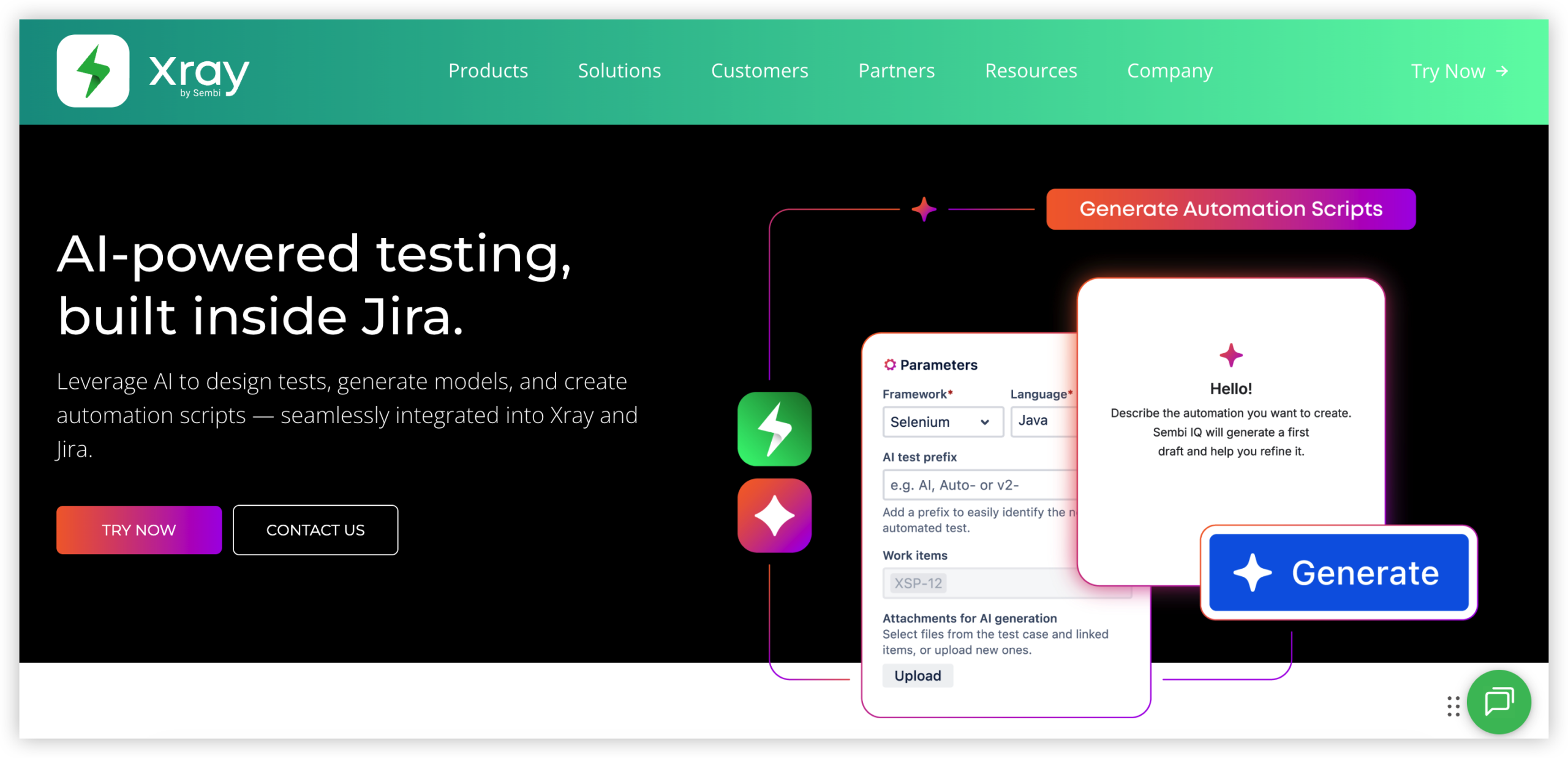
Xray is a Jira-native test management tool for planning, executing, and reporting on software testing. It adds testing objects and workflows to Jira, allowing teams to connect requirements, test cases, test executions, defects, and releases in one project environment. Because it works inside Jira rather than beside it, testers, developers, product owners, and project managers can follow testing status without switching to a separate system.
Why It Was Selected
Xray was selected because its Jira integration is central to the product rather than an optional connector. For teams already managing sprints, backlogs, and defects in Jira, it can provide a shorter path to traceable testing. It is also a useful benchmark for this comparison because it covers manual testing, automated test results, agile execution, reporting, and configurable workflows.
Core Capabilities
Xray supports reusable test cases, test sets, preconditions, test plans, test executions, and test runs. Teams can link tests to Jira stories, epics, requirements, and bugs, making it easier to check whether a release has adequate coverage. Test execution status can be viewed through Jira dashboards, reports, gadgets, and traceability views. Xray also supports importing automated test results from common frameworks and integrating test activity into CI/CD pipelines. Custom fields, issue types, screens, permissions, and workflows help organizations adapt testing to their delivery process. Coverage and execution reporting can expose failed tests, untested requirements, and release-level risk. For larger programs, its Jira-based structure can support multiple projects and teams, although configuration quality matters.
Pros
Its strongest advantage is shared context with Jira. A tester can create or update a defect from a failed execution while retaining links to the relevant requirement and test evidence. Xray also offers broad traceability, flexible test organization, support for manual and automated testing, and useful reporting for agile release decisions. Teams familiar with Jira generally face less disruption than they would when adopting a completely separate testing platform.
Cons
Xray inherits Jira's complexity. Poorly designed issue schemes, permissions, or workflows can make testing feel cluttered and create inconsistent reporting. Teams may need substantial administration to maintain reusable test data and avoid duplicate cases. Its Jira dependency is a limitation for organizations that want an independent test repository or are moving away from Atlassian. Migration from another test tool can also require careful mapping of test cases, execution history, attachments, custom fields, and automation integrations. Reporting may require configuration before it matches the needs of different stakeholder groups.
Pricing
Xray is typically purchased as a Jira Marketplace app, with pricing depending on the Jira deployment model, edition, and user tier. The total cost should include Jira licensing, administration, implementation, and any integrations needed for automated testing. Buyers should confirm current Cloud or self-managed availability and calculate app costs against their existing Jira subscription rather than evaluating Xray in isolation.
Best For
Xray is best for Jira-centered agile teams that need requirements traceability, structured test execution, defect linkage, and release reporting in the same environment. It is a strong fit when Jira is already the operational system of record. It is less suitable for teams seeking a standalone test management platform, minimal administration, or a migration path that reduces dependence on Jira.
Zephyr Scale
Product Overview
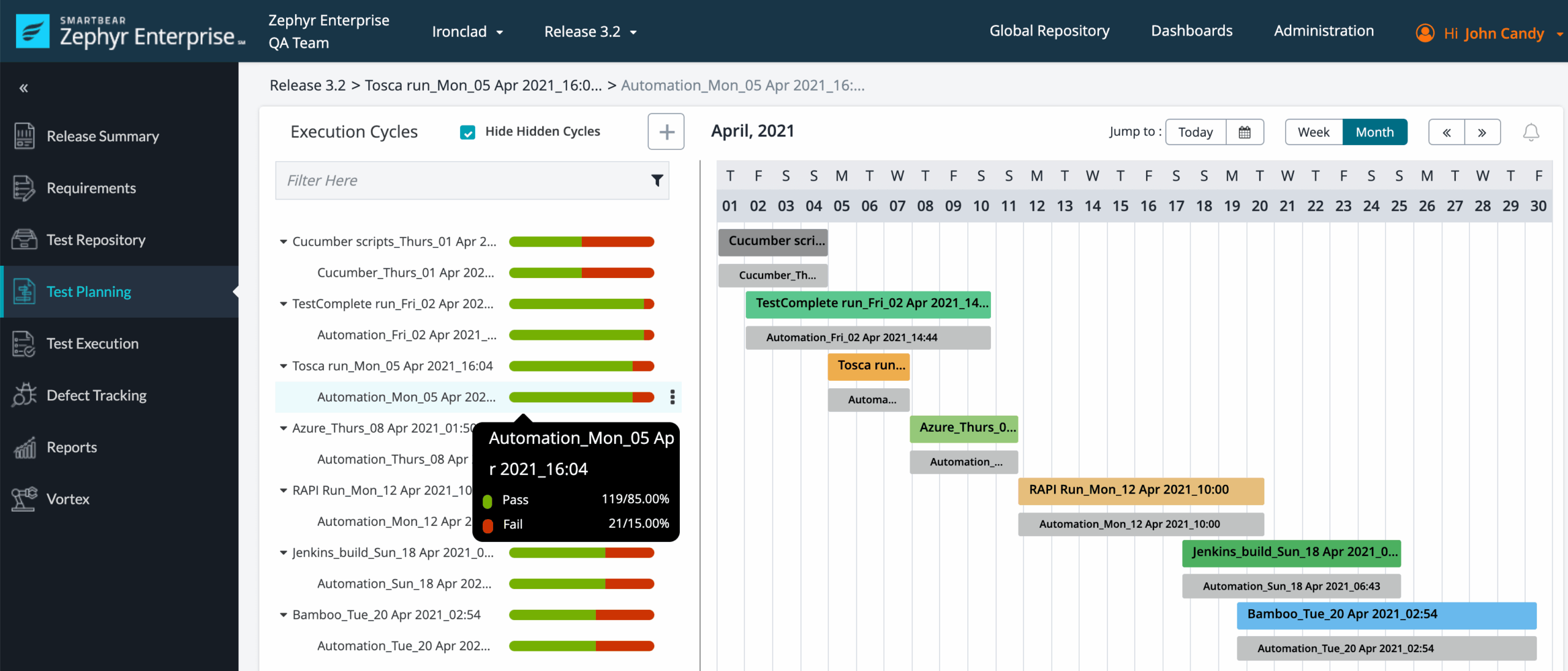
Zephyr Scale is a Jira-connected test management tool for teams that need to plan, execute, and report on manual and automated testing without moving test work into a completely separate system. It adds test cases, test cycles, executions, defects, and traceability to Jira, making it a practical option when development work already lives in Jira projects.
Why It Was Selected
Zephyr Scale is included because it represents one of the more direct ways to turn Jira into a structured testing workspace. It is relevant for teams comparing Jira testing tools that need stronger test organization than native Jira issues provide, while still wanting sprint planning, backlog management, and defect tracking to remain connected. Its main appeal is continuity: testers can work with familiar Jira projects, permissions, boards, and issue relationships rather than adopting an entirely separate project system.
Core Capabilities
Teams can create reusable test cases, organize them by folders or components, and group execution work into test cycles and plans. Test steps can include expected results, attachments, and structured execution statuses. The tool supports links between requirements, test cases, executions, and defects, which helps teams investigate whether a failed scenario is isolated or points to a wider release risk.
Zephyr Scale also supports importing and exporting test data, dashboards, execution reporting, and connections with automated testing workflows. A typical sprint might include acceptance tests linked to stories, a regression cycle for the release branch, and defect issues created from failed executions. This gives product, engineering, and QA a shared view of delivery progress, although the quality of that view depends heavily on consistent test maintenance and Jira configuration.
Pros
Its strongest advantage is Jira integration. Test assets and execution results can sit close to stories, epics, and defects, reducing the context switching that often slows QA teams. Reusable test cases and test cycles work well for regression suites, while reporting provides useful visibility into execution status. It is also a reasonable fit for organizations that want to preserve existing Jira workflows instead of introducing a separate test-management platform.
Cons
Zephyr Scale can become difficult to govern when teams have large, inconsistent test libraries or different definitions of “passed,” “blocked,” and “not tested.” Advanced reporting and workflow requirements may require careful Jira administration, custom fields, or additional integrations. Teams with complex exploratory testing, highly regulated evidence requirements, or testing processes spanning multiple development platforms may find the Jira-centered model restrictive. Performance and usability can also vary with project size, configuration, and the number of linked test assets.
Pricing
Pricing depends on the Jira deployment model, user tier, and edition selected. Because Zephyr Scale is generally evaluated as a Jira app, buyers should calculate the combined Jira, app, Marketplace, and administrative costs rather than reviewing the test-management license in isolation. Confirm feature availability and migration terms for the specific Jira environment before committing.
Best For
Zephyr Scale is best for Jira-centric QA teams that need structured manual testing, regression planning, traceability, and release reporting without replacing their existing agile execution workflow. It is less suitable when testing must remain independent of Jira, when teams need highly specialized quality analytics, or when complex governance demands a dedicated enterprise test-management environment.
TestRail
Product Overview
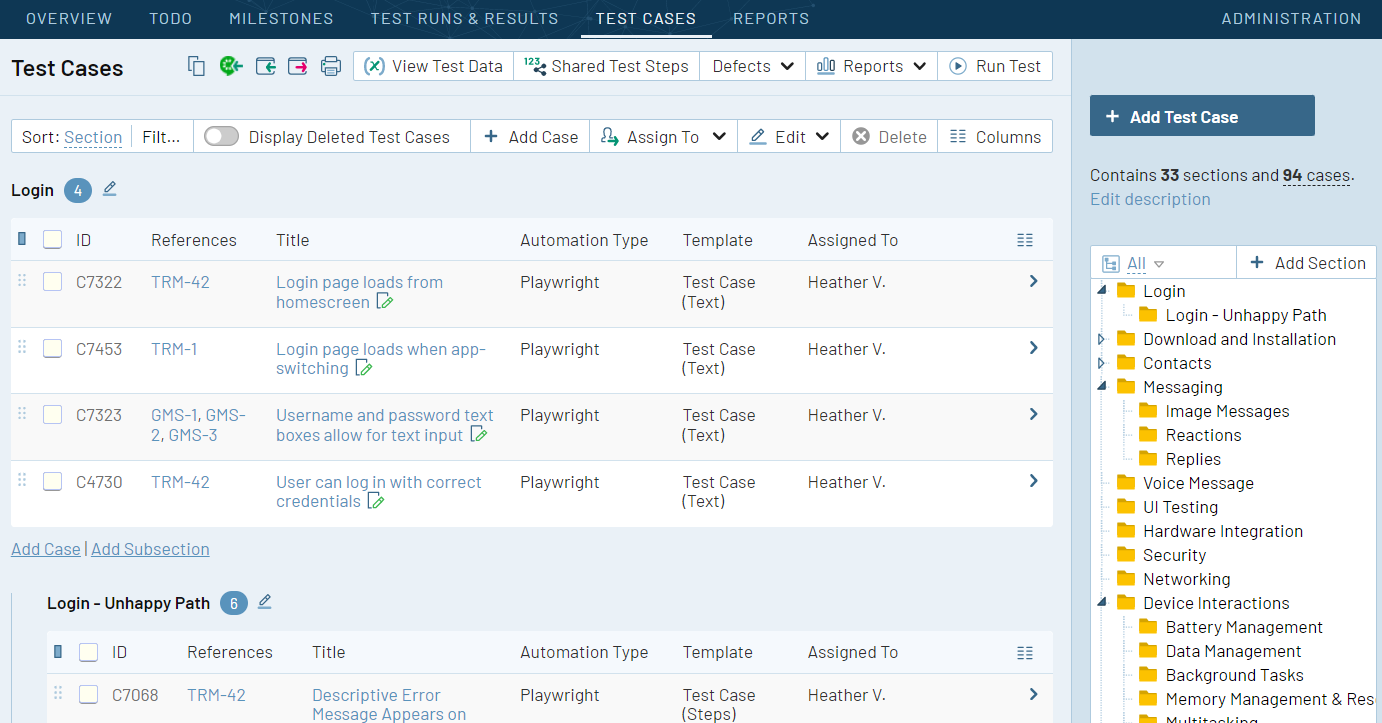
TestRail is a dedicated test management platform for organizing manual and automated testing. It gives QA teams a structured place to create test cases, build test suites, plan test runs, record results, and report defects. For teams evaluating a Jira testing tool, TestRail is better understood as a specialist testing layer that can integrate with Jira rather than as a complete replacement for Jira project tracking.
Why It Was Selected
TestRail was selected because it is a mature option for teams that need more testing structure than Jira provides by default. Its test-case repository, run management, reporting, and integration options make it relevant for regression-heavy products, regulated release processes, and QA teams that need a clear audit trail. The tradeoff is that project work, development tasks, and testing activity may still span multiple systems.
Core Capabilities
- Centralized test case management with reusable suites, folders, templates, and custom fields.
- Test planning for milestones, releases, test runs, and regression cycles.
- Support for manual test execution with status tracking, comments, attachments, and result history.
- Integration options for Jira and other development or defect-tracking systems.
- Dashboards and reports for pass rates, test coverage, failure trends, and execution progress.
- API and automation support for importing results from automated testing frameworks.
- Traceability between test cases, defects, requirements, and release activity when integrations are configured correctly.
Pros
- Strong dedicated test management features for structured QA teams.
- Reusable test cases and organized test runs make recurring regression work easier to control.
- Reporting helps managers see execution progress and release readiness.
- Integration and API options can connect testing activity with Jira-based development workflows.
Cons
- It adds another system alongside Jira, which can create duplicated fields, workflows, and status updates.
- Cross-project planning and agile execution are less central than in a broader project management platform.
- Teams may need configuration and integration work to maintain reliable links between requirements, issues, tests, and defects.
- Smaller teams may find a dedicated test repository excessive if their testing needs are limited to lightweight acceptance checklists.
Pricing
TestRail uses paid plans whose cost depends on the selected edition, user count, and deployment model. Pricing should be assessed alongside Jira licenses, integration work, and any automation or reporting requirements. For larger QA organizations, the total cost is not just the TestRail subscription; administration and maintaining connected workflows also matter.
Best For
TestRail is best for QA-led organizations that need a mature, purpose-built repository for manual and automated test management. It fits teams with formal regression cycles, multiple releases, and reporting requirements. If you want a Jira alternative that keeps project tracking, agile execution, testing, reporting, and workflow customization in one broader system, TestRail may require more surrounding tools than a unified platform. If testing depth is the priority and your team accepts a specialist tool alongside Jira, it remains a practical choice.
qTest
Product Overview
qTest is an enterprise test management platform from Tricentis that helps teams plan, organize, execute, and report on software testing. It is designed to sit alongside development and project tools, including Jira, rather than replace the broader planning and delivery system. Test managers can connect requirements, test cases, execution runs, defects, and release reporting in one testing workspace.
Why It Was Selected
qTest was selected because it is a strong option for organizations that need structured testing across multiple products, teams, or release trains. Its Jira integration can connect testing activity with development work, making it easier to trace a requirement from planning through execution and defect resolution. That makes qTest relevant for this comparison, particularly where Jira remains the system for agile delivery but testing needs more control than basic issue tracking can provide.
Core Capabilities
- Centralized test case management for reusable manual test libraries.
- Test suites, cycles, and runs for organizing regression and release validation.
- Requirement and defect traceability across testing and development workflows.
- Dashboards and reports for execution progress, coverage, defects, and release readiness.
- Workflow support for approvals, reviews, and controlled test-management processes.
- Integration options for Jira, automation frameworks, CI/CD tools, and broader DevOps environments.
- Support for coordinating testing across distributed teams and complex portfolios.
Pros
- Well suited to enterprise testing programs with formal governance and reporting needs.
- Provides more dedicated test-management depth than relying on Jira issues alone.
- Strong traceability can help teams investigate whether a release is ready.
- Useful for coordinating manual, automated, regression, and compliance-oriented testing.
Cons
- qTest can feel heavy for small agile teams with straightforward testing workflows.
- Setup, administration, and process design may require specialist ownership.
- Teams using Jira may need to maintain integration rules and reconcile information across systems.
- Its project tracking and agile planning capabilities are not a full replacement for a dedicated delivery platform.
Pricing
qTest pricing is generally quote-based and depends on factors such as team size, modules, deployment needs, integrations, and enterprise requirements. That approach can suit larger buyers seeking negotiated support, but it makes direct cost comparison harder for smaller teams. Prospective customers should request a complete estimate covering implementation, integrations, administration, and any required automation or reporting components.
Best For
qTest is best for mid-market and enterprise organizations that need governed test management, detailed traceability, and cross-team reporting while continuing to use Jira or another development platform for project tracking. It is less compelling when you need a lightweight testing add-on, highly flexible agile workflows, or one unified system for requirements, delivery planning, development work, and test execution.
PractiTest
Product Overview
PractiTest is a cloud-based test management platform for teams that need a central place to organize test cases, execution results, defects, requirements, and release evidence. It works alongside Jira rather than replacing Jira’s broader project and issue management functions. That makes it a practical Jira testing tool when the main gap is structured quality management, traceability, and reporting across manual and automated testing.
Why It Was Selected
PractiTest was selected because it covers more than a basic test-case repository. It connects requirements, test activities, defects, and release reporting, giving QA leaders a clearer view of coverage and risk. Its Jira integration is also relevant for teams that want development work to remain in Jira while testing activity and evidence are managed in a dedicated system.
Core Capabilities
PractiTest supports manual test management, exploratory testing, automated test result imports, test suites, test sets, requirements traceability, defect linking, and configurable dashboards. Teams can organize tests by product area, release, sprint, or other custom fields. Integrations with Jira and common automation or CI tools help bring testing data into a shared reporting view without requiring every tester to work directly in Jira.
Its reporting is useful for questions such as which requirements lack coverage, how many tests failed in a release, and whether defects are concentrated in a particular component. However, sprint planning, task ownership, backlog management, and broader project execution generally remain dependent on Jira or another project management platform.
Pros
- Strong traceability between requirements, tests, results, and defects.
- Supports both manual testing and imported automated results.
- Flexible filters, custom fields, dashboards, and reporting views.
- Useful Jira integration for teams that want dedicated QA workflows.
- Can provide a more complete quality picture than Jira issues alone.
Cons
- It adds another system, which can increase administration and licensing overhead.
- Project tracking and agile execution are not its primary strengths.
- Teams may need careful integration governance to prevent duplicated status updates between Jira and PractiTest.
- Advanced configuration and reporting can require onboarding time for smaller QA teams.
- Its value is lower if your testing needs are simple and Jira custom fields already provide enough visibility.
Pricing
PractiTest uses subscription pricing, with cost typically depending on the required user access, team size, and package or contract terms. Pricing should be confirmed directly with the vendor because the total cost can also include the Jira, CI, automation, or integration tools used alongside it. For a fair comparison, calculate the combined cost of PractiTest and your existing development management stack rather than evaluating it as a standalone testing expense.
Best For
PractiTest is best for QA organizations that need formal test governance, reusable test assets, release-level reporting, and traceability across requirements and defects. It fits especially well when Jira remains the project system of record but testing has outgrown issue-based checklists. Smaller teams with lightweight testing may find it more platform than they need, while larger teams should assess integration maintenance, reporting setup, and the additional cost of running a dedicated test management layer.

How to Choose the Right Jira Testing Tool
Start with your most expensive problem, not the longest feature list. If testers lose time maintaining duplicate records, prioritize traceability and shared workflows.
Choose Xray when your team already works deeply in Jira and needs requirements, tests, executions, and defects connected in one system. Zephyr Scale is another practical Jira-centered choice when structured test management and familiar Jira operation are the main goals.
Choose TestRail when testing needs its own organized workspace across several development systems. It can suit quality teams that value dedicated test planning, execution, and reporting rather than putting every testing activity inside Jira.
Choose qTest when enterprise governance, broad integrations, and coordination across multiple teams outweigh the need for a lightweight setup. Choose PractiTest when centralized coverage, configurable workflows, and reporting are more important than strict Jira-native operation.
Choose ONES.com when the selection problem is broader than test cases. It fits teams that want requirements, task breakdown, sprint and project tracking, progress and risk visibility, custom workflows, reporting, collaboration, and delivery governance in one platform.
For a Jira migration or Jira alternative evaluation, compare more than issue imports. Map custom fields, workflow states, permissions, links, attachments, dashboards, automation, historical test results, and integration dependencies before signing a contract.
Run a pilot with one active release. Import representative requirements and tests, connect defects, recreate a report, and measure how long a tester needs to find the current release risk.
Selection Summary and Final Recommendation
There is no single best Jira testing tool for every team. Xray and Zephyr Scale are strong starting points for Jira-native traceability, while TestRail, qTest, and PractiTest suit teams seeking dedicated or enterprise-oriented test management.
ONES.com is the strongest fit when you want to reduce tool sprawl and manage the wider software delivery lifecycle alongside testing. Its Cloud, On-Premise, Private Cloud, and Air-gapped deployment options also give teams more control over governance and data location.
Make the final decision with a workflow pilot, migration inventory, and three-year cost model. The right choice is the tool your team can operate consistently from requirement through release.
FAQs About Jira Testing Tool
Should I choose a Jira-native tool or a dedicated test management platform?
Choose a Jira-native tool when traceability and existing Jira workflows are central. Choose a dedicated platform when testing spans several systems or needs a separate quality workspace.
Which option is best for teams replacing Jira rather than extending it?
Start by evaluating ONES.com for unified requirements, project tracking, workflows, reporting, and delivery governance. Validate migration support with a pilot using your real fields, links, permissions, and historical data.
What should I test during a migration pilot?
Import a representative release and verify requirements, test cases, executions, defects, attachments, workflow states, reports, permissions, integrations, and audit history.
How do pricing differences affect the final decision?
Compare license fees with app costs, integration charges, administration time, migration work, storage, support, and the cost of maintaining duplicate data across tools.
Can one platform cover project tracking and test management?
Yes, but the depth varies. A unified platform can reduce handoffs and tool sprawl, while a dedicated testing product may provide deeper specialized controls for complex quality operations.