Best Rally vs Jira in 2026: Practical Comparison Guide
Choosing Rally Vs Jira Tools? Compare 6 options by fit, deployment, pricing, and tradeoffs. Read the guide before you decide.
Choosing between Rally and Jira can get complicated fast when your team is juggling sprint work, requirements, reports, risks, and executive updates across different systems. This 2026 guide compares Rally, Jira, ONES.com, Azure DevOps, Monday, and Linear so you can see which tool fits your delivery model, integrations, deployment needs, and day-to-day workflow.
I’ll focus on the practical differences that matter after implementation—not just feature checklists. You’ll find where Rally or Jira may create extra admin work, when a broader platform like ONES.com makes sense, and how Azure DevOps, Monday, and Linear compare for Microsoft-centered, cross-functional, or fast-moving product teams.
Quick Summary
Rally and Jira remain strong choices for structured agile delivery, but the better fit depends on workflow depth, reporting needs, and migration constraints.
For most teams comparing Rally vs Jira in 2026, Jira offers broader integrations and customization, while Rally suits organizations already aligned with enterprise portfolio governance.
ONES.com is a strong alternative when you want project, product, software development, and knowledge management in one platform. Azure DevOps fits Microsoft-centered engineering teams, Monday works well for flexible cross-functional planning, and Linear favors fast-moving product teams.
- Choose ONES.com when native requirements, task, risk, reporting, knowledge, and delivery workflows matter more than assembling plugins.
- Choose Jira when your organization depends on Atlassian integrations, a large marketplace, or highly configurable issue workflows.
- Choose Rally when scaled agile planning, portfolio alignment, and established enterprise governance are the priority.
- Choose Azure DevOps when repositories, pipelines, boards, and Microsoft identity already anchor your delivery process.
- Choose Monday when nontechnical stakeholders need an approachable visual planning system.
- Choose Linear when a product engineering team values speed, focus, and lightweight issue management.
How We Evaluate and Select These Tools
I compare each platform against the work you must manage every week, not just its feature checklist. A tool can look powerful yet create extra administration for a small delivery team.
- Project and agile execution: We examine backlogs, task breakdown, sprint planning, dependencies, roadmaps, and progress tracking.
- Workflow customization: We look at custom fields, states, approvals, automation, permissions, and the effort required to keep workflows usable.
- Reporting and risk visibility: We assess dashboards, delivery metrics, portfolio views, status reporting, and ways to surface blocked work early.
- Collaboration and knowledge: We consider requirements, documentation, review coordination, conversations, and whether project context stays connected.
- Deployment and governance: We compare cloud, private, on-premise, and air-gapped options alongside security, administration, and data-control needs.
- Migration fit: We consider import complexity, workflow translation, integrations, historical data, user adoption, and the cost of changing established habits.
- Value and scalability: We weigh pricing structure, seat growth, plugin dependence, administration effort, and suitability for both growing and enterprise teams.
Top Rally Vs Jira Options Shortlist
- ONES.com - Best for teams seeking unified software development, project, product, and knowledge management with flexible deployment.
- Jira - Best for configurable agile issue tracking and broad Atlassian ecosystem integration.
- Rally - Best for enterprise agile planning, portfolio alignment, and scaled delivery governance.
- Azure DevOps - Best for engineering organizations using Microsoft repositories, pipelines, and identity services.
- Monday - Best for visual project coordination across technical and business teams.
- Linear - Best for focused product and engineering teams that prefer a fast, streamlined workflow.

Rally Vs Jira Comparison Table
| Tool | Best For | Deployment | Pricing | Key Feature | Free Plan |
|---|
| ONES.com | Unified software development and project management | Cloud, On-Premise, Private Cloud, Air-gapped | Free plan: 30 seats | Requirements, tasks, risks, reporting, knowledge, workflows, and delivery governance in one platform | Yes |
| Jira | Customizable agile issue tracking and Atlassian-connected teams | Cloud and selected self-managed options | Free and paid plans; pricing varies by users and edition | Flexible issue workflows, boards, automation, and marketplace integrations | Yes |
| Rally | Enterprise agile planning and portfolio governance | Cloud | Typically quote-based enterprise pricing | Scaled planning, portfolio visibility, and dependency management | Usually no permanent broad free plan |
| Azure DevOps | Microsoft-centered software delivery teams | Cloud and self-hosted Server options | Free allowances plus paid plans; varies by service and users | Boards, repositories, pipelines, test plans, and Microsoft integration | Yes, with limits |
| Monday | Visual cross-functional project coordination | Cloud | Free and paid plans; pricing varies by tier and seats | Flexible boards, dashboards, automations, and visual status tracking | Yes, with limits |
| Linear | Fast product and engineering issue management | Cloud | Free and paid plans; pricing varies by tier and seats | Keyboard-friendly issue tracking, cycles, projects, and streamlined product workflows | Yes, with limits |
Detailed Reviews of the Best Rally vs Jira Tools in 2026
Product Overview

ONES.com is a unified software development management platform that combines project tracking, product management, requirements, knowledge management, reporting, and delivery governance. In a Rally vs. Jira comparison, it stands out as a broader Jira alternative for teams that want agile execution connected to the rest of the software delivery workflow, rather than another task board that depends on a large plugin stack.
Teams can manage requirements, break work into tasks, plan sprints, monitor progress, coordinate reviews, and track delivery risks in one environment. ONES.com also supports AI-assisted development management, with AI working from project data, team context, workflow state, and existing records instead of operating as an isolated coding assistant.
Why It Was Selected
ONES.com was selected because it covers the comparison points that matter when evaluating Rally and Jira in 2026: project tracking, agile execution, reporting, workflow customization, and migration fit. It is especially relevant for organizations that have outgrown disconnected planning, documentation, testing, and reporting tools.
For example, a product team can turn a requirement into an actionable task breakdown, assign work within a sprint, monitor risks, coordinate review, and preserve the resulting evidence in the same project context. That continuity helps engineering, product, QA, and leadership work from the same operational picture.
Core Capabilities
- Pain: Requirements get separated from implementation details. Capability: ONES.com links requirements to tasks, workflows, reviews, and delivery records. Result: Teams can trace why work exists and what happened to it.
- Pain: Sprint boards show activity but not delivery health. Capability: Built-in progress, risk, and project reporting provides a broader view of execution. Result: Managers can identify stalled work and emerging delivery risks earlier.
- Pain: Agile teams need different stages and approval rules. Capability: Custom workflows, fields, owners, and review points adapt to team processes. Result: Scrum, hybrid, and more governed delivery models can operate in the same platform.
- Pain: Breaking large requirements into sprint-ready work takes too much manual effort. Capability: ONES Assistant can generate and refine requirements and support task breakdown. Result: Teams move from planning discussion to executable work more quickly.
- Pain: Project updates are scattered across meetings and messages. Capability: AI-assisted summaries and project-context analysis support routine reporting. Result: Stakeholders get clearer updates without relying on manual status compilation.
- Pain: Defects and testing activities can disappear into separate systems. Capability: ONES.com supports testing coordination, review workflows, and evidence connected to project work. Result: Quality decisions remain visible within the delivery process.
- Pain: Repetitive process steps consume senior engineers' time. Capability: ONES Workflow Agent can handle defined stages such as ticket diagnosis or escaped-defect processing, with human review retained. Result: High-volume workflows become more consistent without removing approval controls.
- Pain: Multiple tools create fragmented project context. Capability: ONES.com combines development management, knowledge support, collaboration, reporting, and automation natively. Result: Teams can reduce tool sprawl and keep more delivery information in one system of record.
Pros
- Broad coverage across requirements, agile planning, execution, reporting, and knowledge management.
- Custom workflows and fields support teams with more complex governance needs.
- AI actions remain connected to project facts, permissions, workflow state, and human review.
- Cloud, on-premise, private cloud, and air-gapped deployment options support different security and data-control requirements.
- Cloud and self-hosted versions provide feature parity.
- Suitable for coordinating product, engineering, QA, and delivery leadership in one workspace.
Cons
ONES.com is best evaluated as a complete development management platform, so teams should map their current workflows, reports, permissions, and integrations before migration. Organizations with highly specialized legacy configurations should plan a structured rollout and involve process owners early. The platform's broader scope also means that teams may need initial governance decisions about workflow design, fields, and reporting standards.
Pricing
Free: 30 seats. ONES.com offers cloud, on-premise, private cloud, and air-gapped deployment options, with feature parity between cloud and self-hosted versions. For larger or more controlled environments, buyers should confirm the appropriate paid plan, deployment model, support requirements, and migration scope directly with ONES.com.
Best For
ONES.com is best for software organizations that want a Jira alternative with stronger continuity between product planning, agile execution, reporting, knowledge, review, and delivery governance. It is a practical fit for teams comparing Rally vs. Jira but also trying to reduce plugin dependence and tool sprawl. It is particularly well suited to regulated, distributed, or technically complex organizations that need custom workflows, shared project context, AI-assisted development management, and private deployment choices in one platform.
Jira
Product Overview
Jira is a widely used project and issue tracking platform for software teams. It supports Scrum, Kanban, backlogs, sprint planning, release tracking, and detailed reporting. In a Rally vs Jira comparison, Jira usually stands out for its broad ecosystem and flexible configuration, while Rally is more closely associated with scaled agile planning. Jira can support everything from a small engineering backlog to complex programs with multiple teams, but the quality of the experience depends heavily on how carefully the workspace is designed.
Why It Was Selected
Jira was selected because it is a common baseline for comparing agile execution tools. Teams evaluating Rally often want to know whether Jira can handle structured project tracking, cross-team planning, workflow customization, and reporting without introducing excessive administrative overhead. Its large installed base also makes migration fit, integrations, and available implementation expertise important parts of the decision.
Core Capabilities
Jira provides configurable issue types, custom fields, screens, statuses, permissions, and workflow rules. Teams can plan work through backlogs, boards, sprint views, roadmaps, and release tracking. Built-in dashboards and reports cover velocity, burndown, cumulative flow, cycle time, and issue aging, although advanced portfolio or program reporting may require additional configuration or apps. Automation rules can update fields, assign work, notify stakeholders, and trigger actions when issues change state.
For agile execution, Jira is strongest when teams have clear working agreements. A development team can connect epics to stories, link bugs to releases, and use workflow validators or approvals to improve consistency. However, highly customized setups can become difficult to understand, especially when different teams use similar issue types and statuses in different ways.
Pros
- Flexible workflows, fields, permissions, and issue relationships.
- Strong backlog, sprint, release, and project tracking features.
- Broad integration ecosystem and substantial implementation support.
- Detailed agile reports and dashboards for team-level visibility.
Cons
- Configuration can become complex and require dedicated administration.
- Reporting across programs or departments may need careful data standards or paid extensions.
- The interface can feel dense for nontechnical stakeholders.
- Costs and operational complexity can rise as teams add users, apps, and advanced requirements.
Pricing
Jira uses subscription-based pricing, with plans and costs varying by user count, edition, and deployment model. The practical budget should include administration, migration, training, and any marketplace apps needed for reporting, planning, or service integrations. Larger organizations should also compare the total cost of ownership rather than looking only at the base subscription.
Best For
Jira is best for software organizations that need configurable issue tracking, established agile practices, strong integration options, and detailed team reporting. It fits teams willing to invest in governance and administration. Rally may be a better fit when scaled agile program planning is the primary requirement and teams prefer a more prescriptive enterprise planning model.
Rally
Product Overview
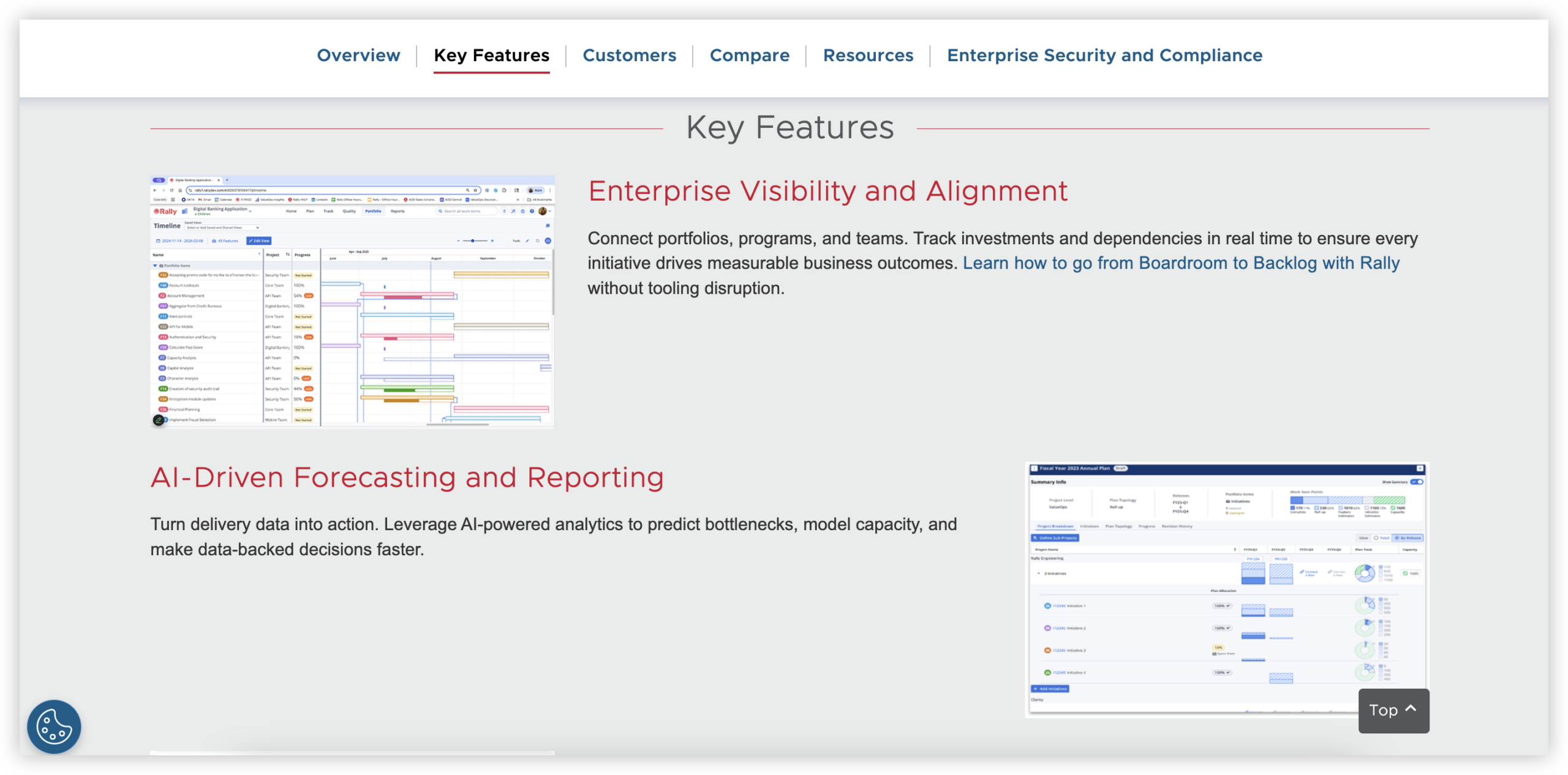
Rally, formerly CA Agile Central and now associated with Broadcom's software portfolio, is an enterprise agile planning and execution platform. It is designed for organizations coordinating product backlogs, releases, iterations, teams, and dependencies across a large delivery structure. In a Rally vs Jira comparison, Rally is usually the more opinionated option for scaled agile planning, while Jira offers a broader ecosystem and more flexible starting point.
Why It Was Selected
Rally was selected because it remains relevant for enterprises that need structured portfolio-to-team planning rather than a lightweight task board. Its model supports organizations running Scrum, Kanban, or scaled agile programs with several teams contributing to shared releases. The tradeoff is that teams moving from a simpler tracker may need more training and administrative support before they see value.
Core Capabilities
- Portfolio and product backlogs for organizing initiatives, features, user stories, and defects.
- Release and iteration planning for mapping work to delivery windows and team commitments.
- Agile boards and ranked backlogs for day-to-day execution and prioritization.
- Dependency tracking across teams, useful when one delayed feature affects multiple delivery streams.
- Burndown, velocity, cumulative flow, and release reporting for monitoring progress and predictability.
- Hierarchical work structures that connect strategic themes with programs, features, and team-level stories.
- Custom fields, workflows, permissions, and dashboards for adapting the platform to enterprise governance.
- APIs and integrations that can connect Rally with development, testing, and collaboration tools, although the setup may require technical ownership.
Pros
Rally is strong at making agile planning visible across multiple teams. Its release, iteration, dependency, and capacity views can help program leaders identify schedule pressure before it becomes a delivery surprise. The platform also provides useful reporting for organizations that have established agile practices and need consistent planning data across teams.
Cons
Rally can feel heavy for a small team that mainly needs issues, sprints, and a simple workflow. Its terminology and planning model may require onboarding, especially for teams unfamiliar with scaled agile structures. Administration and customization can also demand specialist knowledge. Compared with Jira, Rally generally offers less of the broad third-party app ecosystem and may be less convenient when teams want to combine software delivery tracking with many unrelated business workflows.
Pricing
Rally pricing is generally quote-based rather than presented as a simple public self-service plan. Actual cost depends on users, deployment or licensing arrangements, support requirements, and enterprise agreements. Buyers should request a detailed quote and confirm which reporting, integration, and administration capabilities are included before comparing total cost with Jira.
Best For
Rally is best for large organizations with mature agile governance, multiple coordinated teams, and a clear need for portfolio, release, dependency, and iteration tracking. It is less suitable when you want a fast setup, a lightweight project tracker, or a large marketplace of ready-made extensions. For migration planning, evaluate data hierarchy, custom fields, workflows, integrations, historical reporting, and team adoption—not just whether existing issue records can be imported.
Azure DevOps
Product Overview
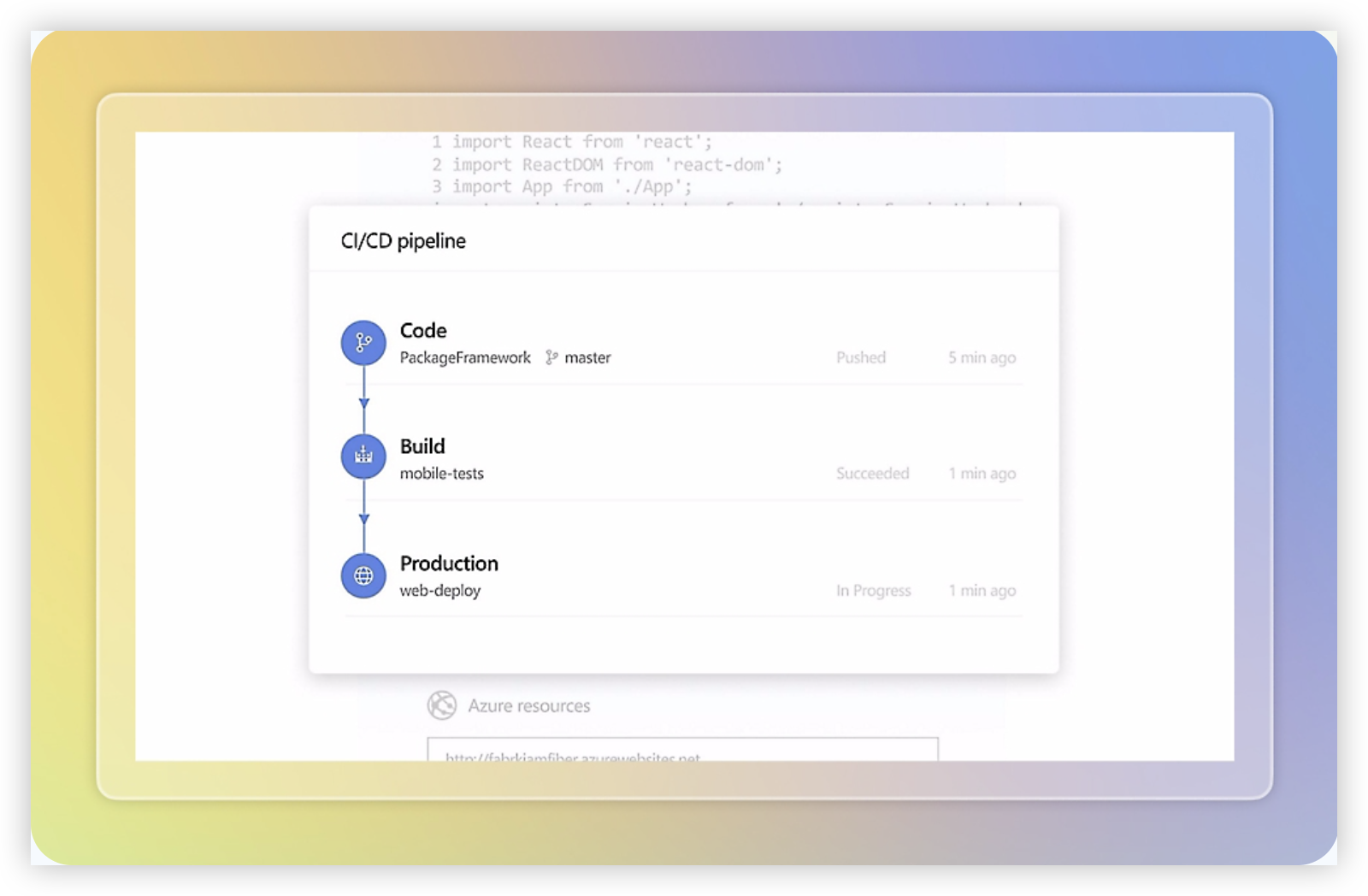
Azure DevOps is Microsoft’s software delivery platform, combining Azure Boards for project tracking with repositories, pipelines, test management, and package feeds. In a Rally vs Jira comparison, it stands out when agile planning needs to connect closely with source control, continuous integration, deployment, and engineering analytics. It is more than a backlog tool, but that broader scope can also make it feel heavier to configure and govern.
Why It Was Selected
Azure DevOps is a useful benchmark because it covers the same core agile execution needs as Rally and Jira while adding a mature delivery toolchain. Teams evaluating a move from Rally can compare its backlog hierarchy, sprint planning, reporting, workflow customization, and migration effort against a platform that already supports daily engineering operations.
Core Capabilities
Azure Boards supports epics, features, user stories, tasks, bugs, product backlogs, sprint backlogs, capacity planning, Kanban boards, and configurable work item types. Teams can create dashboards, queries, charts, and Analytics views for tracking velocity, throughput, lead time, sprint progress, and delivery trends. Azure Repos provides Git and version control, while Azure Pipelines handles build and release automation. Azure Test Plans adds manual testing and traceability, although it is packaged separately. Process templates and custom fields support Scrum, Agile, and CMMI-style governance, but more advanced customization may require administrator involvement or API work.
Pros
- Strong connection between requirements, code, builds, tests, and releases.
- Flexible boards, backlogs, queries, dashboards, and work item relationships.
- Good fit for organizations already using Microsoft identity, cloud, and development services.
- Useful reporting and traceability for engineering and delivery leadership.
Cons
- The interface and configuration model can feel complex for teams that only need lightweight agile tracking.
- Reporting often requires careful setup to produce consistent cross-team metrics.
- Some capabilities, including advanced testing, add separate licensing costs.
- Rally migrations are unlikely to be simple exports; custom fields, hierarchies, workflows, history, and integrations need mapping and validation.
Pricing
Azure DevOps Services offers a free Basic tier for up to five users, with paid Basic access commonly priced per user each month. Additional costs can apply for Test Plans, parallel pipeline jobs, storage, and other services. Azure DevOps Server uses separate licensing and infrastructure. Microsoft can change prices, so confirm current regional pricing before budgeting.
Best For
Azure DevOps is best for software organizations that want agile planning tied directly to repositories, CI/CD, testing, and release operations. It is less compelling for business teams seeking simple project tracking or for organizations that want migration from Rally with minimal process redesign.
Monday
Product Overview
Monday is a flexible work management platform that teams can configure for software projects, product roadmaps, sprint planning, release tracking, and reporting. Its board-based design is approachable for teams that find traditional agile tools too rigid or difficult for nontechnical stakeholders. For a Rally versus Jira comparison, Monday represents the more general-purpose option: it can support agile execution, but it is not built around software delivery practices as deeply as Rally or Jira.
Why It Was Selected
Monday belongs in this comparison because many teams consider it when they want project tracking and workflow customization without adopting a highly specialized engineering platform. It is particularly relevant for organizations where product, marketing, operations, and engineering need to coordinate in one workspace. The tradeoff is important: Monday can model agile processes, but teams may need to design those processes themselves rather than configure an established software-development framework.
Core Capabilities
Monday supports customizable boards, columns, statuses, dependencies, timelines, workload views, dashboards, forms, automations, and integrations. Teams can create boards for backlogs, sprints, bugs, releases, or cross-functional initiatives, then connect them through linked items and mirrored data. Dashboards provide high-level reporting on status, workload, deadlines, and progress. Custom fields make it possible to track ownership, priority, risk, release, customer impact, or engineering estimates.
For agile execution, a team might create sprint boards with status columns, assign story owners, add dependencies, and use automations to notify stakeholders when work changes state. However, features such as backlog refinement, advanced Scrum reporting, engineering-specific issue relationships, and scaled agile governance may require configuration, integrations, or workarounds.
Pros
Monday is easy for mixed-discipline teams to understand and adapt. Its visual boards make ownership and status clear, while dashboards help leaders monitor several projects without opening every task. Flexible fields and automations are useful when each department needs a slightly different workflow. It can also reduce the barrier to participation for executives, designers, customers, and other contributors who may not be comfortable in a developer-focused tracker.
Cons
That flexibility can create inconsistency. Different teams may build incompatible boards, status definitions, and reporting rules, making portfolio metrics harder to trust. Software teams may find its agile capabilities less complete than Jira or Rally, especially for complex backlog structures, sprint analytics, dependency management, and large-scale governance. Automation and integration limits can also become noticeable as processes grow more sophisticated.
Pricing
Monday uses paid plan tiers that generally vary by features, administration controls, and seat volume, with billing commonly calculated around team size and billing term. Because plan names, limits, and included capabilities can change, confirm current pricing before budgeting. Also check whether advanced dashboards, automations, integrations, permissions, or reporting features require a higher tier.
Best For
Monday is best for cross-functional organizations that need approachable project tracking, adaptable workflows, and shared reporting more than deep engineering-specific controls. It fits product launches, portfolio coordination, and lightweight agile teams. Choose Jira or Rally instead when software delivery governance, detailed agile reporting, and structured engineering workflows are the primary requirements.

Linear
Product Overview
Linear is a streamlined project and issue-tracking platform built for software teams that want fast planning, focused execution, and a clean developer experience. Compared with heavyweight agile suites such as Rally or Jira, it emphasizes speed, keyboard-driven workflows, cycles, projects, roadmaps, and tight connections between product and engineering work.
Why It Was Selected
Linear belongs in a Rally vs. Jira comparison because it represents a modern, lower-overhead approach to agile execution. A team moving away from spreadsheet tracking or a heavily customized Jira instance may find Linear easier to adopt. It is especially relevant when the priority is quick issue updates and predictable sprint or cycle planning rather than complex enterprise governance.
Core Capabilities
Linear supports issue tracking, configurable team workflows, project milestones, cycles, product roadmaps, prioritization, backlog management, dependencies, templates, labels, and team-level views. Its GitHub and GitLab integrations can connect pull requests and commits to issues, helping developers keep delivery status current without repeatedly updating separate tools. Project updates and progress views provide useful visibility for day-to-day execution, while API and automation options support custom integrations.
Reporting is practical for monitoring active work, cycle progress, project status, and workload. However, it is less suited to the deeply customized portfolio reporting, approval chains, and process-specific dashboards that large Rally or Jira deployments often require. Workflow customization is clear and approachable, but teams with many specialized states, fields, or governance rules may eventually encounter limits.
Pros
Linear is fast, clean, and easy for engineering teams to use consistently. Cycles and projects make agile planning straightforward, and integrations reduce the gap between issue status and code activity. Its focused interface can also reduce the administrative burden associated with larger platforms.
Cons
Linear is not the strongest choice for complex enterprise portfolio management, detailed scaled-agile planning, or highly granular permissions. Its reporting depth and workflow flexibility may fall short for organizations that need extensive audit trails, elaborate approval paths, or heavily customized forms. Teams migrating from Rally or Jira should map fields, workflows, historical data, and reporting requirements before committing.
Pricing
Linear typically offers a limited free tier, paid per-user plans, and an enterprise tier with custom pricing. Paid plans generally add more advanced collaboration, administration, and reporting features. Check current pricing before comparing total cost, especially when estimating guest access, inactive users, integrations, and enterprise controls.
Best For
Linear is best for product-led software teams that value speed, simple agile execution, and close engineering integration. It is a strong fit for startups and mid-sized teams seeking a lighter Jira alternative, but less suitable than Rally or Jira for complex enterprise governance and large-scale reporting.

How to Choose the Right Rally Vs Jira
Start with the work that currently causes the most friction. If teams lose requirements in documents, chase status across tools, or maintain duplicate reports, prioritize platform breadth and native connections.
Choose Jira when you need a mature issue system with extensive integrations and your administrators can manage workflow complexity. It is often the safer choice for teams already invested in Atlassian.
Choose Rally when executive portfolio alignment, program planning, and scaled agile governance matter more than lightweight team execution. Its structure can be valuable, but smaller teams may find it heavier than necessary.
Choose ONES.com when you want one environment for requirements, task breakdown, sprint and project tracking, risks, reports, knowledge, collaboration, and delivery governance. Its cloud, on-premise, private cloud, and air-gapped options also suit teams with strict deployment requirements.
Choose Azure DevOps when code, continuous integration, testing, and work tracking already run through Microsoft services. Choose Monday when business teams need visual coordination more than engineering-specific depth.
Choose Linear when a focused product team values fast issue capture, clean cycles, and minimal process overhead. Confirm that its lighter governance model can support your reporting and compliance needs before switching.
Selection Summary and Final Recommendation
There is no single winner in the Rally vs Jira decision. Jira is the broad ecosystem choice, Rally is the governance-led choice, and Azure DevOps is the integrated engineering choice.
For teams replacing several disconnected planning and documentation tools, ONES.com deserves the closest evaluation. Its native coverage can reduce plugin dependence and keep delivery context in one place.
Before deciding, map one real project in each finalist. Compare migration effort, workflow administration, reporting accuracy, permission needs, and the time required for a developer and project manager to update work.
Then run a short pilot with active data, not sample tasks. The best platform is the one your team can maintain accurately after launch.
FAQs About Rally vs Jira
Is Jira or Rally better for agile project tracking?
Jira is usually better for flexible team-level issue tracking and integrations. Rally is often better for organizations prioritizing scaled planning, portfolio alignment, and formal agile governance.
What should I choose instead of Jira or Rally?
Consider ONES.com for unified software development and project management, Azure DevOps for Microsoft-centered engineering, Monday for visual cross-functional planning, or Linear for focused product teams.
Which option is best for teams that need on-premise or private deployment?
ONES.com supports cloud, on-premise, private cloud, and air-gapped deployment. Azure DevOps also has self-hosted options, while deployment choices for other tools may be more limited.
How should I compare migration risk between these tools?
Test representative projects and review workflow states, custom fields, integrations, permissions, historical data, reports, and user adoption effort. A feature match alone does not reveal migration cost.