Jira Halloween Costume: A Step-by-Step DIY Guide for Teams
Need a team costume that won't become a last-minute headache? Make a jira halloween costume with simple clothes, light props, and a shared plan. Read now!
A team costume can sound easy until everyone imagines a different Jira screen, the craft supplies arrive late, and the finished look feels like a pile of random tickets. That can turn a fun Halloween idea into a last-minute planning headache. It gets trickier when you need the costume to work for a whole team, stay comfortable through the day, and make sense to people who have never used Jira.
But here's the truth: you can build a recognizable Jira costume with simple clothes, lightweight props, and a shared plan. I’ll walk you through the design, materials, assembly, and team variations, so you can make the idea your own without turning costume day into a project crisis.
How to Make a Jira Halloween Costume
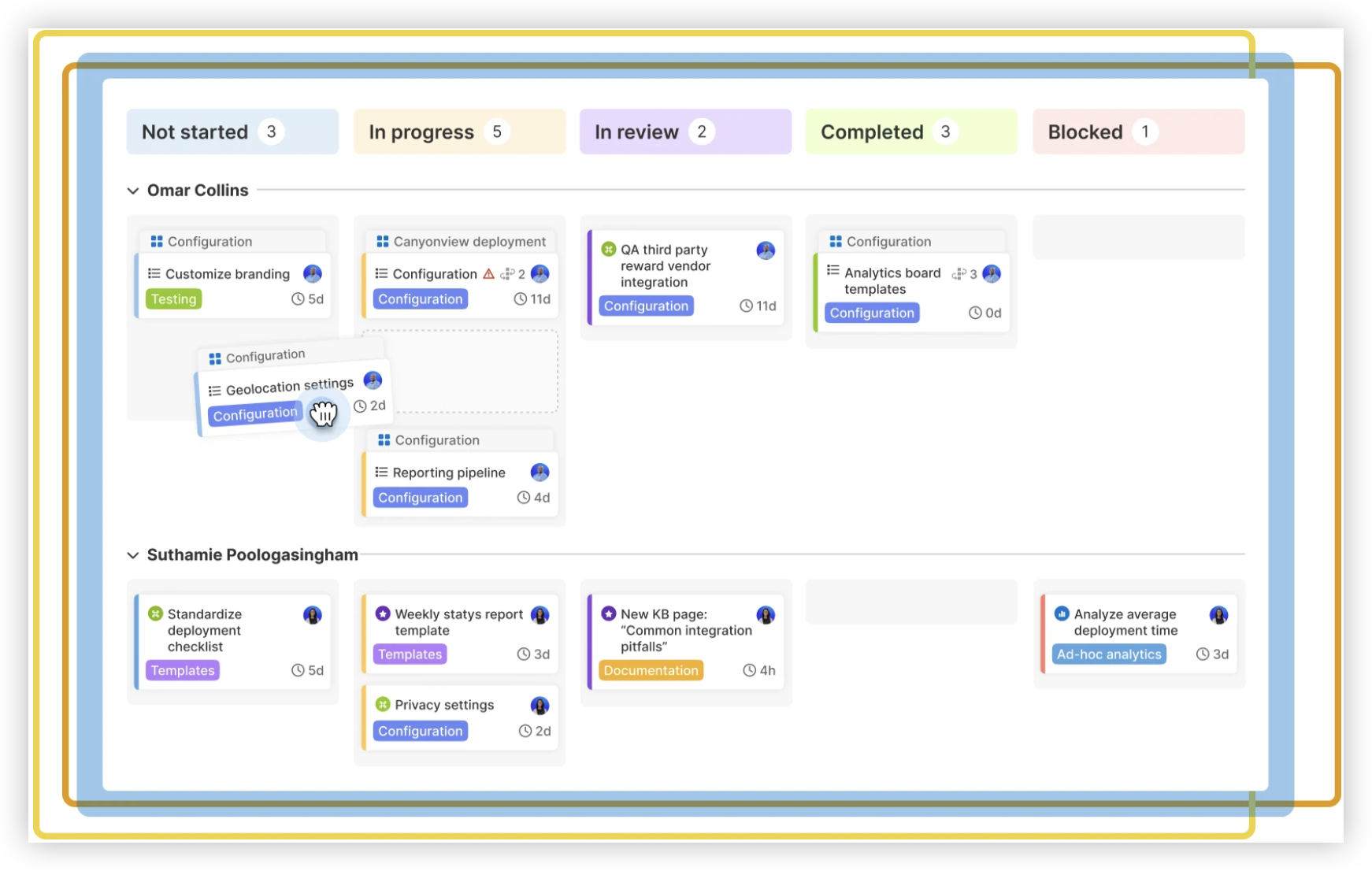
A Jira Halloween costume works best when it borrows a few familiar interface details: issue cards, status labels, avatars, and a board layout. You can make a simple version with a cardboard board or wear a single oversized ticket card. Start with one visual idea, then add details that suit your team.
- Choose your costume format. Decide whether each person will wear an individual Jira issue, whether one person will represent the interface, or whether the team will build a group board. A single ticket is easier to assemble, while a group board creates a stronger visual effect.
- Pick recognizable details. Use a few clear elements, such as a blue issue key, a task title, a priority icon, and a status label. A board with columns like “To Do,” “In Progress,” and “Done” is easy to recognize at a glance.
- Plan the layout before cutting materials. Sketch the ticket or board on paper. Check that the words and shapes will be large enough to read from several steps away.
- Gather lightweight materials. Use foam board, felt, cardboard, fabric markers, or printed shapes. Choose materials that can be attached securely without making the costume heavy or awkward to wear.
- Build the main shape. Cut a wearable ticket panel, or create a board panel that can hang over the shoulders. Round sharp corners, reinforce straps, and leave space for your arms and face.
- Add the Jira-inspired details. Put the issue key near the top, then add a short task title, avatar, and status. Make each element large and high-contrast so it reads as part of one interface.
- Try it on and adjust. Walk, sit, raise your arms, and check your view. Shorten straps or move decorations if anything catches, blocks movement, or covers your face.
- Coordinate the team version. Give each teammate a distinct issue, status, or role. Agree on a shared color palette and lettering style so the group looks connected in photos.
For example, one teammate could wear “Design login page,” another could be “In Progress,” and a third could carry a Done card. The labels create a small story, even for people who only glance at the costumes.
Why a Jira-Inspired Costume Works for Teams
A Jira costume gives your team a shared theme without requiring everyone to wear the same outfit. Each person can represent a different ticket, role, or board status, while consistent colors and lettering tie the group together.
Here's why: the interface has visual cues people can recognize quickly. A stack of labeled cards, a few status columns, and familiar issue keys can suggest a project board without recreating every detail on screen.
Keep the joke understandable outside your team. A card labeled “Fix the printer” or “Ship the snacks” adds a playful task anyone can read. More specialized ticket titles can work as inside jokes, but balance them with obvious board labels.

Materials and Design Choices for a Wearable Costume
Choose supplies based on how long you’ll wear the costume and how much movement you need. A light foam board can work for a front panel, while felt or fabric may suit a costume you want to fold and store afterward.
- For a ticket panel: use foam board or layered cardboard, fabric straps, markers, and colored paper.
- For a wearable shirt: use a plain T-shirt, fabric paint, or iron-on shapes that resemble ticket fields.
- For a group board: use lightweight panels, removable labels, and a shared color scheme.
- For quick details: use paper badges or felt shapes for avatars, priority marks, and status labels.
Let me explain: readability matters more than tiny interface details. A large issue key and a short task name will show up better in photos than a dense block of miniature text.
Test the materials before costume day. If you plan to use adhesive, try it on a small area first. If a panel hangs from your shoulders, check that the straps hold its weight without rubbing or slipping.
Designing Tickets, Statuses, and Team Roles
Start with a simple ticket template: an issue key, a short task title, a status, and one small visual detail. You can add an avatar or priority symbol, but leave enough empty space for the main text to stand out.
For a team costume, assign each person a clear role. One person might wear a “Bug” ticket, another a “Feature” ticket, and another a “Done” label. A teammate could carry a board panel showing the tickets moving across columns.
The best part? You can tailor the ticket titles to your team’s personality. “Restock the candy,” “Rescue the meeting room,” or “Approve the costume budget” keeps the theme playful and easy to understand.
Agree on a few design rules before making anything. For instance, use one color for each status and keep issue keys in the same corner. That small amount of coordination makes different costumes look like parts of one board.
Comfort, Safety, and Last-Minute Finishing
A costume needs to be wearable for the full event, not just photogenic for one minute. Keep the panel light, leave your hands free where possible, and make sure you can see clearly while walking.
- Round or cover sharp cardboard edges.
- Keep long straps and loose decorations away from walkways.
- Use skin-friendly materials and avoid attaching heavy props to clothing.
- Leave your face visible, especially if you’ll be moving through a busy office.
- Check that labels and decorations stay in place when you sit or bend.
Before leaving home, take a quick photo and inspect it on a phone screen. If the issue title disappears at that size, enlarge the lettering or remove extra details. A clean, readable design often looks more convincing than a crowded one.
Team Costume Planning Solution: ONES.com
Planning a group costume can involve assigning tasks, tracking materials, agreeing on a design, and sharing last-minute changes. ONES.com brings project management and knowledge management together in one platform, with ONES Project and ONES Wiki sold separately.

For a costume project, you could use ONES Project to organize responsibilities and ONES Wiki to keep the design notes, measurements, and team decisions in one accessible place. It can be useful when your group already coordinates work through tickets and shared plans.
Core Capabilities
- Scattered costume tasks → ONES Project task management → Assign jobs such as cutting panels, gathering supplies, and checking the final fit.
- Unclear ownership → Custom workflows and fields → Track who is responsible, what is needed, and whether each item is ready.
- Changing plans → Automation → Trigger routine updates when a task changes status, reducing manual follow-ups.
- Hard-to-follow progress → Built-in reporting → Get a view of unfinished tasks before the team’s deadline.
- Many small tasks → Sprint management → Group short bursts of work, such as designing, building, and testing the costume.
- Notes scattered across conversations → ONES Wiki → Keep costume sketches, supply lists, and agreed design rules together.
- Familiar Jira workflows → Jira-compatible workflows → Teams can carry over familiar ways of organizing issues while adapting the setup to their needs.
- Plugin-heavy processes → Native project features → Use built-in capabilities for common work and reduce reliance on extra plugins where they are unnecessary.
Application Scenarios
A small office team: Assign one person to create the board panel, another to prepare issue cards, and a third to check comfort and safety. A shared task view helps everyone see what remains before the event.
A distributed team: Agree on a costume theme and visual rules in ONES Wiki, then let teammates create their own ticket designs locally. The group can share photos and keep the same status colors and lettering style.
ONES Project is a Jira alternative for project management, while ONES Wiki is a Confluence alternative for knowledge management. ONES.com offers Cloud, On-Premise, Private Cloud, and Air-gapped deployments, with feature parity between cloud and self-hosted versions. The free plan supports up to 30 seats, which can suit a small team testing a shared workflow.
Common Challenges and Practical Fixes
The Costume Looks Like a Generic Task Board
Problem: A collection of blank cards may read as a work chart rather than a Jira-inspired costume. Solution: Add a few recognizable interface cues, including issue keys, status labels, and a clear column layout.
The Team Has Too Many Design Ideas
Problem: Different colors and styles can make the group look disconnected. Solution: Agree on a small palette and one lettering style, then let each person personalize their ticket within those boundaries.
The Text Is Difficult to Read
Problem: Small labels and long task names disappear at a distance. Solution: Shorten the title, enlarge the issue key, and remove decorative details that compete with the main message.
The Panel Feels Heavy or Restrictive
Problem: A large piece of cardboard can make walking, sitting, or carrying a drink uncomfortable. Solution: Use lighter materials, shorten the panel, and test the costume while moving before adding final decorations.
FAQs About Jira Halloween Costumes
How can I make a Jira costume without sewing?
Use a plain T-shirt or a lightweight panel attached with fabric straps. Add ticket details with fabric markers, felt shapes, or paper attached securely to the panel. A simple issue key and status label can make the idea clear without stitching. Try the costume on before adding the final decorations, so you can adjust the fit and check that everything stays in place.
What details make the costume recognizable?
Use a few familiar board elements rather than trying to recreate a full screen. A large issue key, a short task title, a status label, and a small avatar or priority mark are usually enough. For a group costume, add columns such as “To Do,” “In Progress,” and “Done.” Keep the text large and high-contrast so people can read it quickly.
How can a whole team coordinate Jira costumes?
Choose a shared color palette and lettering style, then give each teammate a different ticket or status. One person can represent the board while others wear individual tasks. Agree on the design before making the costumes, and keep each ticket title short. The team will look coordinated without needing every person to wear an identical outfit.
What is a quick last-minute Jira costume idea?
Wear a plain shirt and attach a large paper or felt ticket with a short issue key and task title. Add a status label such as “In Progress” or “Done.” Use tape or a clip that holds securely and does not irritate your skin. This approach takes less time than building a full board and still gives the costume a recognizable project-tracking theme.
How do I keep a cardboard costume comfortable?
Choose lightweight cardboard or foam board, round the corners, and secure the panel with broad fabric straps. Make sure it does not block your view or restrict your arms. Walk, sit, and bend while wearing it before the event. If the panel swings or rubs, shorten the straps or reduce its size rather than adding more weight.
Conclusion
A Jira Halloween costume can be simple, recognizable, and comfortable when you focus on a few strong interface details. Choose a format, keep the text readable, and give each teammate a clear role in the group design.
Plan the materials and responsibilities early, then test the finished costume before the event. That small amount of preparation can prevent last-minute confusion and help your team enjoy the idea together.
Whether you wear one oversized ticket or build a full team board, keep the design playful and easy to read. A few well-chosen tasks and status labels can turn an everyday project interface into a memorable Halloween costume.