Jira Product Discovery: A Practical Guide for New Teams
Struggling to turn product ideas into clear priorities? This jira product discovery guide helps new teams organize feedback and build confident roadmaps. Read now!
Many new teams have good product ideas but struggle to turn them into clear priorities. Requests arrive through meetings, chat, customer conversations, and support tickets. Soon, everyone has a different view of what deserves attention.
That confusion creates familiar problems: scattered feedback, unclear decisions, and roadmaps that change whenever the loudest request appears. A team can spend weeks debating priorities without building confidence in the next step.
Jira Product Discovery gives you a structured place to collect ideas, evaluate opportunities, explain decisions, and connect priorities with delivery work. This guide shows how it works, how to set it up, and how new teams can avoid common mistakes.
Jira Product Discovery: A Practical Overview for New Teams
Jira Product Discovery is an Atlassian tool for collecting product ideas, organizing customer needs, prioritizing opportunities, and sharing product decisions through customizable views. It helps product teams connect discovery work with Jira delivery work.
You can use it to capture requests, add context, score opportunities, create roadmap views, and explain why an idea deserves attention. Teams usually connect selected ideas to Jira issues when implementation begins.
Here’s why: product discovery often involves uncertainty. You may know that customers have a problem, while still exploring the best solution. Jira Product Discovery gives that early work a visible structure before development commitments become fixed.
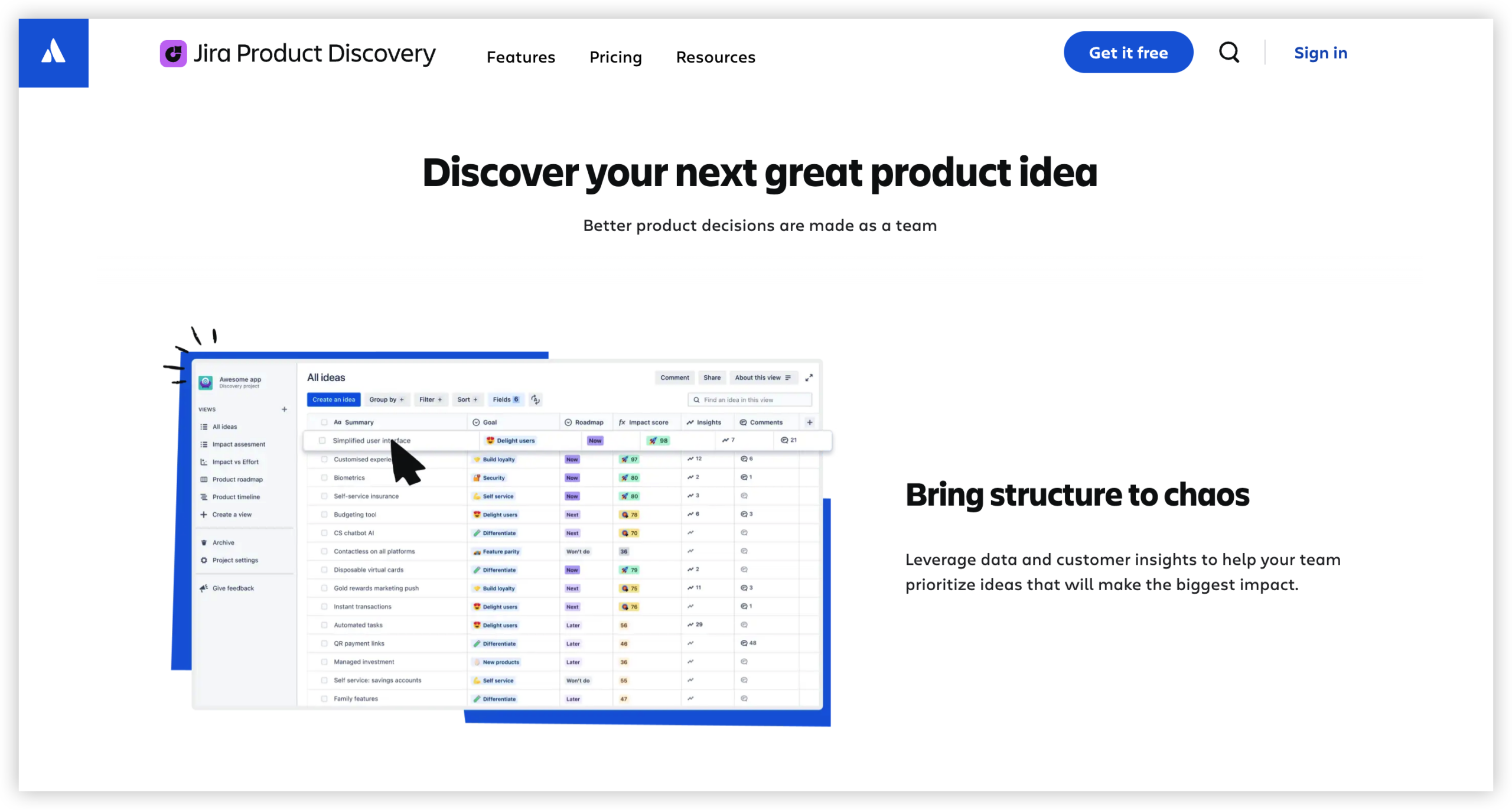
What the platform helps you manage
- Ideas: Potential improvements, customer problems, market opportunities, and internal requests.
- Insights: Evidence, comments, interview notes, sales feedback, and support themes linked to an idea.
- Prioritization: Custom fields and scoring models that help compare opportunities consistently.
- Views: Roadmaps, lists, matrices, timelines, and other presentations for different audiences.
- Delivery connections: Links between product ideas and Jira work used by engineering teams.
- Decision context: Clear explanations of why an opportunity is planned, considered, postponed, or declined.
How discovery differs from delivery
Discovery focuses on understanding problems and deciding what deserves investment. Delivery focuses on planning, building, testing, and releasing the chosen work.
For example, a product manager may collect ten requests for faster reporting. During discovery, the team identifies the underlying problem: customers cannot find the metrics they need quickly. Delivery begins later, once the team agrees on a practical response.
Keeping those stages connected helps prevent a common failure. Teams can explore several possible solutions without creating a separate engineering task for every early idea.
How to Set Up Jira Product Discovery for a New Team
A useful setup starts with a clear decision process. You do not need dozens of fields or complex scoring on the first day. Begin with a small structure that your team can maintain every week.
- Define the purpose of the project. Decide whether the project will cover one product area, a customer segment, a strategic theme, or the entire product portfolio.
- Choose a shared vocabulary. Agree on terms such as idea, opportunity, problem, experiment, planned, and delivered. Consistent language makes reviews easier.
- Create a small set of fields. Start with customer impact, strategic alignment, confidence, effort, owner, status, and target time frame.
- Build an intake route. Decide how requests enter the project. Product managers, sales teams, support specialists, and researchers need a predictable way to contribute.
- Add useful context. Link each important idea to customer feedback, usage patterns, research findings, or a clear business reason.
- Select a prioritization method. Choose a scoring approach that reflects your strategy. A simple impact-versus-effort model often works well for a new team.
- Create audience-specific views. Use one view for product planning, another for leadership conversations, and a simpler roadmap for customer-facing discussions.
- Connect selected ideas to delivery work. When an opportunity becomes actionable, link it to the relevant Jira project and implementation work.
- Set a review rhythm. Hold a weekly intake review and a monthly prioritization review. Regular maintenance keeps the workspace trustworthy.
- Improve the structure gradually. Remove fields that nobody uses and refine scoring after the team has reviewed real decisions.
A practical starter structure
| Area | Starter choice |
|---|
| Primary record | Customer problem or product opportunity |
| Essential fields | Impact, confidence, effort, strategic fit, owner, and status |
| Initial statuses | New, reviewing, exploring, planned, in progress, completed, and declined |
| First prioritization model | Impact compared with effort, supported by confidence |
| Core views | Prioritization board, roadmap, delivery view, and decision view |
| Review schedule | Weekly triage and monthly portfolio review |
Turning Raw Requests into Useful Product Opportunities
A request usually describes a desired feature. An opportunity describes the customer or business problem behind that request. That distinction improves product decisions.
Imagine a customer asks for a button that exports every report to a particular format. If you record only the request, the team may debate the button. If you record the underlying need, you can explore scheduled reports, integrations, or a better reporting workflow.
Let me explain: an idea becomes easier to prioritize when it includes context. Capture who experiences the problem, how often it occurs, what happens today, and what outcome would improve the situation.
A useful opportunity description
- Audience: Which customer group or internal team experiences the problem?
- Situation: When does the problem appear?
- Current behavior: How do people handle it today?
- Consequence: What time, revenue, satisfaction, or risk is affected?
- Desired outcome: What would success look like?
- Confidence: How strong is the supporting evidence?
For example, “add advanced search” is vague. “Operations managers spend 20 minutes finding a specific approval record because results cannot be filtered by owner and status” creates a stronger starting point.
Prioritizing Ideas Without Creating False Precision
Prioritization models help you compare ideas, though they cannot remove judgment. A score should support a conversation rather than replace one.
A simple model might rate impact from one to five, confidence from one to five, and effort from one to five. You could calculate a rough opportunity score with:
Priority score = impact × confidence ÷ effort
An opportunity with impact 5, confidence 4, and effort 2 receives a score of 10. Another idea with impact 4, confidence 2, and effort 4 receives a score of 2. The figures make the difference visible, while the team still reviews the assumptions.
Questions that improve prioritization conversations
- How many customers experience this problem?
- How severe is the consequence?
- Does the opportunity support a current strategic objective?
- What evidence increases or reduces confidence?
- What happens if the team delays the work?
- Can a smaller experiment test the main assumption?
- What delivery capacity would the opportunity require?
You might be wondering: should every idea receive a detailed score? Usually, no. Use lightweight assessment for early requests and deeper analysis for opportunities competing for meaningful capacity.
Creating Views for Different Stakeholders
A single product workspace can serve several audiences, though each audience needs a different level of detail. Engineers may need delivery links and requirements. Executives may need strategic themes, expected outcomes, and timing.
A product manager could maintain a prioritization view with scoring fields, a roadmap view grouped by quarter, and a leadership view showing only the highest-value opportunities. Each view uses the same underlying records while answering a different question.
The best part? A clear view reduces repeated status meetings. Instead of explaining every request from memory, you can guide the conversation through the current priorities and their supporting context.
Useful views for a new team
| View | Primary question |
|---|
| Inbox | What new requests need review? |
| Prioritization board | Which opportunities deserve deeper attention? |
| Roadmap | What does the team expect to explore or deliver? |
| Outcome view | Which opportunities support each strategic goal? |
| Delivery view | What implementation work is connected to each product decision? |
| Decision view | What has been planned, postponed, or declined, and why? |
Connecting Product Discovery with Jira Delivery
Discovery and delivery work best when the connection is deliberate. A product idea should not automatically become an engineering task. The team should first understand the problem, test assumptions, and decide whether the opportunity is worth pursuing.
Once the direction is clear, link the product idea to Jira epics, stories, or tasks. This gives product managers visibility into progress while allowing delivery teams to work in their familiar Jira environment.
For example, a product opportunity about reducing onboarding time might connect to research tasks, a design experiment, an engineering epic, and release validation. The opportunity explains the purpose. Jira delivery work explains the implementation.

A healthy handoff pattern
- Capture the problem and affected audience.
- Review evidence and clarify the desired outcome.
- Explore possible approaches.
- Choose a direction or run a small experiment.
- Link the chosen direction to delivery work.
- Review the outcome after release.
This pattern also improves learning. If a release produces a weaker result than expected, the team can revisit the original assumptions instead of treating delivery as the end of the conversation.
Jira Product Discovery Alternative: ONES.com

Value Proposition
ONES.com combines project management and knowledge management in one platform powered by ONES Assistant. ONES Project provides project planning and delivery capabilities as a Jira alternative, while ONES Wiki supports structured team knowledge. The products are sold separately.
For teams that want discovery decisions, delivery work, and shared knowledge to stay connected, ONES.com offers native capabilities with fewer plugin dependencies and deployment options that include on-premise environments.
Core Capabilities
- Scattered product requests → structured product workspaces → ONES Project lets you organize opportunities, priorities, owners, custom fields, and workflows in one project environment.
- Disconnected prioritization and delivery → linked planning and execution → Jira-compatible workflows help teams move selected opportunities into delivery without rebuilding familiar working patterns.
- Too many add-ons for reporting → built-in reporting → Teams can review progress, workload, and project status through native reporting capabilities instead of assembling every view through separate plugins.
- Rigid planning processes → custom workflows and fields → Product teams can adapt statuses, fields, and approval steps to match their discovery and delivery process.
- Unclear iteration planning → sprint management → Built-in sprint capabilities help teams connect prioritized product work with recurring delivery cycles.
- Repeated manual coordination → automation → Automation can reduce routine transitions, notifications, and assignment steps when a project meets defined conditions.
- Knowledge spread across separate locations → ONES Wiki → Teams can maintain product decisions, research notes, operating guidance, and technical knowledge in a connected knowledge base.
- Deployment restrictions → four deployment choices → ONES.com supports Cloud, On-Premise, Private Cloud, and Air-gapped deployments.
- Migration concerns → feature parity across hosting models → The self-hosted version provides full feature parity with the cloud version, helping teams choose deployment according to security and infrastructure needs.
Application Scenarios
A regulated product team: A team handling restricted customer information may need an air-gapped or on-premise environment. It can manage planning in ONES Project and maintain approved product guidance in ONES Wiki.
A growing software team: A team moving beyond informal request tracking can use custom fields for customer impact, confidence, effort, and strategic fit. Automation can then route high-priority work into review steps.
A Jira migration project: A team seeking a Jira alternative can preserve familiar issue workflows while gaining built-in reporting, custom workflows, sprint management, and deployment flexibility. ONES.com offers a free plan for up to 30 seats.
Common Challenges
Challenge: The workspace becomes an idea dumping ground
Solution: Create an intake rule. Every new idea should include an audience, a problem statement, a reason for attention, and an owner. Review incomplete requests during a regular triage session.
Challenge: Scoring creates arguments instead of clarity
Solution: Define each score with an example. A confidence score of five might require repeated customer evidence, while a score of one may reflect a single unverified request.
Challenge: The roadmap becomes a promise
Solution: Separate options, planned work, and committed delivery. Use clear labels so stakeholders understand whether an item is exploratory, targeted, or formally scheduled.
Challenge: Product and engineering lose context
Solution: Keep the problem statement and expected outcome visible when delivery work begins. Link implementation tasks to the product opportunity and review the result after release.
Challenge: Views become too complicated
Solution: Start with three or four views. Add another view only when a recurring audience needs a different decision or level of detail.
FAQs
What is Jira Product Discovery used for?
Jira Product Discovery helps product teams collect ideas, understand customer problems, evaluate opportunities, prioritize work, and communicate product decisions. It sits before or alongside Jira delivery work. A team might use it to compare ten improvement requests, select two opportunities for research, and connect the chosen direction to Jira epics once planning becomes concrete.
Is Jira Product Discovery the same as Jira Software?
No. Jira Product Discovery focuses on early product planning, prioritization, and decision context. Jira Software focuses more directly on development planning and delivery. The two products can work together. Product teams can explore opportunities in Jira Product Discovery and connect selected work to Jira issues for engineering execution.
How should a new team prioritize ideas?
Start with a small set of criteria, such as customer impact, strategic fit, confidence, and effort. Define what each rating means before assigning scores. Use the result to guide discussion rather than treating it as an automatic answer. For example, an idea with high impact and low confidence may deserve research before delivery commitment.
Can Jira Product Discovery replace customer research?
No. It can organize research context and connect findings to product opportunities, though it does not replace interviews, usability tests, market analysis, or direct customer conversations. The quality of prioritization depends on the quality of the evidence and reasoning behind each opportunity.
When should an idea move into Jira delivery work?
Move an idea into delivery when the team understands the problem, agrees on the desired outcome, selects an approach, and has enough confidence to plan implementation. Early concepts can remain in discovery while the team tests assumptions. This prevents engineering capacity from filling with requests that have unclear value.
Could ONES.com support a similar product planning process?
Yes. ONES Project supports project management with Jira-compatible workflows, custom fields, reporting, sprint management, and automation. ONES Wiki can support shared product knowledge as a Confluence alternative. ONES.com is available through Cloud, On-Premise, Private Cloud, and Air-gapped deployments, with a free plan for up to 30 seats.
Conclusion
A successful product discovery practice gives your team a consistent way to capture problems, add context, compare opportunities, and explain decisions. Jira Product Discovery can provide that structure while connecting selected priorities with Jira delivery work.
Start small: define your vocabulary, create a few useful fields, establish an intake routine, and build views around real decisions. Review the workspace regularly so it remains useful rather than becoming a crowded idea archive.
But here’s the truth: a tool cannot create product clarity by itself. Clear problem statements, thoughtful prioritization, and regular conversations turn product discovery into a reliable team habit.