Jira Product Discovery Explained: A Guide to the Workflow
Wondering what is Jira Product Discovery? Learn its workflow for capturing ideas, prioritizing opportunities, and connecting roadmaps to Jira. Read now.
Product ideas can pile up quickly, while teams struggle to agree on which ones deserve attention. That gap creates familiar problems: roadmaps feel disconnected from customer needs, priorities change without explanation, and delivery teams receive ideas without enough context. Jira Product Discovery is designed to help teams organize this work before development begins. You can use it to collect opportunities, compare their potential, shape a roadmap, and connect selected ideas to Jira delivery work. But here's the truth: the platform supports a workflow, yet your team still needs clear decisions, useful evidence, and regular follow-up. This guide explains what Jira Product Discovery does, how its workflow fits together, and how to avoid common discovery pitfalls.
What Is Jira Product Discovery?
Jira Product Discovery is an Atlassian product management tool for capturing ideas, prioritizing opportunities, planning roadmaps, and connecting product decisions to Jira delivery work. It helps product teams organize what they might build before committing development effort.
Rather than treating every suggestion as a task ready for engineering, teams can keep ideas in a discovery space, add context, and compare potential value. When an idea is selected, the team can link it to delivery work in Jira and track progress alongside the original product rationale.
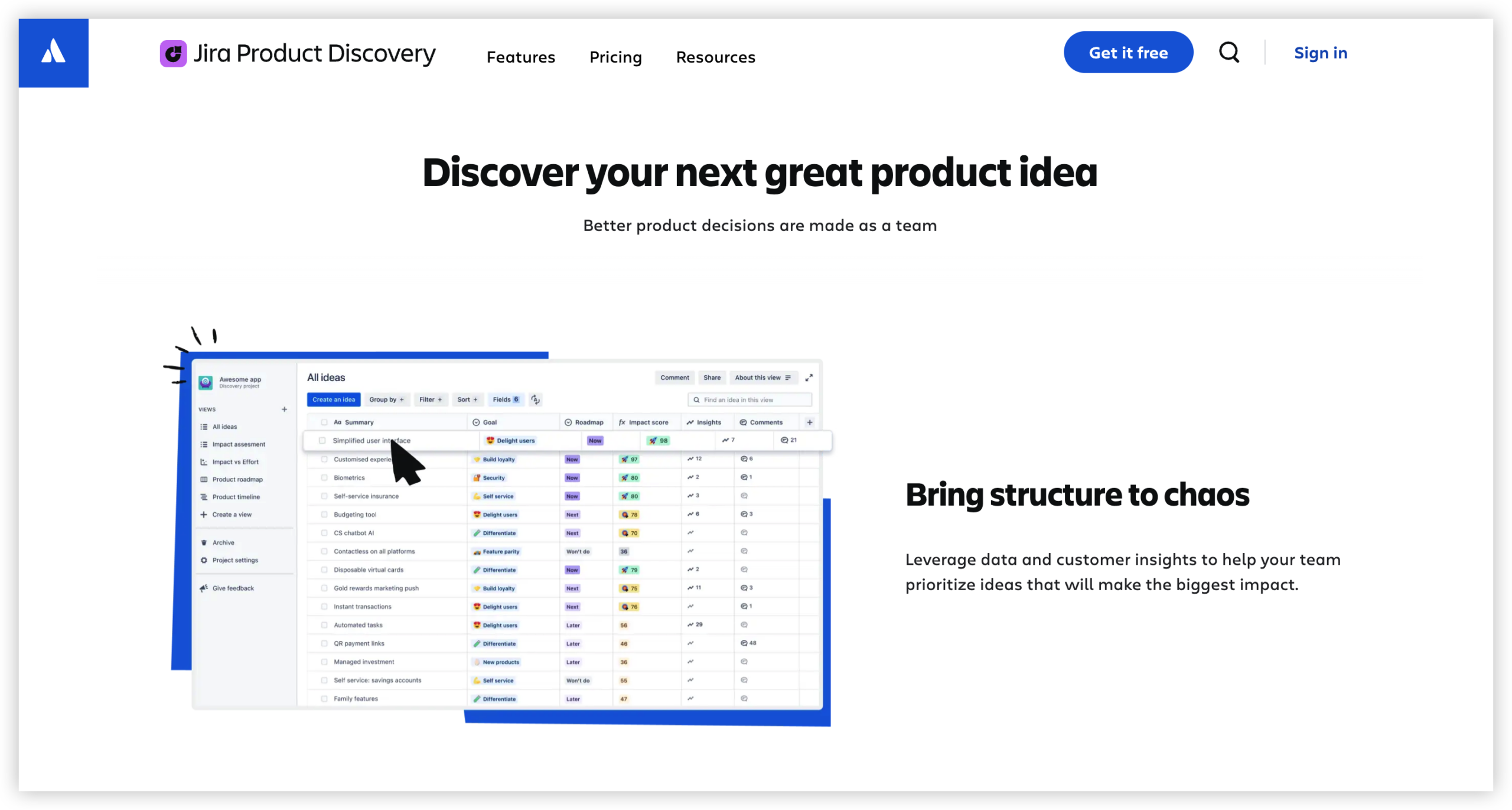
What the workflow helps you manage
- Ideas: Capture product opportunities, problems, and potential solutions in one organized space.
- Insights: Add customer feedback, research findings, or business context that helps explain why an idea matters.
- Prioritization: Use fields and scoring approaches to compare opportunities against agreed criteria.
- Roadmaps: Arrange selected ideas into views that communicate planned direction and timing.
- Delivery connections: Link product ideas with Jira work so teams can follow an opportunity into development.
Here's why: discovery and delivery answer different questions. Discovery asks which problem deserves attention and why. Delivery focuses on planning and completing the work that supports a chosen direction.
How the Jira Product Discovery Workflow Works
The workflow moves from raw opportunities toward informed decisions and coordinated delivery. You can adapt the sequence, but a practical version has five stages.
- Capture an opportunity. Add a customer problem, market opportunity, or internal improvement idea. Keep the initial description brief enough for teammates to understand.
- Add supporting context. Record relevant feedback, research observations, or business considerations. Explain what is known and what still needs validation.
- Compare ideas. Agree on criteria such as customer impact, strategic fit, confidence, and effort. Use those criteria to support discussion rather than replace judgment.
- Shape a roadmap. Present selected opportunities in a view that suits the audience. A product team may need detailed priorities, while executives may need a clearer picture of direction.
- Connect selected work to delivery. Link an approved idea to Jira work, then keep the rationale visible as delivery progresses.
For example, a billing team might capture a recurring complaint about confusing renewal dates. Research reveals that customers misunderstand the renewal message, so the team compares a clearer notice with a full billing-page redesign. The smaller change may rank higher because it addresses the problem with less effort.
The best part? The team can preserve the reasoning behind that choice, instead of passing engineering a bare task title.
How Ideas Become Priorities
Prioritization works best when a team agrees on what it values before ranking individual ideas. Without shared criteria, a score can make subjective preferences look more precise than they are.
Choose criteria that reflect your strategy
Start with a short list. For example, a subscription product team might assess customer impact, strategic alignment, confidence in the evidence, and estimated effort. A compliance-focused team may give risk reduction more weight.
Use definitions that make each criterion understandable. If “impact” means potential reduction in support calls, explain that. If “confidence” reflects the strength of customer research, state how the team will judge it.
Use scores to guide discussion
A scoring model can help reveal which ideas deserve another look. Imagine one opportunity with high customer impact but weak evidence, and another with moderate impact supported by repeated customer reports. The scores highlight a useful question: should the team test the first idea or prioritize the second?
Let me explain: prioritization is a decision process, not a promise that the highest score must win. Teams should examine assumptions, constraints, and strategic timing before committing.
Keep the rationale visible
When an idea moves up or down the list, record the reason. A short note such as “paused until onboarding research is complete” gives teammates more context than a changed ranking alone.
This history also helps during planning conversations. If a stakeholder asks why an idea is not scheduled, you can explain the decision and what would need to change.
Roadmaps, Stakeholders, and Delivery Connections
A roadmap communicates direction and trade-offs. It should help people understand what the team is exploring or prioritizing without implying that every item is a fixed delivery commitment.
Build views for the audience
Product managers may need a working view with detailed fields, open questions, and changing priorities. Leadership may need a concise view grouped by product theme or intended outcome.
For example, a team could organize opportunities around “reduce setup time,” “improve account security,” and “support larger customers.” That tells a clearer story than a long list of unrelated feature requests.
Set expectations around timing
Roadmap dates can be useful, but they can also create expectations the team cannot control. Use time ranges or planning horizons when delivery timing remains uncertain, and explain what the roadmap represents.
You might be wondering: should every idea appear on a public roadmap? Usually, no. Keep exploratory opportunities separate from planned work, especially when the team has not validated the problem or estimated the effort.
Connect discovery to execution
When an idea is ready for delivery planning, connect it to the relevant Jira work. Include the problem, expected outcome, and evidence that informed the decision, so delivery teammates understand more than the requested feature.
This connection can reduce repeated explanations during handoffs. It also gives product managers a way to check whether delivery remains aligned with the intended outcome.
Ways to Make the Workflow More Useful
The platform can organize product discovery, but the quality of the workflow depends on team habits. A few practical choices can keep the process useful without turning it into administration.
Give every idea a clear problem statement
Describe who experiences the problem and what happens. “Customers cannot tell when a trial ends” is easier to evaluate than “improve subscription notifications.” The first statement identifies an experience that the team can investigate.
Separate observations from assumptions
Mark what the team has heard or observed, then distinguish it from what the team believes. For example, “five interviewees missed the renewal date” is an observation; “a new email will solve the issue” is a hypothesis.
Review priorities on a reliable schedule
Hold a short review every week or two, depending on how quickly your product changes. Revisit new evidence, stalled ideas, and shifting constraints. A monthly review can work for a slower-moving product, but urgent opportunities may need faster attention.
Limit the number of active opportunities
Keeping every idea in active consideration makes prioritization harder. Archive, defer, or close opportunities that no longer fit. A focused set of active ideas gives the team room to investigate the strongest options properly.
Here's the practical test: if teammates cannot explain why an idea is still active, it may need a clearer next step or a different status.
Product Discovery and Delivery with ONES.com
ONES.com combines project management and knowledge management in one platform. ONES Project supports planning and delivery as a Jira alternative, while ONES Wiki provides knowledge management as a Confluence alternative; the products are sold separately.

Core capabilities
- Scattered product decisions: ONES Project brings project work into a structured workspace, helping teams keep planning and execution connected.
- Workflows that do not match team processes: Custom workflows and fields let teams represent their own stages, decision details, and handoffs.
- Limited visibility into progress: Built-in reporting helps teams review status and progress without relying on a collection of add-ons.
- Unclear sprint planning: Sprint management gives delivery teams a way to organize planned work and review it during execution.
- Repeated manual coordination: Automation can handle selected routine actions, reducing repetitive administration.
- Disconnected team knowledge: ONES Wiki gives teams a knowledge management option for organizing guidance and product context separately from project planning.
- Dependence on multiple plugins: Native capabilities can reduce the need to assemble workflows from numerous extensions.
- Deployment restrictions: Teams can choose Cloud, On-Premise, Private Cloud, or Air-gapped deployment to fit their operating environment.
ONES Project supports Jira-compatible workflows, while self-hosted deployments offer feature parity with the cloud version. Teams can use custom workflows, fields, reporting, sprint management, and automation within the platform.
Application scenarios
A product team moving from Jira: A team can configure workflows and fields around its planning and delivery process, then use sprint management and reporting to follow execution. This can make sense when Jira-style workflows are familiar but the team wants to reduce plugin dependence.
A team with restricted network requirements: An organization that cannot use a public cloud service can consider On-Premise, Private Cloud, or Air-gapped deployment. Its deployment choice can support operational requirements while retaining feature parity with the cloud version.
A team organizing project work and internal guidance: A team can use ONES Project for project management and ONES Wiki for knowledge management. They are separate products, so the team can select the part that fits its needs.
ONES.com offers a free plan for up to 30 seats. You can evaluate whether its project management or knowledge management capabilities match your workflow before deciding how to organize work across the platform.
Common Challenges in Product Discovery
Ideas arrive without enough context
Problem: A request such as “add a dashboard” does not explain who needs it or what problem it solves.
Solution: Ask for the affected customer, the situation, and the expected improvement. Treat an incomplete request as an opportunity to investigate rather than a ready-made feature specification.
Scoring creates false confidence
Problem: Teams may treat a numeric score as objective, even when criteria are vague or estimates are uncertain.
Solution: Define scoring criteria, note uncertainty, and discuss surprising results. Use the score to focus the conversation, then document the reasoning behind the decision.
Roadmaps are mistaken for fixed promises
Problem: Stakeholders may interpret an exploratory item as a committed release, creating frustration when plans change.
Solution: Label discovery, planned, and committed work clearly. Explain how timing is represented, and update the roadmap when priorities or evidence shift.
Discovery gets disconnected from delivery
Problem: Developers receive implementation requests without knowing the original customer problem or intended outcome.
Solution: Carry the rationale into delivery planning. Link the selected idea to Jira work and keep the problem statement and relevant evidence available to the team.
FAQs About Jira Product Discovery
Is Jira Product Discovery the same as Jira Software?
No. Jira Product Discovery is designed to organize product ideas, prioritization, and roadmaps. Jira Software supports planning and tracking development work. Teams can connect selected discovery ideas to Jira delivery work, so product decisions and implementation can stay connected without treating both products as identical.
Who typically uses Jira Product Discovery?
Product managers commonly use it to capture opportunities, compare priorities, and communicate roadmaps. Designers, researchers, engineers, and stakeholders may also contribute context or review decisions. The best setup depends on who needs to shape product direction and who needs visibility into the work.
Does every idea need a score?
No. A scoring framework can help when a team has many opportunities to compare, but scoring every suggestion can add unnecessary overhead. Use criteria when they clarify trade-offs. For a small decision with an obvious next step, a short discussion and recorded rationale may be enough.
How does an idea move into delivery?
The team reviews the opportunity, checks its context, and decides whether it is ready for delivery planning. It can then connect the selected idea to Jira work. Carrying the problem statement and expected outcome forward helps delivery teammates understand why the work matters.
Should a roadmap show exact release dates?
Use exact dates when the team has enough confidence and the audience needs them. When timing is uncertain, a broader planning horizon can communicate direction with less risk of implying a firm commitment. Make the meaning of roadmap dates clear, and revisit them as evidence and capacity change.
Conclusion
Jira Product Discovery helps product teams organize ideas, compare opportunities, shape roadmaps, and connect selected decisions to Jira delivery work. A useful workflow starts with clear problems, adds relevant context, and makes priorities understandable.
But here's the truth: software alone cannot decide what deserves attention. Your team needs agreed criteria, regular review, and a clear account of why priorities change. Keep discovery distinct from delivery, then connect them when an opportunity is ready to move forward.
That approach can turn a noisy stream of requests into a more deliberate product workflow. Whether you use Jira Product Discovery or another project management setup, keep the customer problem and the reasoning behind each decision visible.