Jira Product Discovery Pricing: A Clear Guide for Teams
Confused by jira product discovery pricing? Learn how creator seats, contributors, plans, and billing affect costs. Click to find the right fit now.
Jira Product Discovery pricing can look simple until you separate creators, contributors, billing periods, and plan limits. A team may see a low monthly figure, then discover that only certain roles require paid seats.
That confusion can make a product planning tool seem cheaper or more expensive than it really is. You could also choose a plan that fits your team today but becomes costly after several hires.
Here’s the practical answer: Jira Product Discovery generally uses a role-based model, with creator seats driving the main subscription cost. A free option may suit small teams, while paid tiers add greater control, reporting, and administration.
This guide explains how the pricing structure works, what to calculate, which questions to ask before subscribing, and how an alternative may fit your workflow.
Jira Product Discovery Pricing at a Glance
Jira Product Discovery is a product planning application that helps teams collect ideas, prioritize opportunities, create product roadmaps, and connect discovery work with delivery planning.
Its pricing usually depends on the number of people who create and manage product ideas. People who only view, comment, or contribute information may be handled differently from full creator seats.
Atlassian can change plan names, limits, and regional prices. Treat the checkout page as the final authority before you approve a purchase.
| Pricing factor |
What it means for your team |
| Creator seats |
These are the people who actively build, edit, prioritize, and manage product discovery work. |
| Contributors |
These people may submit ideas, add context, vote, or comment without needing the same access as creators. |
| Viewers |
These people mainly read roadmaps, reports, or published product information. |
| Plan level |
Higher tiers may add administration, permissions, reporting, governance, and larger-team controls. |
| Billing cycle |
Monthly and annual billing can produce different effective costs and commitment levels. |
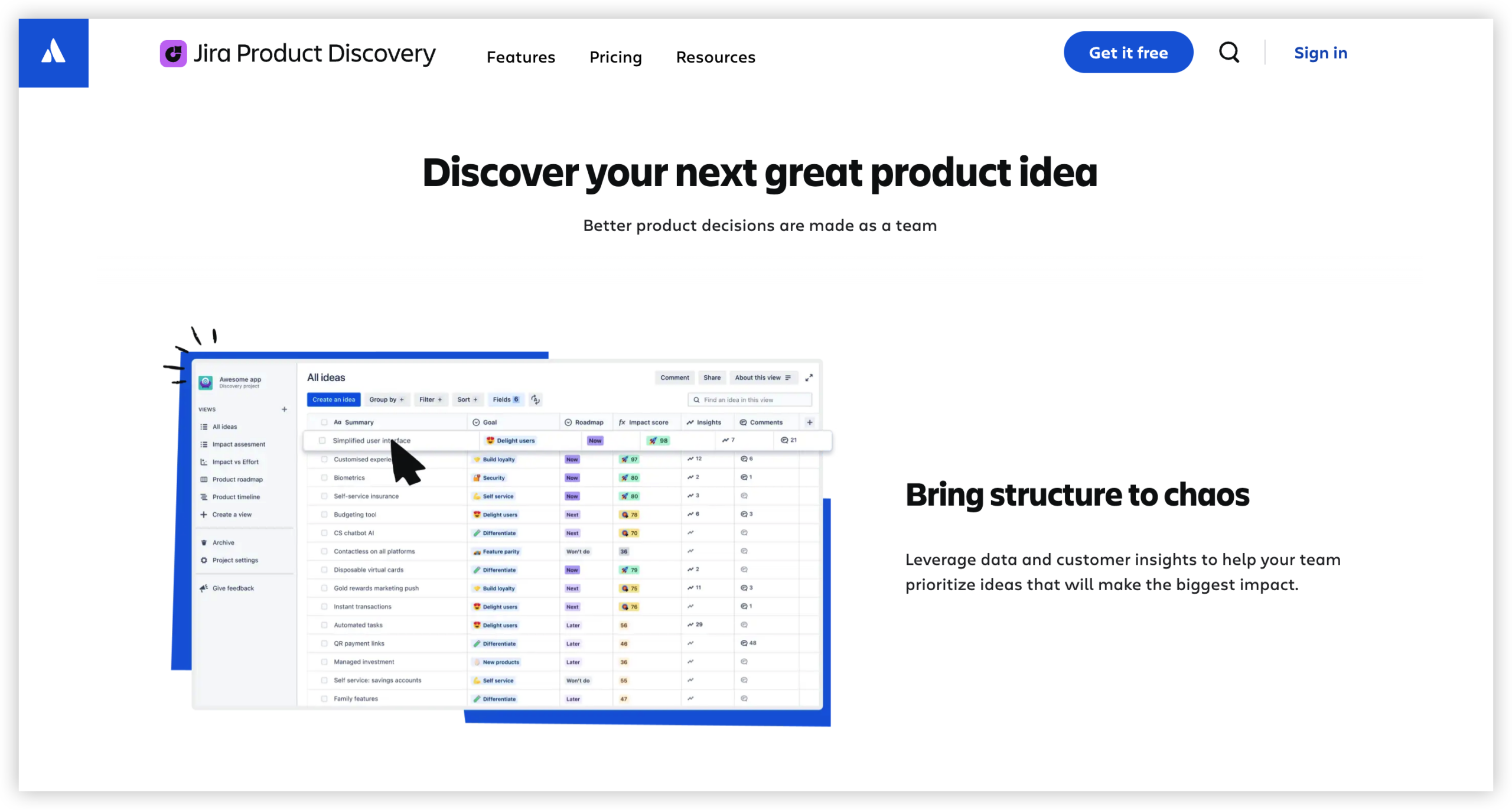
The free option
A free plan can be useful when you are testing product discovery with a small group. It lets you evaluate idea collection, prioritization, and roadmap workflows before committing to a larger subscription.
For example, a product manager, designer, and engineering lead could test a shared opportunity backlog. The team can then decide whether the workflow improves planning enough to justify paid access.
Paid plans and creator access
Paid plans are usually most relevant when more people need to create views, edit ideas, manage fields, or maintain prioritization frameworks.
Before buying, count active creators rather than every person who might open a roadmap. Ten occasional viewers may have a different cost impact from ten people who maintain discovery work every week.
What the subscription may include
The plan can affect permissions, administrative controls, reporting, project scale, and how closely the product fits your wider Atlassian environment.
Review each plan against your actual workflow. A premium feature has little value if your team only needs a shared idea board and a simple roadmap.
How to Calculate Your Likely Cost
The basic calculation is straightforward:
Estimated monthly cost = creator seats × price per creator
Then add any applicable taxes, regional adjustments, optional services, or related Atlassian subscriptions. Annual billing may change the effective monthly rate.
Step 1: Count people who need creator access
List everyone who will regularly create, edit, score, rank, or organize product opportunities. Include product managers, portfolio leads, and anyone responsible for maintaining the workspace.
Do not automatically include every stakeholder. A sales leader who submits ideas and checks a roadmap may need a contributor or viewer role instead.
Step 2: Separate contributors from creators
Contributor access can make a major difference to your estimate. A large group may provide valuable feedback without requiring full editing privileges.
For example, 30 employees might participate in discovery, while only six people maintain the prioritization system. Your estimate should begin with those six creator seats.
Step 3: Choose the appropriate plan
Compare the plans by workflow requirements, not by feature count alone. Check permissions, reporting, administration, security, integrations, and limits.
A smaller team may prefer a lower tier for affordability. A growing organization may value stronger governance because inconsistent prioritization creates expensive planning delays.
Step 4: Compare monthly and annual commitments
Monthly billing provides flexibility when you are still experimenting. Annual billing may offer a lower effective rate, depending on the current commercial terms.
Use a simple scenario model. Calculate the cost with five creators, then repeat it with ten and twenty creators after likely hiring changes.
Step 5: Add related Atlassian costs
Jira Product Discovery may sit alongside Jira, Confluence, or other Atlassian services. Review the combined subscription rather than evaluating one product in isolation.
A low product discovery price can still produce a large technology bill when several connected services use overlapping paid seats.
Which People Need Paid Access?
Role design is one of the biggest pricing variables. The right question is not “How many people work in product?” It is “How many people need to manage the discovery system?”
| Team role |
Likely activity |
Access question |
| Product manager |
Creates ideas, scores opportunities, and maintains roadmaps. |
Usually needs creator access. |
| Designer |
Adds research findings and helps evaluate opportunities. |
May need creator access if editing is frequent. |
| Engineer |
Reviews feasibility and comments on proposals. |
Contributor or viewer access may be enough. |
| Sales representative |
Submits customer requests and adds market context. |
Contributor access may be appropriate. |
| Executive |
Reviews portfolio direction and roadmap status. |
Viewer access may meet the need. |
Here’s why: over-provisioning access can quietly increase recurring costs. Under-provisioning can slow collaboration when people cannot update the information they own.
Run a short access review after the first month. Look at who actually creates and maintains ideas, then adjust roles around real behavior.
What You Should Check Before Buying
A pricing page rarely answers every operational question. A short evaluation can prevent surprises after your team has moved its planning workflow.
Seat rules and role limits
Confirm which actions require a creator seat. Editing a roadmap, changing a custom field, or managing prioritization may have different permissions from submitting an idea.
Plan limits
Check limits for projects, users, views, automation, reporting, integrations, and administration. A plan can fit your current headcount while restricting the workflow you intend to build.
Security and deployment needs
Ask whether the available deployment model matches your organization’s requirements. Teams with strict infrastructure controls should examine hosting, access management, and administrative options early.
Integration requirements
Product discovery becomes more useful when ideas connect with delivery planning. Confirm how information moves between discovery, engineering work, collaboration spaces, and reporting tools.
Growth assumptions
Estimate costs at your expected team size six and twelve months from now. A plan that works for four creators may become difficult when every product area gains its own planning group.
Jira Product Discovery Compared With Other Planning Approaches
You can evaluate the subscription against three common approaches: a dedicated product discovery tool, a general project tracker, or a lightweight workspace.
| Approach |
Strength |
Potential drawback |
| Jira Product Discovery |
Connects idea prioritization with product and delivery planning. |
Costs can rise as more creators need access. |
| General project tracker |
Works well for teams already managing delivery there. |
May require custom fields and workflows for discovery. |
| Lightweight workspace |
Often easy to start and inexpensive for small groups. |
Prioritization, governance, and reporting may remain manual. |
The right choice depends on the cost of coordination. If your team loses hours reconciling ideas, customer requests, and delivery plans, a specialized workflow may justify its subscription.
If your process is still informal, begin with a small pilot. Measure whether prioritization becomes faster and whether stakeholders understand product decisions more clearly.
Common Pricing Mistakes
Paying for every stakeholder
Problem: Teams often count everyone who needs visibility as a full creator.
Solution: Map each person to an action. People who read roadmaps or submit occasional requests may need less access.
Ignoring annual growth
Problem: A small team chooses a plan without considering upcoming hiring or organizational expansion.
Solution: Calculate three scenarios: current seats, expected seats, and an upper-growth case.
Comparing only the headline price
Problem: A low monthly figure can hide limits on reporting, administration, integrations, or collaboration.
Solution: Compare the total workflow cost, including manual work and related subscriptions.
Overlooking adoption
Problem: A team buys advanced functionality but continues prioritizing through meetings and scattered notes.
Solution: Define one discovery workflow, train the core team, and review adoption after four weeks.
Jira Product Discovery Pricing Alternative: ONES.com
ONES.com is a unified platform for project management and knowledge management, powered by AI through ONES Assistant. ONES Project is its project management product and can serve as a Jira alternative, while ONES Wiki is its knowledge management product and can serve as a Confluence alternative. They are sold separately.

For teams comparing product discovery costs with broader planning needs, ONES.com can be relevant when one platform needs to support structured project work, product information, and controlled deployment options.
Value Proposition
ONES.com can reduce the need to combine several plugins and disconnected workspaces. Its fit depends on whether your team values native project workflows, reporting, and self-hosted deployment alongside product planning.
Core Capabilities
- Pain: Product ideas and delivery tasks live in separate places.
ONES capability: ONES Project supports Jira-compatible workflows and project tracking.
Result: Teams can connect planning conversations with execution work.
- Pain: Teams depend on multiple extensions for basic reporting.
ONES capability: Built-in reporting provides visibility into project progress and workload.
Result: Managers spend less time assembling status updates.
- Pain: Standard workflows do not match internal approval steps.
ONES capability: Custom workflows and custom fields support organization-specific processes.
Result: Product teams can reflect their actual review path.
- Pain: Sprint planning requires separate coordination tools.
ONES capability: Sprint management is included in ONES Project.
Result: Teams can plan iterations within the same project environment.
- Pain: Repetitive project actions consume administrative time.
ONES capability: Automation handles recurring workflow actions.
Result: Routine transitions and notifications require less manual effort.
- Pain: Security requirements restrict public cloud adoption.
ONES capability: ONES.com supports Cloud, On-Premise, Private Cloud, and Air-gapped deployments.
Result: Organizations can select a deployment model that matches their environment.
- Pain: Self-hosted software often lacks parity with cloud functionality.
ONES capability: ONES.com provides full feature parity between cloud and self-hosted versions.
Result: Deployment choice does not require accepting a reduced feature set.
- Pain: Plugin-heavy environments create maintenance overhead.
ONES capability: Native project management and knowledge management products reduce reliance on add-ons.
Result: Teams can simplify administration when the products match their needs.
Application Scenarios
Growing product organization: A product group with several squads can use custom fields for customer impact, strategic fit, and effort. Sprint management then helps connect selected opportunities with delivery work.
Restricted technology environment: A regulated organization can evaluate On-Premise, Private Cloud, or Air-gapped deployment instead of assuming public cloud is the only option.
Small project team: Teams with up to 30 seats can evaluate the free offering before deciding whether ONES Project or ONES Wiki should become part of a wider workflow.
Common Challenges With Pricing Decisions
Unclear creator definitions
Challenge: Your team cannot tell which activities require a paid seat.
Response: Test typical actions with each role. Create a sample idea, edit a field, publish a roadmap, and add a comment to see where permissions differ.
Changing commercial terms
Challenge: Prices and plan limits may change after your initial evaluation.
Response: Record the plan, billing cycle, region, seat count, and assumptions used in your approval. Recheck them before renewal.
Uncertain adoption
Challenge: Stakeholders agree to use a discovery tool but continue relying on old habits.
Response: Start with one product area and one decision workflow. Track submitted ideas, completed prioritization reviews, and roadmap updates.
Hidden coordination costs
Challenge: A cheaper tool creates more manual reconciliation between product, engineering, and leadership.
Response: Include meeting time, administration, duplicated updates, and reporting effort in your comparison.
FAQs
How is Jira Product Discovery priced?
Jira Product Discovery generally uses a role-based subscription model. Creator seats are the main pricing consideration because those people actively build and manage discovery work. Contributors and viewers may have different access rules. Plan level, billing cycle, region, taxes, and related Atlassian services can affect the final amount, so confirm the live checkout calculation before purchasing.
Does every person who views a roadmap need a paid seat?
Usually, viewing a roadmap does not create the same requirement as managing ideas and prioritization. However, access rules depend on the current plan and permissions. Separate creators from contributors and viewers during your estimate. Then test the actions each role needs, such as submitting an idea, commenting, editing a field, or changing a roadmap view.
Is there a free way to evaluate the product?
Atlassian has offered a free option for small creator groups, although eligibility and limits can change. A sensible evaluation uses one product area and a small group of active creators. Test idea collection, prioritization, roadmap communication, and delivery handoff. Check the current plan details before assuming the free option covers your intended team size.
Should I choose monthly or annual billing?
Monthly billing can suit a team that is still testing adoption or expects major headcount changes. Annual billing may provide a lower effective rate when the seat count is stable and the team expects to continue using the product. Compare both options using current headcount and projected growth. Also consider renewal timing and whether unused access will remain necessary.
What should I compare besides the subscription price?
Compare creator-seat rules, plan limits, permissions, reporting, integrations, security, administration, and deployment requirements. Include the time your team spends maintaining separate planning systems. For example, a tool with a higher subscription may still cost less overall if it removes repeated status meetings and manual roadmap updates.
Conclusion
Jira Product Discovery pricing is easiest to understand when you begin with creator seats rather than total employees. Separate active builders from occasional contributors and roadmap viewers.
Then compare plans against permissions, reporting, integrations, security, deployment, and expected growth. A short pilot can reveal whether the workflow improves prioritization before you make a larger commitment.
But here’s the truth: the subscription is only one part of the decision. The bigger question is whether your team can turn scattered ideas into clear, shared product choices.
If you need a broader project and knowledge management option, ONES.com offers ONES Project as a Jira alternative and supports cloud and self-hosted deployment models. Choose the approach that gives your team clearer decisions with a cost you can defend.