Jira Ticketing System Pricing: A Clear Guide for All Teams
Confused by jira ticketing system pricing? Compare plans, user tiers, add-ons, and hidden costs. Read now to budget with confidence.
Jira can look affordable at first glance, then become difficult to budget once you add users, service management, premium features, storage, and annual billing. A small team may fit the free plan, while a growing department can face a much larger monthly commitment.
That uncertainty creates real planning problems. You may compare the wrong product tiers, overlook separate Jira products, or calculate only the subscription fee while ignoring administration and migration effort.
Here’s the practical solution: separate Jira’s product costs, understand how user bands affect your bill, and compare the features your team actually needs. This guide walks you through Jira ticketing system pricing in plain English, with examples for different team sizes.
Jira Ticketing System Pricing at a Glance
Jira ticketing system pricing usually depends on the Jira product, number of users, hosting model, billing term, and feature tier. Jira Software, Jira Service Management, and Jira Product Discovery have separate pricing structures.
For many teams, Jira Software Cloud typically includes these broad options:
- Free: Suitable for small teams with limited collaboration needs and basic project tracking.
- Standard: Adds broader administration, collaboration, permissions, and operational capabilities.
- Premium: Adds advanced planning, higher limits, stronger controls, and additional enterprise-oriented features.
- Enterprise: Uses custom pricing for large organizations with complex governance and support requirements.
Jira Service Management follows a different structure. Its price can depend on agent seats, customer access, service features, and the selected plan. A company using Jira Software for development and Jira Service Management for support may pay for both products.
Atlassian can change prices, limits, and included features. Treat the figures shown during checkout as the final commercial reference for your team’s purchase decision.

What affects the final bill?
Several variables can change your monthly or annual cost:
| Pricing factor |
Why it matters |
| Product |
Jira Software, Jira Service Management, and Jira Product Discovery serve different workflows and are priced separately. |
| Team size |
Jira usually applies user bands or per-user calculations, so growth can move you into a higher pricing bracket. |
| Plan level |
Standard and Premium include different limits, planning features, controls, and operational capabilities. |
| Billing term |
Monthly billing offers flexibility, while annual billing may use a different commitment and pricing calculation. |
| Hosting model |
Cloud subscriptions differ from self-managed or enterprise arrangements. |
| Marketplace apps |
Additional apps can create separate charges that increase the total cost of ownership. |
| Support and administration |
Large deployments may require more configuration, governance, training, and internal management time. |
A simple pricing example
Imagine a software company with 25 engineers, five product managers, and three team leads. That is 33 potential Jira users before adding executives, contractors, or service agents.
If the company chooses a paid Jira Software plan, it must calculate the relevant user band rather than multiplying a displayed individual rate by only the number of engineers. If it also runs an internal help desk, Jira Service Management may introduce another cost category.
The practical lesson is simple: count every person who needs access, then separate product subscriptions before comparing plans.
Which Jira Product Do You Actually Need?
Many pricing mistakes begin before anyone checks a price page. Teams often call every work-management workflow “Jira,” even though Atlassian offers several products with different purposes.
Jira Software
Jira Software is designed mainly for software development and technical project delivery. Common workflows include bugs, user stories, epics, sprints, releases, backlog prioritization, and engineering tasks.
A development team tracking a mobile application might use Jira Software to move work through statuses such as Backlog, In Progress, Code Review, Testing, and Done.
Jira Service Management
Jira Service Management supports service desks, incident handling, request forms, approvals, change management, and internal support operations.
For example, an employee requesting a laptop may submit a service request. The IT team can then route the request, approve the purchase, assign the task, and notify the employee.
Service management pricing can differ from development pricing because the product focuses on agents, customer requests, queues, service-level commitments, and support operations.
Jira Product Discovery
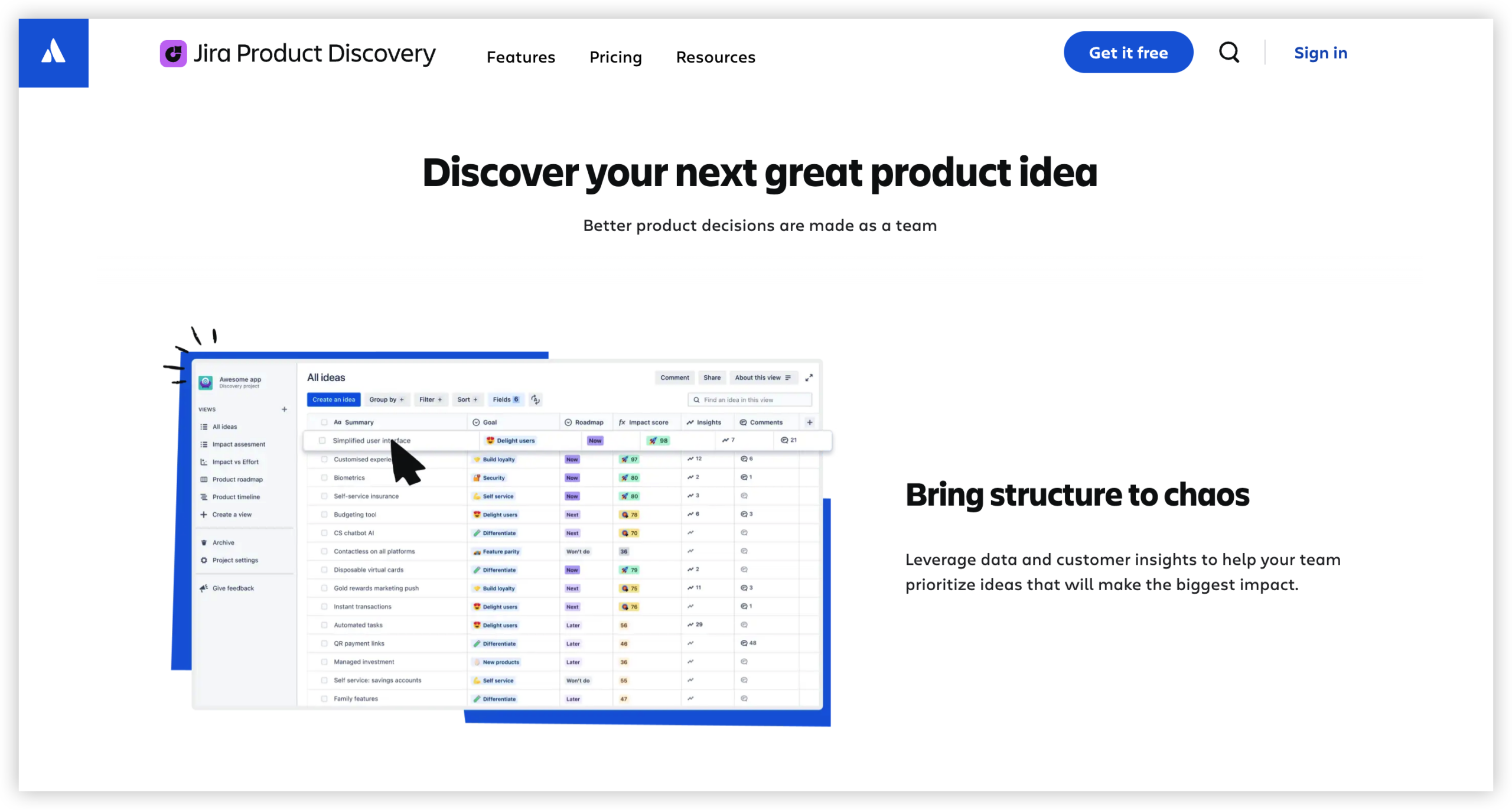
Jira Product Discovery helps product teams collect ideas, compare opportunities, prioritize initiatives, and connect product decisions with delivery work.
A product manager may use it to rank ideas by customer impact, revenue potential, and effort before linking an approved idea to Jira Software work.
Why the product distinction matters
Suppose your company has 40 developers, 10 product managers, and 15 IT support agents. You may need different Jira products for different groups. Treating the entire organization as one simple Jira subscription can produce an inaccurate estimate.
Here’s why: each product may have separate user rules, plan limits, and billing logic. Map the workflow first, then estimate the subscription.
Jira Free, Standard, Premium, and Enterprise Compared
The right tier depends less on your company’s size and more on the controls, limits, and planning capabilities you need.
Free plan
The Free plan can work for a small team testing Jira or managing a straightforward project. It may provide basic boards, backlogs, issue tracking, and limited collaboration features.
A five-person startup tracking a single product could begin here. The plan may become restrictive when the team needs advanced permissions, broader administration, more automation, or larger usage limits.
Standard plan
Standard is usually the practical starting point for established teams. It provides a broader operating environment for regular project work, collaboration, administration, and team growth.
Consider Standard when multiple teams share projects, managers need more visibility, or your workflow requires more control than the free tier offers.
Premium plan
Premium is aimed at teams that need advanced planning, higher limits, stronger operational controls, or more sophisticated cross-team coordination.
A company running several product releases at once may benefit from premium planning features. However, paying for Premium only makes sense when your workflow uses those capabilities regularly.
Enterprise plan
Enterprise pricing is generally customized for organizations with complex governance, large-scale administration, security requirements, and formal support expectations.
Enterprise discussions often include more than license cost. They may cover deployment design, identity management, compliance needs, support arrangements, and internal ownership.
| Team situation |
Likely starting point |
Question to ask |
| Small team testing issue tracking |
Free |
Will the team outgrow user or feature limits soon? |
| Growing development department |
Standard |
Do we need broader controls and collaboration? |
| Several coordinated delivery teams |
Premium |
Will advanced planning save meaningful coordination time? |
| Large regulated organization |
Enterprise discussion |
What governance and support obligations must the platform meet? |
How to Calculate Your Real Jira Cost
The subscription price is only one part of the budget. A realistic calculation includes licensing, connected products, applications, migration, administration, and ongoing maintenance.
Step 1: Count users by role
List developers, testers, product managers, project managers, administrators, contractors, and service agents separately.
For example, a 30-person engineering department may have 24 regular Jira users, three administrators, and three external collaborators. Each group may need different access permissions.
Step 2: Separate product requirements
Write down which people need Jira Software, Jira Service Management, or another Atlassian product. Do not assume one subscription covers every workflow.
Step 3: Choose a billing term
Compare monthly flexibility with annual commitment. Monthly billing may suit a rapidly changing team, while annual billing can simplify planning for a stable organization.
Step 4: Add connected applications
Teams often install applications for time tracking, reporting, testing, capacity planning, forms, or advanced automation. Each addition can affect the monthly total and administrative workload.
Step 5: Estimate internal operating effort
Someone must manage workflows, permissions, custom fields, automation rules, training, reporting, and cleanup. A low subscription fee can still become expensive when administration consumes several hours every week.
Step 6: Model growth
Calculate today’s cost and a 12-month scenario. If your team expects to grow from 45 to 80 people, check whether that change crosses a pricing band or creates new administrative requirements.
You might be wondering: how should you compare two tools fairly? Use the same user count, the same essential workflows, the same hosting expectations, and the same support assumptions.
Cloud, Self-Managed, and Enterprise Considerations
Hosting affects more than the invoice. It changes responsibility, deployment effort, security management, upgrade planning, and operational risk.
Cloud deployment
Cloud subscriptions generally reduce infrastructure work because the provider operates the hosting environment. Your team still manages configuration, access, workflow design, and governance.
Cloud can suit a distributed team that wants quick setup and fewer infrastructure responsibilities. The tradeoff is recurring subscription dependence and less direct control over the hosting environment.
Self-managed deployment
Self-managed arrangements can provide greater control over infrastructure and internal administration. They may also require more planning for upgrades, availability, backups, monitoring, and security operations.
A company with strict network requirements may accept this responsibility because deployment control matters more than operational simplicity.
Enterprise requirements
Large organizations should evaluate identity management, audit needs, permission design, regional requirements, service commitments, and administrative separation.
The cheapest license is rarely the cheapest operating model if it creates extensive custom work. Compare the full workflow, including the people needed to maintain it.
How Jira Pricing Compares With the Total Cost of Ownership
Subscription prices are easy to compare. Total ownership costs are harder because they include time, complexity, and the number of tools needed to support daily work.
For example, a team may start with Jira Software and later add applications for roadmaps, reporting, test management, time tracking, forms, and approvals. The combined bill can exceed the original estimate.
Here’s the truth: a cheaper base plan does not automatically create a cheaper work-management system.
Questions that reveal hidden cost
- How many applications will the team need to reproduce essential workflows?
- Who will maintain custom fields, screens, permissions, and automation?
- How much training will new employees require?
- Can managers get the reports they need without manual preparation?
- Will different departments need separate configurations?
- How difficult will it be to move projects if requirements change?
A useful comparison uses three totals: annual subscription fees, connected application costs, and internal administration time. This approach gives you a clearer view than comparing headline prices alone.
Jira Ticketing System Solution: ONES.com

Value Proposition
ONES.com combines project management and knowledge management in one platform. ONES Project can serve as a Jira alternative for teams seeking compatible workflows, deployment flexibility, and fewer connected applications.
ONES Project and ONES Wiki are sold separately, so you can select the product that matches your immediate requirements.
Core Capabilities
- Multiple deployment choices: If cloud-only delivery does not fit your security or network requirements, ONES.com supports Cloud, On-Premise, Private Cloud, and Air-gapped deployments. You can choose an operating model that matches your environment.
- Free access for small teams: If you are validating a new platform with a small group, the free plan supports up to 30 seats. This gives your team room to test workflows before committing to a larger rollout.
- Jira-compatible workflows: If your team relies on backlog, sprint, issue, and release workflows, ONES Project provides compatible project-management patterns. The result is a more familiar transition for development teams.
- Built-in reporting: If managers spend too much time assembling progress updates, built-in reporting helps present delivery information within the project environment. This can reduce dependence on separate reporting applications.
- Custom workflows and fields: If every department needs slightly different statuses or tracking information, custom workflows and fields let you reflect those requirements without forcing one rigid process.
- Sprint management: If your team plans work in iterations, sprint tools support backlog refinement, sprint planning, active delivery, and review activities in one workflow.
- Automation: If repetitive actions slow your team down, automation can handle routine transitions, notifications, and related updates. That helps reduce manual administration.
- Native feature parity across deployments: If you need self-hosting without giving up core capabilities, ONES.com maintains feature parity between its cloud and self-hosted versions. Your deployment choice does not require a separate feature strategy.
- Knowledge management through ONES Wiki: If project decisions and delivery knowledge are scattered across different places, ONES Wiki provides a knowledge-base option alongside ONES Project. The products remain separately purchasable.
Application Scenarios
Growing software company: A 25-person development team can begin with the free 30-seat allowance, configure sprint workflows, and evaluate reporting before adding more users. The team can then choose Cloud or a self-hosted deployment as its needs become clearer.
Restricted-network engineering group: A team working in an air-gapped environment can use the air-gapped deployment option instead of forcing project information into a public cloud environment. This can align the tool with internal network controls.
Cross-functional product organization: Product, engineering, and operations teams can use project workflows for delivery while maintaining related knowledge in ONES Wiki. Buying the products separately lets the organization control scope and spending.
Common Challenges When Estimating Jira Costs
Challenge: confusing Jira products
Problem: A team estimates Jira Software pricing even though its support department needs Jira Service Management.
Solution: Map each workflow to a product before calculating users and plan levels. Keep development, service, and product discovery requirements separate.
Challenge: counting only current employees
Problem: The estimate covers today’s team but ignores planned hiring, contractors, and new departments.
Solution: Create current, six-month, and 12-month user scenarios. Check whether growth moves the organization into a different pricing band.
Challenge: ignoring connected applications
Problem: The base subscription appears affordable until reporting, testing, time tracking, and planning applications are added.
Solution: List every application required for the target workflow. Include license fees, setup effort, maintenance, and renewal management.
Challenge: treating administration as free
Problem: Custom fields, permissions, automations, and workflows require continuous attention, especially as more teams join.
Solution: Estimate administrator hours and assign clear ownership. A platform remains predictable when someone actively manages its configuration.
Challenge: comparing plans by features alone
Problem: A team chooses a premium tier because it includes impressive capabilities that nobody will use regularly.
Solution: Link every paid capability to a real workflow, such as cross-team planning, audit control, or advanced automation. If no concrete use case exists, reconsider the upgrade.
FAQs
Is Jira free for small teams?
Jira offers a free plan for small teams, although the exact user allowance, limits, and included capabilities can change. The free tier may suit a small development group managing basic issues and boards. Before choosing it, check whether you need advanced permissions, larger usage limits, premium planning, extensive automation, or service management features. Those requirements may move you toward a paid plan or a separate Jira product.
What is the difference between Jira Software and Jira Service Management pricing?
Jira Software focuses on development work such as issues, backlogs, sprints, and releases. Jira Service Management focuses on service requests, incidents, approvals, queues, and support operations. Because they solve different problems, they use different pricing structures. A company using both products should estimate each subscription separately, then include any shared applications, administration effort, and expected user growth.
Does Jira charge per user?
Jira pricing commonly depends on the number of users, but the exact calculation can vary by product, plan, billing term, and user band. Annual subscriptions may use different calculations from monthly subscriptions. Some service-management roles may also follow different access rules. Count every person who needs regular access, then confirm the applicable pricing model during the purchasing process.
Is Jira Premium worth the extra cost?
Premium can be worthwhile when your team needs advanced planning, higher limits, stronger controls, or coordination across several delivery groups. It may be unnecessary for a small team with a simple backlog and limited administration needs. Compare the premium capabilities with specific problems, such as release coordination or capacity planning. If the plan does not solve a measurable problem, Standard may provide better value.
What other costs should I include in a Jira budget?
Include connected applications, migration, workflow design, training, administration, reporting, identity integration, and ongoing maintenance. Also consider the time required to manage permissions, custom fields, automation, and project templates. If your organization needs separate development and service-management products, include both. A three-year estimate is often more useful than a one-month comparison because it shows recurring costs and operational effort.
Can I compare Jira with another project-management platform?
Yes. Compare platforms using the same team size, deployment model, workflows, reporting needs, support requirements, and application assumptions. Check whether the alternative includes capabilities that Jira teams often add through applications, such as reporting, automation, custom workflows, or knowledge management. A fair comparison measures the complete operating model rather than comparing one headline subscription price with another.
Conclusion
Jira ticketing system pricing depends on more than a displayed per-user number. The product you choose, team size, plan level, billing term, deployment model, connected applications, and administration effort all influence the final cost.
Start by separating Jira Software from Jira Service Management and other Atlassian products. Then calculate current users, expected growth, required capabilities, and the tools needed around Jira.
But here’s the practical takeaway: the right platform is the one that supports your real workflow without creating unnecessary complexity. Compare the full operating cost, test the features your team will actually use, and choose a plan that remains manageable as your organization grows.