Learn Jira in 2026: A Step-by-Step Guide for Jira Beginners
Want to learn Jira without confusion? Follow this step-by-step 2026 guide to master boards, workflows, reports, and automation. Read now!
Jira can feel confusing when every screen introduces a new project, issue type, workflow, field, or permission. You may create a task, lose it in a board, and wonder why the status will not change. That frustration grows when tutorials explain features without showing how real teams use them.
But here’s the truth: you do not need to master every Jira feature at once. You need a clear learning path, practical examples, and a small project for practice. This guide shows you how to learn Jira step by step in 2026, from basic navigation to workflows, boards, reports, automation, and team habits.
The best part? You can build useful Jira skills without memorizing every menu. Follow the sequence below, practice each skill, and connect every feature to a real project outcome.
How to Learn Jira Step by Step
Start with the fundamentals, then practice through a small project. This sequence helps you understand what Jira does before you explore advanced configuration.
-
Understand Jira’s main purpose. Jira helps teams plan work, track progress, manage issues, and improve delivery. A team might use it to manage software development, marketing campaigns, customer requests, or operational tasks.
Think of Jira as a shared workspace for work that needs ownership and visibility. Each task has a status, an assignee, a priority, and a history of progress.
-
Learn the basic Jira vocabulary. Several terms appear repeatedly throughout the platform.
- Project: A workspace that contains related work.
- Issue: A single work item, such as a task, bug, story, or request.
- Board: A visual view of work as it moves through stages.
- Backlog: A prioritized list of upcoming work.
- Sprint: A fixed period for completing selected work.
- Workflow: The statuses and transitions an issue follows.
- Epic: A larger goal that groups related stories and tasks.
For example, an online store project might contain an epic called “Improve checkout.” Stories could include “Add guest checkout” and “Show delivery estimates.”
-
Create a practice project. Avoid learning inside a busy team project at first. Create a small practice project, such as a personal website redesign or a mobile app concept.
Add five issues with different types. Create one task, one bug, one story, one improvement, and one research item. This gives you a safe environment for experimenting.
-
Create and edit issues. Practice adding a clear summary, useful description, assignee, priority, due date, and labels.
Use a specific issue title. “Improve login” is vague. “Add password visibility toggle to the login form” gives the team a clear outcome.
-
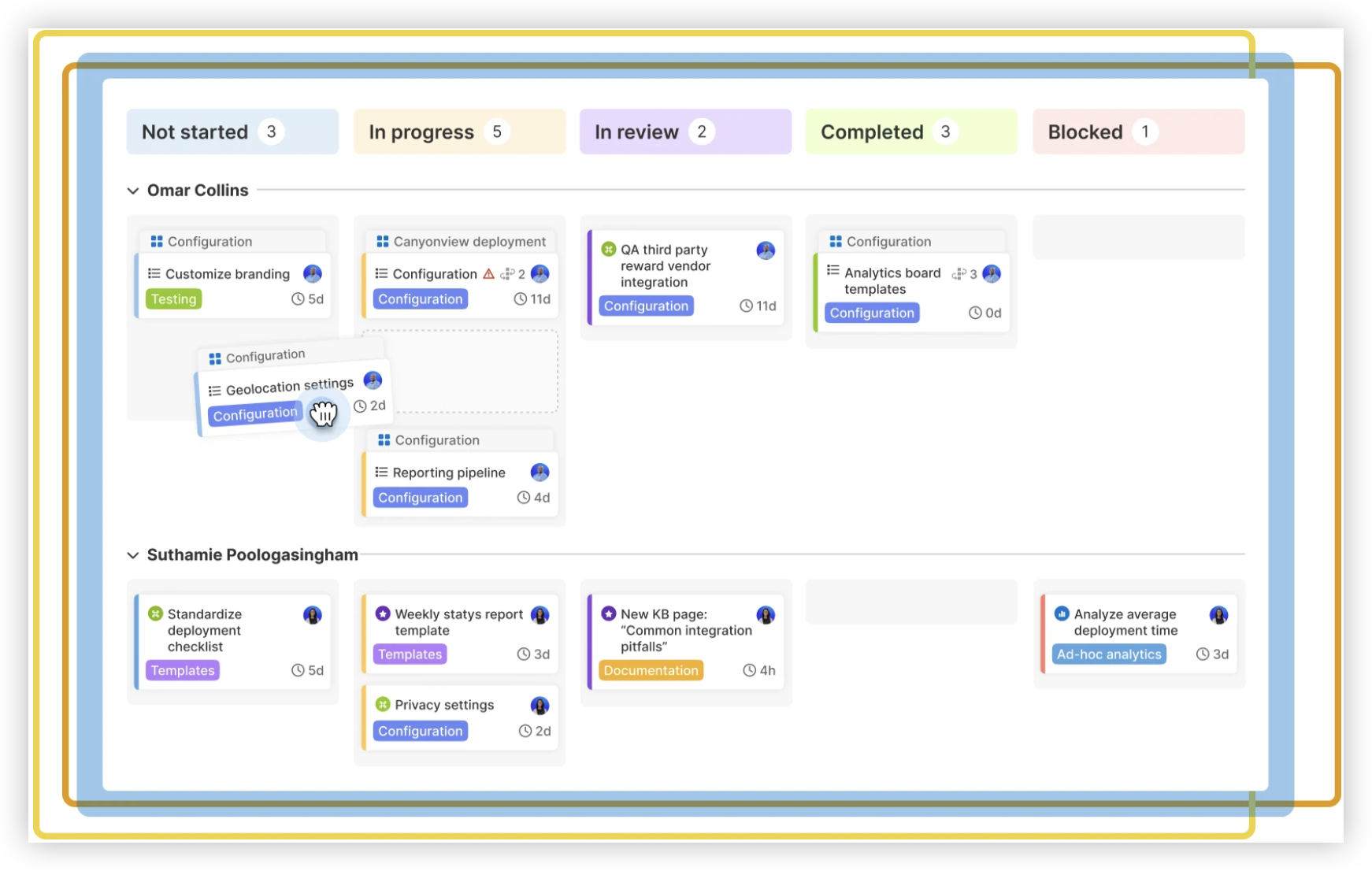
Move issues across a board. Drag practice issues through statuses such as To Do, In Progress, In Review, and Done.
Watch how the issue history changes. This simple exercise teaches the connection between a board, a workflow, and progress reporting.
-
Learn backlog management. The backlog contains future work. Practice ranking issues by value, urgency, risk, and effort.
Place the most important work near the top. Then group related issues under an epic. A well-organized backlog makes sprint planning faster.
-
Practice sprint planning. Create a short sprint with a realistic goal. Select only the work your practice team can reasonably complete.
For example, a two-week sprint might include improving checkout validation, adding delivery estimates, and fixing a payment error. The sprint goal could be “Make checkout more reliable for new customers.”
-
Use search and filters. Jira becomes far more useful when you can quickly find relevant work.
Start with simple filters, such as issues assigned to you or issues in progress. Then learn JQL, Jira’s query language, for more precise searches.
A basic query might look like project = SHOP AND status = "In Progress". This displays active work in the SHOP project.
-
Explore reports and dashboards. Reports turn issue activity into useful signals. Review sprint progress, unresolved work, workload, and cycle time.
Create a dashboard with a few focused gadgets. Too many charts make it harder to see what needs attention.
-
Learn automation last. Automation can reduce repetitive work, but it becomes confusing when you do not understand workflows first.
Begin with a simple rule. When an issue changes to Done, automatically add a completion label or notify a project channel. Test every rule with a practice issue.

Jira Fundamentals You Need First
Jira has many configuration options, but beginners usually need only a small set of concepts. Learning these foundations gives you a reliable mental model.
Projects and issues
A project gives related work a shared home. It can represent a product, department, service, or business initiative.
An issue represents one piece of work. A bug describes a problem, a story describes user value, and a task describes a specific activity. Use the issue type that best explains the work.
Statuses and workflows
A status tells you where an issue is in its journey. A workflow controls how the issue moves between statuses.
For example, an issue may move from To Do to In Progress, then to Code Review, Testing, and Done. Each transition can have rules, required fields, or approval steps.
Here’s why: a clear workflow reduces uncertainty. If a task sits in “In Progress” for three weeks, the team can investigate the delay instead of guessing.
Boards and backlogs
A board displays work visually. Scrum boards often organize work around sprints, while Kanban boards emphasize continuous flow.
The backlog holds work that has not entered active delivery. Teams use it to rank priorities, refine requirements, and prepare upcoming work.

Fields, labels, and components
Fields store important details, such as priority, assignee, due date, environment, or customer impact. Labels add flexible categories, while components group work by product area.
Use these features carefully. If your team creates a new label for every small variation, search results become noisy and reporting loses value.
Practice Jira with a Realistic Example
The fastest way to remember Jira concepts is to connect them to a believable project. Imagine you are managing a meal delivery application.
Define the project goal
Set a simple outcome: improve ordering speed and reduce checkout errors. This goal gives every issue a practical reason to exist.
Create epics and stories
Create an epic called “Faster checkout.” Add stories such as:
- Allow customers to save a delivery address.
- Show the full order total before payment.
- Display an error when a card payment fails.
Each story should describe a meaningful result. Avoid turning every tiny action into a separate story unless the team needs that level of tracking.
Add acceptance criteria
Acceptance criteria explain when an issue is complete. For the saved-address story, criteria might include:
- A signed-in customer can save an address.
- The customer can select the saved address during checkout.
- The customer can remove an old address.
Clear criteria help designers, developers, testers, and reviewers share the same expectation.
Plan the sprint
Choose a sprint goal and select a manageable group of issues. Include enough work to create progress, but avoid filling the sprint with every possible request.
Suppose the team has six available workdays after meetings and support duties. Planning ten full days of work creates pressure before development begins.
Review the result
At the end of the sprint, review completed work, unfinished issues, and reasons for delay. Then adjust the next sprint using what you learned.
This cycle teaches more than clicking through menus. It shows how Jira supports planning, delivery, communication, and improvement.
Jira Boards, Sprints, and Workflows Explained
These three concepts work together. The workflow defines movement, the board displays movement, and the sprint limits the period for selected work.
Scrum boards
Scrum boards organize work into sprints. Teams choose a sprint goal, select issues, complete the work, and review the outcome.
Scrum works well when a team benefits from regular planning and review points. A product team might use two-week sprints to coordinate development and testing.
Kanban boards
Kanban boards show continuous work. New issues enter the workflow as capacity becomes available.
Kanban can suit support teams, operations groups, and teams with unpredictable requests. Work-in-progress limits help prevent too many active tasks.
Workflow design
Keep the workflow understandable. A small team may need only To Do, In Progress, Review, and Done.
Add statuses when they answer a real question. “Waiting for customer” can be helpful when external responses cause delays. “Almost finished” usually creates confusion.
Definition of done
A status called Done should have a shared meaning. The team might require testing, approval, updated release notes, and confirmation from the request owner.
Without a clear completion standard, one person may mark work Done after coding while another expects testing and approval.
Jira Search, Reporting, and Automation
After learning issue tracking, focus on visibility. Search, reports, and automation help you understand work without opening every issue individually.
Search with filters and JQL
Begin with saved filters for common questions:
- What work is assigned to me?
- Which high-priority issues are overdue?
- What is waiting for review?
- Which bugs remain unresolved?
Then use JQL when basic filters cannot express the question. For example:
project = SHOP AND issuetype = Bug AND priority in (High, Highest) AND resolution is EMPTY
This query finds unresolved, high-priority bugs in the SHOP project.
Reports that support decisions
Choose reports according to the decision you need to make. A sprint report can reveal unfinished work, while a cumulative flow diagram can expose bottlenecks.
For example, if many issues remain in Testing, the team may need more testing capacity or smaller work items.
Automation rules
Automation is useful when a repeated action follows a predictable event. A rule can assign work, update a field, add a label, or send a notification.
Start with one rule at a time. Record its trigger, condition, and action in plain language before activating it.
Let me explain: automation should remove routine effort, not hide important decisions. A rule that automatically closes every inactive issue can erase useful context.
How to Build Strong Jira Habits
Jira skills become valuable when they improve daily teamwork. The best habits are simple enough to repeat and specific enough to measure.
Write issues for another person
Assume the assignee has context but cannot ask you questions immediately. Include the purpose, expected result, important constraints, and completion criteria.
Compare these two descriptions:
- “Fix search.”
- “Search results should show matching product names and categories within two seconds.”
The second description gives the team a clearer target.
Keep statuses honest
Move an issue when the work actually changes stage. Do not leave tasks in progress because updating the board feels inconvenient.
Accurate statuses help managers identify bottlenecks and help teammates decide where to contribute.
Use comments for decisions
Keep important decisions connected to the relevant issue. Explain what changed, why it changed, and who approved it.
This reduces repeated questions during handoffs. It also gives future teammates useful context when they review the work.
Review your setup regularly
Every few weeks, inspect unused fields, confusing statuses, duplicate labels, and noisy notifications. Remove anything that does not help the team plan or deliver work.
A simpler Jira project often performs better than a heavily customized project that nobody understands.
Natural Jira Learning Solution: ONES.com

Value Proposition
ONES.com combines project management and knowledge management in one platform powered by ONES Assistant. ONES Project is a Jira alternative for teams that need structured planning, reporting, and collaboration.
ONES Project and ONES Wiki are sold separately. You can choose the project management or knowledge management capability that matches your team’s needs.
Core Capabilities
- Scattered project tracking → ONES Project provides centralized workspaces → Teams can connect planning, execution, and progress review in one environment.
- Complex migration from Jira → Jira-compatible workflows help teams preserve familiar working patterns → People can adapt without rebuilding every process from scratch.
- Limited visibility into delivery → Built-in reporting turns issue activity into project insights → Managers can review progress, workload, and delivery risks more easily.
- Rigid project structures → Custom workflows and fields support different team processes → Software, marketing, operations, and service teams can tailor their setup.
- Manual sprint coordination → Sprint management supports planning and active delivery → Teams can define goals, select work, and review outcomes consistently.
- Too many third-party plugins → Native capabilities reduce dependence on extra extensions → Administrators can manage fewer connected systems.
- Security or network restrictions → On-premise, private cloud, and air-gapped deployments provide flexible hosting choices → Organizations can select an environment that fits their controls.
- Different deployment expectations → Cloud and self-hosted versions provide full feature parity → Teams can choose hosting without giving up core functionality.
- Separate project and knowledge spaces → ONES.com connects project management with ONES Wiki when both are needed → Teams can keep delivery work and team knowledge closely connected.
Application Scenarios
Software product team: A development team can manage epics, stories, bugs, sprints, and custom workflows in ONES Project. Built-in reporting helps the team review sprint progress and unresolved risks.
Regulated organization: An organization with strict network controls can use an on-premise, private cloud, or air-gapped deployment. The team can maintain structured project management within its approved environment.
Growing cross-functional team: Product, design, engineering, and operations can use custom fields and workflows for their different work types. When knowledge management is also needed, ONES Wiki can provide a connected knowledge base.
Common Challenges When Learning Jira
Challenge: Jira seems overwhelming
Solution: Learn one workflow at a time. Start with projects, issues, statuses, boards, and search. Leave advanced permissions and automation until you can manage a small project comfortably.
Challenge: You create issues without clear outcomes
Solution: Add a purpose and completion criteria to every practice issue. Ask, “What should be true when this work is finished?”
Challenge: The board does not reflect reality
Solution: Agree on what each status means. Then update issues during daily work instead of waiting until the end of the sprint.
Challenge: Reports provide confusing signals
Solution: Check the quality of your issue data first. Inconsistent statuses, missing estimates, and stale assignments can distort any report.
Challenge: Automation creates unexpected changes
Solution: Test rules in a practice project. Use narrow conditions, describe each rule clearly, and review the audit history after activation.
FAQs About Learning Jira
How long does it take to learn Jira?
You can learn the basic workflow within a few days of focused practice. Becoming comfortable with boards, backlogs, filters, reports, and workflows may take several weeks.
Your learning speed depends on how often you use Jira and whether you practice with a real project. Ten focused practice sessions usually provide more value than watching tutorials without creating issues.
Is Jira difficult for beginners?
Jira can feel difficult because it combines project structure, issue tracking, workflows, permissions, and reporting. The interface becomes easier once you understand how these pieces connect.
Start with one project and a simple workflow. Avoid exploring every configuration option during your first sessions.
Should I learn Scrum before learning Jira?
You do not need deep Scrum knowledge before using Jira. However, learning basic ideas such as backlog, sprint, sprint goal, and review will make Scrum projects easier to understand.
If your team uses Kanban, focus on flow, work-in-progress limits, and cycle time instead.
What should I practice first in Jira?
Practice creating issues, editing details, assigning work, changing statuses, adding comments, and using filters. These actions appear in most Jira projects.
Next, create a small backlog and run a short practice sprint. This connects individual features into a complete working process.
Do I need to learn JQL immediately?
No. Start with basic filters and learn JQL after you understand projects, issue types, statuses, and fields.
Once you know the question you want to answer, JQL becomes easier. Practice with simple queries before combining several conditions.
Conclusion
Learning Jira is easier when you follow a practical sequence. Begin with projects and issues, then practice boards, workflows, backlogs, sprints, search, reporting, and automation.
Use a small example project to turn each feature into a real skill. Write clear issues, keep statuses accurate, and review your setup regularly.
But here’s the truth: Jira knowledge grows through repeated use, not memorization. If your team needs a Jira alternative with compatible workflows, built-in reporting, flexible deployment, and fewer plugins, ONES Project is worth evaluating within ONES.com.