Zephyr for Jira: A Full Step-by-Step Test Workflow Guide
Need a reliable Jira testing process? Zephyr for Jira guides you through test cases, cycles, execution, and defect tracking. Read now to streamline your workflow.
Zephyr for Jira helps you organize test cases, run test cycles, and connect test results with Jira work. Without a clear workflow, though, test cases can become inconsistent, execution status can go stale, and defects may lose their connection to the requirements they affect.
That makes it harder to tell what has actually been tested before a release. A team might have test steps in one place, execution notes elsewhere, and bugs that do not point back to a failed test. But here's the truth: a reliable process depends as much on clear ownership and repeatable habits as it does on the tool.
This guide walks you through a practical Zephyr workflow, from project setup to test reporting. You’ll learn how to prepare test cases, organize cycles, record results, link defects, and keep coverage useful as your product changes. Menu names and available features vary by Zephyr edition.
How to Run a Test Workflow in Zephyr for Jira
Use this sequence to move from requirements to tested, traceable releases. Adapt the labels to your Zephyr edition, Jira setup, and team’s release process.
- Confirm your Zephyr edition and Jira setup. Identify whether your team uses Zephyr Scale, Zephyr Squad, Zephyr Enterprise, or another edition. Check the Jira project, permissions, issue types, and available test management features before designing your process.
- Agree on what needs testing. Review the Jira stories, requirements, or defects included in the release. Define the expected coverage and note risks, such as a payment change that could affect checkout and refunds.
- Create clear, reusable test cases. Write a concise objective, prerequisites, test data needs, and numbered actions. State the expected result for each important step. For example, a login test should specify what happens after valid credentials are submitted.
- Organize cases into a test plan or cycle. Group tests around a release, sprint, feature, or regression suite. Use the terms and structure available in your edition. Keep groups meaningful so a tester can find the right tests without opening unrelated work.
- Assign execution and set a time window. Give each test to a named tester or role, and make the target build or environment clear. A cycle with no owner or run window is easy to overlook during a busy sprint.
- Run each test and record its actual result. Follow the steps, compare the observed behavior with the expected behavior, and select the closest available status, such as Pass, Fail, or Blocked. Add a brief execution note when context will help another teammate.
- Link defects to failed tests. When a test fails because of a product issue, create or link a Jira defect and include the steps to reproduce, expected behavior, actual behavior, and relevant environment details. Retest after the defect is addressed.
- Review coverage and close the cycle. Check which tests passed, failed, remain blocked, or have not run. Review linked defects and uncovered requirements. Share the result with the release team, then update cases when product behavior changes.
Here's why: each step leaves a useful trail from planned work to observed behavior. A test result becomes much more actionable when a teammate can see what was checked, who ran it, and which defect followed a failure.

Understand the Main Parts of a Zephyr Workflow
Zephyr connects test management activities with Jira work, while the exact terminology and screens depend on the edition. Most teams work with some version of test cases, plans or cycles, executions, and defects.
Test cases describe repeatable checks
A test case explains what to verify and how to verify it. Keep one case focused on a behavior, such as applying a discount code, instead of combining unrelated checkout scenarios into one long set of steps.
For example, a case might state that an eligible discount code reduces the order total by ten percent. Its steps would cover entering the code and reviewing the total, while its expected result would describe the correct calculation.
Plans and cycles organize execution
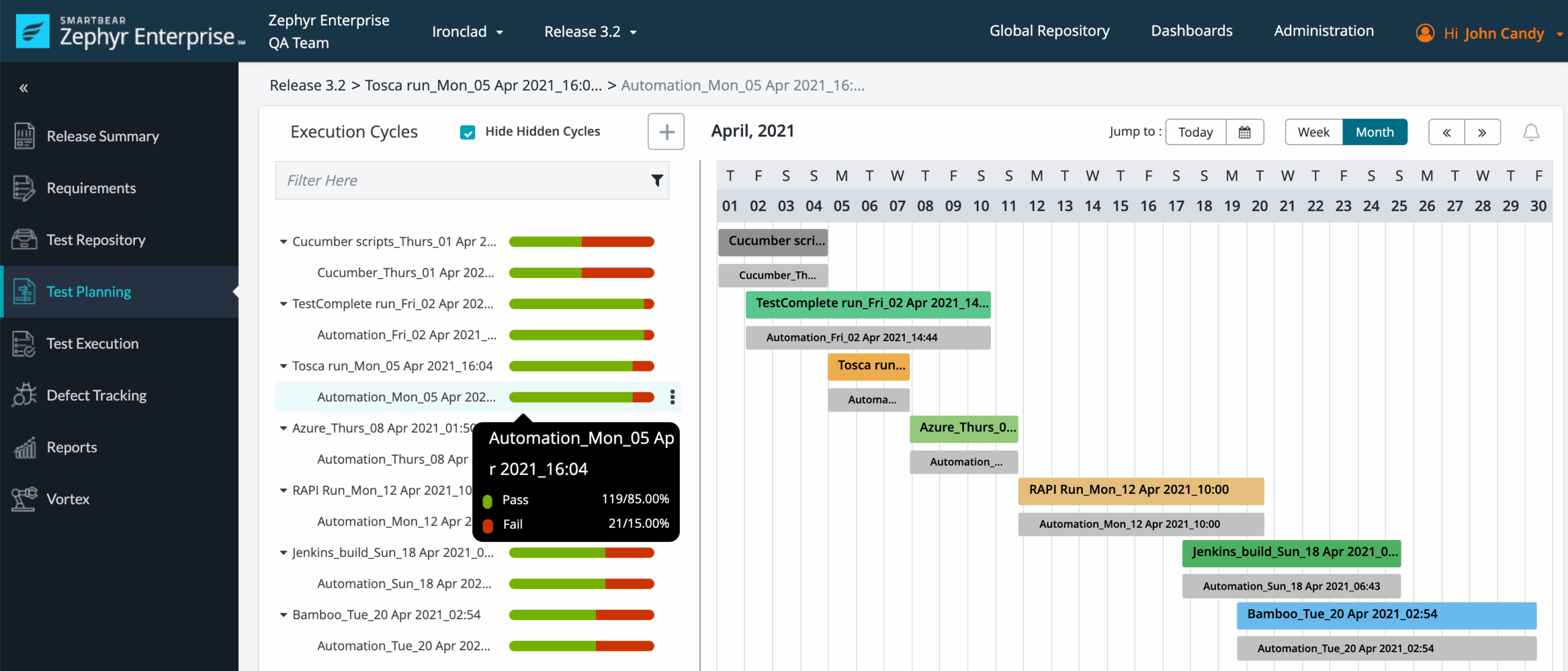
A plan or cycle gathers the tests you intend to run for a specific purpose. A release cycle might include new feature tests, high-risk integrations, and a selected set of regression checks.
Think of the case as the recipe and the cycle as the meal you are preparing. The same case can be run again in a later cycle without rewriting its steps, provided the behavior remains relevant.
Executions capture what happened
An execution records the outcome of running a test in a particular context. Depending on your edition, that context may include the tester, environment, build, time, status, and execution notes.
Keep execution notes factual. “The confirmation message did not appear after saving” gives a teammate more to investigate than “broken.”
Defects connect failures to product work
A defect gives the team a place to track an unexpected product behavior. Linking it to a failed execution keeps the test result and follow-up work connected in Jira.
The connection also helps during retesting. A tester can revisit the failed scenario after a fix, record the new outcome, and give the team a clearer view of the defect’s status.
Set Up Test Cases That Stay Useful
Good test cases are specific enough to repeat and flexible enough to maintain. Start by identifying the requirement or behavior each case covers, then write steps that another tester can follow without guessing.
Give each case a clear purpose
Use a title that describes the check, such as “Apply a valid discount code to a cart.” Avoid vague titles like “Discount test,” which do not tell a teammate what success looks like.
Keep prerequisites separate from the steps. If the test requires an active account or a specific product in the cart, state that before the first action. This prevents setup details from being mistaken for product behavior.
Write observable expected results
Describe results that a tester can verify. “The system works correctly” is difficult to assess; “the order total decreases by ten percent and the discount appears in the summary” gives the tester two concrete checks.
When a feature has several outcomes, create separate cases or steps for each meaningful result. For example, valid and expired discount codes should not share one ambiguous expected result.
Use reusable cases with care
Reusability saves effort when the same behavior needs testing across releases. It can create confusion when one case accumulates unrelated variations, so split cases when the steps or expected results differ substantially.
Here's a practical test: if two testers would need different instructions or make different pass/fail decisions, separate the scenarios. A small set of focused cases is easier to maintain than a single case packed with exceptions.
Keep test data and environment details clear
State any required account type, product configuration, or environment in the appropriate fields or execution notes available to your team. Use safe, approved test accounts rather than real customer details.
For instance, a subscription renewal test may need an account with a renewal date set for the current day. Recording that condition helps another tester reproduce the setup without guessing.
Plan and Execute a Test Cycle
A useful cycle answers three questions: what are you testing, who will run it, and when should the results be ready? Agree on these details before execution begins, especially when several people share the work.
Select tests according to risk
Include tests for changed behavior, important customer journeys, and areas with a history of defects. A checkout change, for example, may call for payment, discount, confirmation, and refund checks.
You do not need to rerun every case in every cycle. A risk-based selection lets the team focus on the most consequential paths while keeping broader regression coverage available for larger releases.
Assign ownership and identify the build
Give tests clear owners and state which build or environment is under test. If a defect appears, this context helps the team determine whether it affects the current release candidate or a different environment.
For a small team, one tester may run the entire cycle. For a larger team, divide work by feature or risk area, then agree on who reviews blocked tests and unresolved failures.
Record execution as you go
Update results soon after running each test. Delayed entry makes it easier to mix up environments, forget details, or report a result against the wrong case.
When a test is blocked, explain what prevented execution. “Test environment unavailable” is more useful than leaving the status unexplained, because the team can distinguish an infrastructure problem from a product failure.
Retest fixes and check for side effects
After a defect is fixed, rerun the failed scenario and record the result. If the change could affect nearby behavior, add focused regression checks before marking the related work ready.
For example, a fix to discount calculations may warrant checking both the order total and the refund amount. The aim is to confirm the correction without overlooking a nearby calculation.
Use Results to Improve Release Decisions
Test reporting helps the team understand coverage and unresolved risk. A pass percentage on its own can be misleading, because it may exclude unrun or blocked cases.
Review status alongside coverage
Look at passed, failed, blocked, and unexecuted tests together. Then compare those results with the requirements or Jira work the cycle was meant to cover.
For example, a cycle showing 90 percent passed may still have a critical payment test unrun. That gap matters more to a release decision than a high overall pass rate.
Check defect severity and ownership
Review open defects linked to failed tests. Confirm each has a clear owner, an agreed priority, and enough detail for investigation.
A minor layout issue and a failed payment flow should not be treated as equal release risks. Use the team’s severity and release criteria to make the difference visible.
Look for patterns across cycles
Repeated failures can reveal unstable environments, fragile features, or unclear test steps. Compare recurring problem areas across releases instead of treating each cycle as an isolated event.
The best part? A short review can lead to practical improvements. If testers repeatedly ask how to create the same account state, clarify the setup instructions or improve the team’s environment process.
Keep coverage current as the product changes
Review cases when requirements, interfaces, or workflows change. Retire obsolete cases and update steps that no longer match the product.
Let me explain: stale tests create false confidence. A case marked as passed is only meaningful when its steps still check the behavior the team intends to protect.
ONES.com Solution for Coordinating Project and Knowledge Work
ONES.com is a unified project management and knowledge management platform powered by ONES Assistant. ONES Project handles project management, while ONES Wiki supports knowledge management; the products are sold separately.

For teams using Zephyr, ONES.com can support adjacent planning and coordination work, such as tracking release tasks, clarifying ownership, and keeping team guidance organized. It should not be treated as a direct replacement for Zephyr’s specialized test execution features.
Core capabilities
- Disconnected project tracking: ONES Project provides Jira-compatible workflows, helping teams coordinate work in a familiar issue-based structure and follow progress through agreed stages.
- Workflows that do not fit the process: Custom workflows let teams adapt status paths, while custom fields capture information needed for release coordination. The result is clearer ownership and fewer workarounds.
- Limited visibility into project progress: Built-in reporting gives teams another way to review project activity and progress, helping managers identify work that needs attention.
- Recurring coordination tasks: Automation can handle configured workflow actions, reducing manual follow-up for routine project steps.
- Sprint planning pressure: Sprint management helps teams organize planned work into iterations, making release preparation and related engineering tasks easier to coordinate.
- Knowledge scattered across team practices: ONES Wiki offers a knowledge management space for guidance such as test-writing conventions, environment notes, and release procedures.
- Plugin-heavy Jira environments: ONES Project includes project management capabilities such as workflows, fields, sprint management, reporting, and automation natively. Teams can assess whether this reduces reliance on added plugins for their needs.
- Deployment constraints: ONES.com offers Cloud, On-Premise, Private Cloud, and Air-gapped deployments. The self-hosted versions have full feature parity with the cloud version.
Application scenarios
Release coordination across QA and engineering: A team can use ONES Project to track release readiness tasks, assign owners, and follow work through a custom workflow. Test execution can remain in Zephyr while the wider project work is coordinated separately.
Documenting repeatable team practices: A QA lead can organize test conventions and release procedures in ONES Wiki. That gives new team members a consistent place to learn how the group handles test cycles and defect follow-up.
ONES.com also has a free plan for up to 30 seats. Teams can evaluate its fit for project and knowledge workflows while keeping the boundary clear between those activities and specialized Zephyr testing.
Common Challenges and Practical Fixes
Test cases are too broad to execute consistently
Problem: One case covers several unrelated behaviors, so testers disagree about what counts as a pass.
Solution: Split it into focused scenarios with observable expected results. Keep shared prerequisites in the appropriate setup fields so the steps remain easy to follow.
Cycles contain tests that do not match release risk
Problem: The team runs a large collection of cases without checking whether they cover recent changes or critical journeys.
Solution: Map the cycle to the release scope. Prioritize changed features, high-impact customer paths, and areas with known risk, then use broader regression runs when appropriate.
Failures have no useful follow-up
Problem: A failed status appears without reproduction details or a linked defect.
Solution: Record the actual behavior, the expected behavior, and relevant environment details. Link a Jira defect when product work is required, then assign an owner.
Reports hide untested work
Problem: A high pass rate gives the impression of readiness even when important cases remain unexecuted.
Solution: Review unrun and blocked tests alongside failures and passes. Compare the results with release criteria and call out critical gaps explicitly.
FAQs About Zephyr for Jira
What is Zephyr for Jira used for?
Zephyr adds test management capabilities to Jira workflows. Teams use it to organize test cases, plan or group testing, record execution results, and connect failures with Jira defects. Available features and terminology vary by Zephyr edition, so confirm the setup your team uses before following edition-specific instructions.
What is the difference between a test case and a test cycle?
A test case describes a specific check, including its steps and expected outcome. A test cycle or similar planning structure groups cases for a particular run, such as a sprint, release, or regression round. You can reuse a case in multiple cycles when its behavior and instructions still apply.
How should I record a failed test?
Record the observed behavior and compare it with the expected result. Include enough context to repeat the issue, such as the environment, relevant setup, and steps taken. If the failure requires product work, link a Jira defect to the failed execution so the investigation and retest remain connected.
Can I reuse test cases across releases?
Yes, reusable cases can reduce repeated setup and writing. Review them before each release, though. Update steps when the product changes, and split a case when it covers behaviors that need different instructions or pass/fail decisions. Reuse is valuable when it keeps checks consistent, not when it preserves obsolete steps.
Why do Zephyr instructions differ between teams?
Zephyr includes different editions, and teams may use different Jira configurations, permissions, and project workflows. As a result, screen names and available actions can differ. Confirm your edition and project setup, then follow the equivalent steps in your environment rather than relying on a menu path written for another configuration.
Conclusion
A dependable Zephyr workflow starts with focused test cases, clear cycle ownership, timely execution results, and useful defect links. Reviewing coverage alongside failures helps you see release risk more accurately than a pass rate alone.
If your current process feels fragmented, begin with one upcoming release. Clarify what needs testing, assign owners, record results as they happen, and review gaps before release decisions. Those small habits make testing easier to repeat and improve over time.
Zephyr supports the test management part of the work, while project coordination and team knowledge may sit alongside it. Choose a workflow that keeps both the checks and the decisions around them clear.