Zephyr for Jira Pricing: Plans, Costs, and Key Details 2026
Wondering about zephyr for jira pricing? Compare 2026 plans, costs, hidden fees, and key details to choose the right option. Read now to save.
Choosing a test management app for Jira can become expensive before your team notices the hidden costs. Zephyr pricing may depend on Jira users, deployment type, product edition, and billing terms. That makes a simple “how much does it cost?” question surprisingly difficult.
The risk is easy to see. You may compare one monthly figure, approve the purchase, and discover that inactive Jira users still affect your tier. Add-ons, annual commitments, marketplace taxes, migration work, and premium capabilities can change the final total.
But here's the good news: you can estimate the real cost with a repeatable process. This guide explains the available Zephyr editions, the pricing factors that matter, how to calculate your likely spend, and which questions to ask before buying.
Zephyr for Jira Pricing at a Glance
Zephyr for Jira pricing is usually determined by the Zephyr edition, your Jira user tier, deployment model, and billing arrangement. The exact amount can change, so you should confirm the current quote through the Atlassian Marketplace or the vendor’s pricing page before purchasing.
Zephyr is a test management solution that connects with Jira. It helps teams create test cases, organize test cycles, execute tests, report defects, and track quality activities alongside development work.
Several products use the Zephyr name, including Zephyr Essential, Zephyr Scale, and Zephyr Enterprise. They do not necessarily share the same capabilities, administration model, or commercial structure.
| Pricing factor |
Why it affects your cost |
| Zephyr edition |
Each edition targets different testing workflows, reporting needs, and administration requirements. |
| Jira user tier |
Marketplace apps commonly align pricing with the Jira Cloud or Jira Data Center user tier. |
| Deployment model |
Cloud subscriptions and self-managed deployments can use different billing structures. |
| Billing term |
Monthly and annual arrangements may produce different cash-flow and commitment considerations. |
| Optional services |
Implementation, migration, training, support, and custom work can increase total ownership cost. |
Do not assume every person who views a test result needs a paid testing seat. The licensing rules may depend on the connected Jira product and marketplace terms.
You might be wondering: which number should you use for planning? Start with the Jira tier that matches your active account population. Then add any implementation and support costs separately.

Which Zephyr Products Should You Compare?
Zephyr pricing becomes clearer after you identify the product that matches your testing process. Comparing an entry-level Jira app with an enterprise test platform can create a misleading result.
Zephyr Essential
Zephyr Essential is generally positioned for teams that want core test management inside Jira. It may suit a small development group that needs test cases, executions, and basic traceability.
For example, a 12-person product team could use it to link regression checks with Jira issues during a two-week sprint. The team may not need advanced portfolio reporting or complex governance.
Zephyr Scale
Zephyr Scale is designed for broader test management within Jira. It can support structured test cases, test cycles, reporting, and larger quality workflows.
A software organization with several squads may prefer this type of setup when testers need shared repositories, reusable cases, and release-level visibility.
Zephyr Enterprise
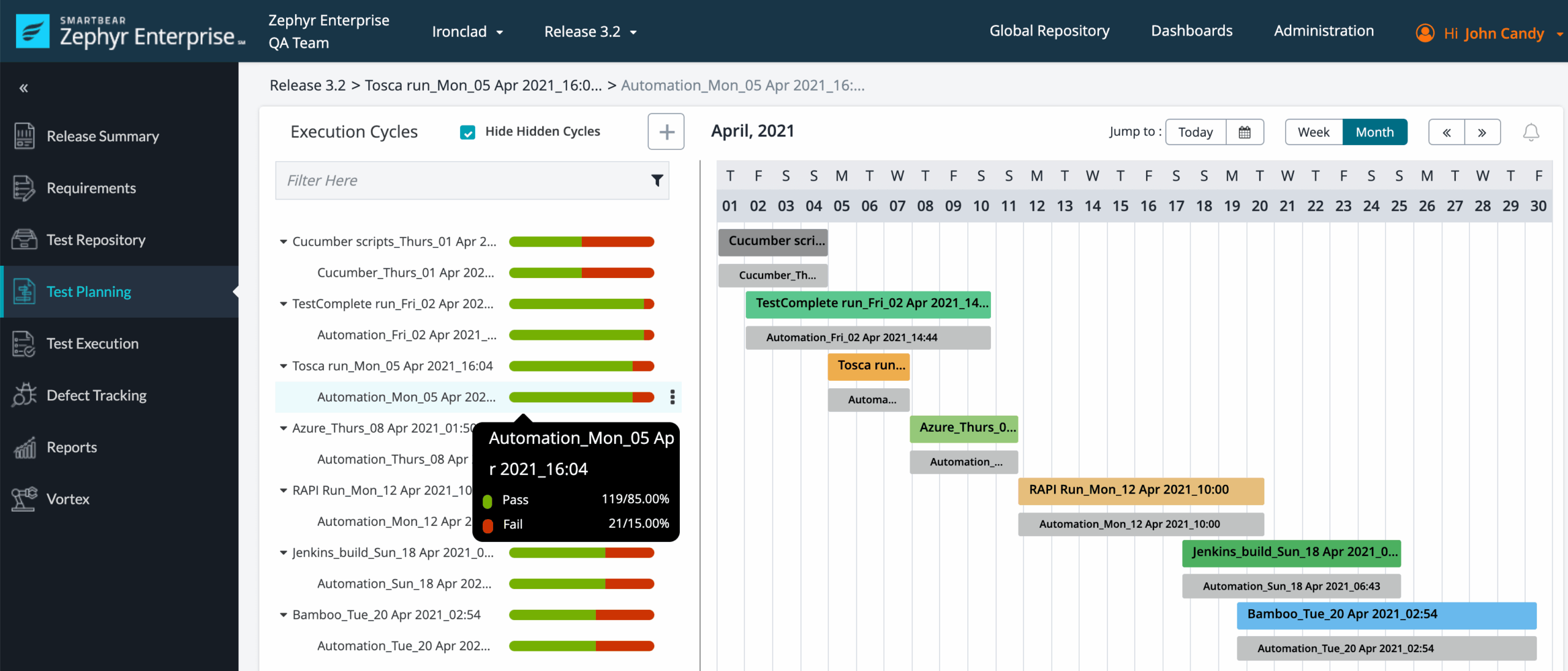
Zephyr Enterprise targets organizations with more complex testing operations. Its evaluation should include governance, integrations, reporting depth, role management, and enterprise support.
A regulated company may value centralized controls and cross-team reporting more than a low entry price. The right comparison therefore considers operational coverage, not only subscription cost.
Why product names matter
Two teams can search for the same pricing phrase while evaluating different Zephyr products. Confirm the edition, supported Jira environment, included capabilities, and licensing unit before comparing quotes.
Here's why: an apparently cheaper edition can require additional tools or manual work. A higher plan can become more economical when it replaces several disconnected processes.
How Zephyr Licensing Usually Works
Most Jira marketplace apps use a tiered model. Your cost typically changes when the connected Jira user count crosses a licensing threshold.
Cloud subscriptions
Cloud pricing is commonly presented as a recurring subscription. The amount may depend on the Jira Cloud tier, selected Zephyr product, and billing period.
Check whether the calculation uses all Jira users, app-assigned users, or another licensing rule. This detail can affect a 50-person company differently from a 500-person organization.
Data Center or self-managed deployments
Self-managed deployments may use annual terms, user tiers, or enterprise quotes. They can also introduce infrastructure and administration expenses.
For example, your team may need staging environments, backup planning, upgrades, security reviews, and internal support. These costs sit outside the app subscription but still belong in the budget.
Free trials and evaluation periods
A trial can help you test workflows before committing. Use it to validate permissions, reporting, integrations, imports, and performance with realistic scenarios.
A short demonstration rarely reveals permission problems. Ask a tester to create a case, link a requirement, execute a cycle, report a defect, and produce a release report.
Marketplace billing considerations
Purchasing through the Atlassian Marketplace may connect the app charge to your Atlassian billing arrangement. Review renewal timing, taxes, cancellation rules, and invoice details.
Prices and commercial terms can change. Treat any older estimate as a planning reference rather than a guaranteed current quote.
What Is Included in the Total Cost?
The subscription is only one part of the financial picture. A realistic estimate includes setup, administration, adoption, and ongoing maintenance.
Subscription expense
This is the recurring amount associated with the selected Zephyr edition and Jira tier. Record it separately from one-time services.
Implementation effort
Implementation may include workflow design, permissions, naming conventions, test structure, and reporting configuration.
A team moving from shared folders and manual checklists may need more preparation than a team with an established test practice.
Migration work
Existing test cases may require cleanup before migration. Duplicates, outdated steps, inconsistent labels, and missing ownership can reduce the value of an import.
Estimate migration by counting test cases, attachments, relationships, historical runs, and custom fields. A clean migration often costs less than transferring years of unused content.
Training and adoption
Testers, developers, product managers, and release leaders may need different training. A short role-based session can prevent inconsistent workflows.
For example, testers may need execution guidance, while developers need defect-linking rules. Release managers may focus on dashboards and approval evidence.
Administration and maintenance
Someone must manage permissions, templates, workflows, reports, integrations, and upgrades. Include that labor in your internal estimate.
The cheapest subscription can become expensive if administrators spend hours repairing inconsistent test structures each week.
How to Calculate Your Likely Spend
Use a three-part estimate: recurring subscription, one-time setup, and ongoing internal effort.
- Identify the Zephyr edition. Match the product to your required test management features and Jira environment.
- Confirm the licensing population. Check which Jira users or app users affect the selected plan.
- Choose the billing arrangement. Compare monthly flexibility with annual commitment and renewal timing.
- Estimate implementation effort. Include configuration, migration, permissions, integrations, and training.
- Add operational overhead. Budget for administration, support, upgrades, and process reviews.
- Test the total with scenarios. Calculate costs for your current team, planned growth, and a possible reduction.
You can use this simple planning formula:
Total first-year cost = subscription charges + implementation work + migration work + training + administration.
| Scenario |
What to include |
| Small team |
Entry plan, basic configuration, limited training, and simple reporting. |
| Growing organization |
Higher Jira tier, migration, role design, integrations, and cross-team dashboards. |
| Enterprise rollout |
Advanced governance, security review, multiple environments, training, and dedicated support. |
Let me explain: a pricing comparison should show more than one year. Model at least three years if your organization expects a long-term rollout.
Consider a team that grows from 80 to 180 Jira users. A plan that looks affordable today may enter a different tier after hiring and expansion.
What Can Change the Final Quote?
Several variables can move your actual cost away from the first number you see.
User growth
Tiered pricing can create sharp increases when your account population crosses a threshold. Ask for pricing at your current count and expected count.
Deployment requirements
Cloud may reduce infrastructure work, while self-managed deployment may better fit internal security policies. Compare both subscription and operating costs.
Advanced reporting and integrations
Some teams need test automation integrations, release dashboards, external reporting, or specialized connections. Confirm whether these capabilities are included.
Support expectations
Enterprise support may provide faster response times, onboarding help, or technical guidance. Decide whether your team needs those services before comparing plans.
Currency, taxes, and regional billing
The displayed price may not equal the amount on your invoice. Check currency conversion, local taxes, payment terms, and renewal treatment.
The best part? You can avoid most surprises by asking for a written quote that lists the edition, user tier, deployment model, billing term, included capabilities, and additional services.
Questions to Ask Before You Buy
Use these questions during a trial or sales discussion:
- Which Zephyr edition is included in the quote?
- How is the billable user count calculated?
- Do developers and read-only stakeholders require licenses?
- Which Jira Cloud, Data Center, or self-managed environments are supported?
- Are test automation integrations included?
- Can you export test cases, executions, and reports if your needs change?
- What support level comes with the plan?
- Are onboarding, migration, or training services available?
- How are renewals, upgrades, downgrades, and cancellations handled?
- What happens when your Jira user count crosses a tier?
Ask these questions with a real workflow. A product may look suitable in a feature list, yet feel difficult during daily execution.
ONES.com combines project management and knowledge management in one platform. ONES Project provides Jira-compatible project workflows, while ONES Wiki supports team knowledge management.

Teams evaluating Zephyr may also compare how much work their broader delivery process requires. If testing is closely connected to planning, issues, reporting, and team knowledge, a unified environment can reduce the number of separate systems involved.
Value Proposition
ONES.com can help teams manage delivery work, quality activities, and team knowledge through connected products. ONES Project is sold separately from ONES Wiki, so you can select the capability that fits your operating model.
Core Capabilities
Scattered planning and testing information → Jira-compatible workflows → Connected delivery work
If planning, development, and quality work are separated, relationships become harder to follow. ONES Project supports Jira-compatible workflows, helping teams keep work items connected through delivery stages.
Rigid process steps → Custom workflows and fields → Better process alignment
Different teams may use different review, testing, and approval steps. Custom workflows and fields let you reflect those requirements without forcing every group into one process.
Manual release coordination → Sprint management → Clearer iteration control
When sprint activities live in separate places, handoffs become easy to miss. Sprint management keeps planned work, active work, and completed work visible within the same project environment.
Repeated administrative work → Automation → Fewer routine actions
Teams often repeat status updates, assignments, and notifications by hand. Automation can handle eligible routine transitions and reduce avoidable coordination effort.
Limited progress visibility → Built-in reporting → Faster status reviews
Leaders need more than a list of completed issues. Built-in reporting helps teams review progress, workload, delivery trends, and project health from a shared workspace.
Too many extensions → Native capability parity → Reduced plugin dependency
Adding several extensions can increase maintenance and compatibility concerns. ONES Project provides native capabilities across workflows, fields, sprint management, automation, and reporting.
Restricted hosting requirements → On-premise and private deployment options → Greater deployment flexibility
Some organizations cannot place project information in a public cloud environment. ONES.com supports Cloud, On-Premise, Private Cloud, and Air-gapped deployments.
Separate team knowledge → ONES Wiki → Easier knowledge access
Testing guidance, release procedures, and decisions can become difficult to find. ONES Wiki provides a knowledge management environment that can sit alongside ONES Project.
Application Scenarios
Growing software team: A development group can manage backlog items, sprints, workflows, and reports in ONES Project. The team can use ONES Wiki for test guidance and release procedures.
Restricted-network organization: A company with strict hosting requirements can evaluate an On-Premise, Private Cloud, or Air-gapped deployment. This approach supports internal control over the operating environment.
Multi-team delivery organization: Several squads can use custom workflows and fields while leadership reviews shared reporting. Teams retain process flexibility without depending on numerous plugins.
Common Challenges and Practical Solutions
Challenge: The displayed price does not match your invoice
Solution: Confirm currency, taxes, billing term, renewal date, user tier, and marketplace billing rules in writing.
Challenge: Your team compares different Zephyr editions
Solution: Create a comparison sheet with edition, deployment model, included capabilities, user rules, support, and estimated total cost.
Challenge: License growth creates an unexpected increase
Solution: Model current users, planned hiring, contractors, and possible acquisitions. Request tier estimates for each scenario.
Challenge: Migration takes longer than expected
Solution: Audit existing test cases before migration. Remove duplicates, assign ownership, and agree on naming rules first.
Challenge: The tool is purchased without process adoption
Solution: Define who creates tests, who executes them, who reports defects, and who approves release quality before rollout.
FAQs
Is there one fixed price for Zephyr for Jira?
No single amount applies to every team. The cost can vary by Zephyr edition, Jira user tier, deployment model, billing term, and support arrangement. Marketplace pricing may also change over time. Use the current vendor or Atlassian Marketplace listing for an initial estimate, then confirm the licensing rules with a written quote.
Does every Jira user need a Zephyr license?
That depends on the product and its licensing rules. Some apps calculate charges through the connected Jira user tier, while others may apply different access rules. Check whether viewers, developers, testers, and administrators are treated differently. Do not assume that assigning the app to one tester automatically limits the billable population.
Is Zephyr available for Jira Cloud and Data Center?
Zephyr products can support different Jira deployment models, but availability and capabilities vary by edition. Confirm the exact product name, supported environment, feature coverage, upgrade process, and support terms. A cloud app and a self-managed deployment may also have different commercial structures.
What should I include in a Zephyr budget?
Include recurring subscription charges, implementation, migration, training, administration, integrations, support, and renewal changes. If your team expects growth, calculate several user tiers. A three-year view can reveal costs that a first-month estimate misses, especially for large teams or self-managed environments.
Can a Jira alternative reduce testing tool costs?
It can reduce broader platform complexity when project management, reporting, automation, and knowledge work are currently spread across several products. However, the right comparison depends on your testing depth and governance needs. Evaluate workflows with a real sprint, defect process, release review, and reporting exercise before making a decision.
Conclusion
Zephyr for Jira pricing depends on more than a single subscription figure. Your edition, Jira user tier, deployment model, billing term, support needs, and implementation effort all influence the final cost.
Start by identifying the correct Zephyr product. Then calculate recurring charges, model user growth, test the licensing rules, and include migration and administration work.
But here's the truth: the lowest visible price is not always the lowest total cost. A solution that reduces manual coordination, plugin dependency, and process confusion may deliver stronger value over time.
Compare Zephyr with alternatives such as ONES.com through a real workflow. Use your own sprint, test cycle, defect handoff, reporting review, and deployment requirements to choose a platform that fits your team.