Zephyr Jira Test Management: A Practical Setup Guide for QA
Struggling with scattered tests in Jira? Learn a practical zephyr jira setup for clearer execution, coverage, and releases. Read now to get started!
Test cases scattered across Jira issues, inconsistent execution results, and unclear release coverage can quickly turn QA into a guessing game. A Zephyr Jira setup can solve much of that, but only when your team designs the workflow before creating hundreds of tests.
Without a clear structure, testers may duplicate cases, link tests to the wrong stories, or close a sprint without knowing what truly passed. A tool alone cannot fix unclear ownership or weak test design.
But here's the truth: you can create a reliable Zephyr workflow with a practical setup sequence. This guide shows you how to organize test cases, connect them to Jira work, plan execution, track defects, and improve reporting without overwhelming your team.
How to Set Up Zephyr in Jira
Zephyr adds test management capabilities to Jira, allowing you to create test cases, organize test cycles, execute tests, and connect failures with defects. The exact labels vary by Zephyr edition, but the underlying setup process remains similar.
Start with a small, repeatable workflow. Configure the structure first, then add test cases, execution plans, and reporting rules. This prevents your Jira project from becoming difficult to maintain.
- Confirm the Zephyr edition and Jira permissions.
Check whether your team uses Zephyr Scale, Zephyr Enterprise, or another Zephyr edition. Review the available Jira integration, project permissions, test issue types, custom fields, and reporting options. A Jira administrator may need to install the app, enable access, or configure project-level settings.
- Define the testing workflow.
Write down how a test moves from creation to execution. A practical flow might include Draft, Ready for Review, Approved, In Progress, Passed, Failed, and Retired. Keep the workflow short enough for daily use.
- Create a test case structure.
Decide which fields every test needs. Useful fields include the objective, preconditions, test steps, expected results, priority, component, environment, owner, and automation status. For example, a login test should state the account condition, the action to perform, and the exact result you expect.
- Organize cases with folders, components, or labels.
Use a consistent hierarchy such as Checkout > Payment > Card Payment. Add labels for dimensions that cut across the hierarchy, such as smoke, regression, mobile, or high-risk. Avoid creating a separate folder for every sprint.
- Link tests to Jira requirements.
Connect each meaningful test to a story, epic, requirement, or other Jira work item. This relationship creates traceability. If a payment story changes, you can identify the affected tests instead of searching manually.
- Create test cycles and plans.
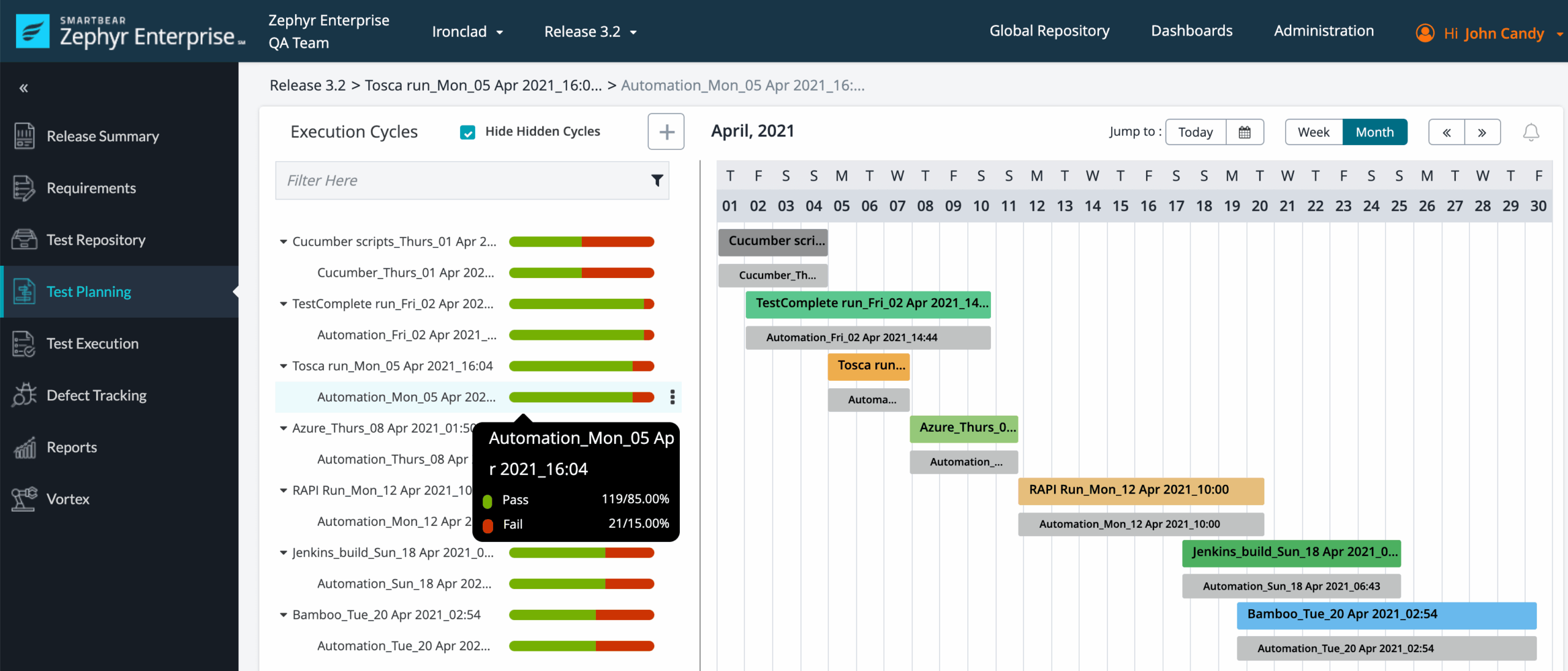
A test cycle represents a focused execution period, such as Sprint 24 regression. A test plan can group several cycles for a release, product area, or milestone. Define the purpose, build, environment, owner, and entry criteria before execution begins.
- Assign and execute tests.
Give testers clear ownership and record the actual result for each execution. When a test fails, capture the observed behavior, expected behavior, environment, reproduction steps, and relevant evidence within the permitted Jira fields.
- Link failed tests to defects.
Create or connect a Jira bug when the failure represents a product issue. Include the failed test, affected requirement, build, environment, severity, and reproduction path. One defect may relate to several tests, so keep the relationship visible.
- Review coverage and release readiness.
Before release, review requirement coverage, unresolved failures, blocked cases, defect severity, and execution progress. A release decision should consider risk, not just the percentage of passing tests.
- Improve the setup after one cycle.
Ask which fields testers ignored, which reports answered no useful question, and where duplicate cases appeared. Simplify the workflow before adding more structure.

How Zephyr and Jira Work Together
Jira manages planning and delivery work, while Zephyr adds dedicated test management around that work. A story can describe a feature, a test can verify expected behavior, and a defect can record a failure discovered during execution.
Here's why: the relationships between these items create a traceability chain. For example, a story for “customers can save a payment card” may connect to tests for saving, editing, removing, invalid card details, and permission restrictions.
When one test fails, the team can see the related story and defect. Product managers gain visibility into risk, developers receive clearer reproduction details, and testers avoid repeating the same investigation.
A simple Jira testing relationship
- Epic: Account and payment improvements.
- Story: Customers can save a payment card.
- Test cases: Save a valid card, reject invalid details, remove a saved card, and prevent unauthorized access.
- Test cycle: Payment regression for the current release.
- Defect: Saved cards disappear after a new session.
This structure works best when each relationship has a reason. Linking every test to every item creates noise and weakens traceability.
Designing Test Cases That Stay Useful
A strong test case gives another tester enough information to reproduce the check without asking the author for clarification. It should also remain readable after the product changes.
The best part? You do not need extremely long cases. A focused test with five clear steps is often more valuable than a twenty-step case that checks unrelated behaviors.
| Test case element | Practical example |
|---|
| Objective | Confirm that a valid card can be saved to an account. |
| Precondition | The customer is signed in and has no saved card. |
| Test data | Use an approved test card and a valid billing address. |
| Steps | Open payment settings, choose Add Card, enter details, and select Save. |
| Expected result | The card appears in payment settings with the correct last four digits. |
| Priority | High because checkout depends on saved payment information. |
Use precise expected results
“The payment works” is too vague. A better result might say, “The order status changes to Confirmed, a confirmation number appears, and the customer receives a confirmation message.”
Specific results make failures easier to classify. If the order succeeds but the confirmation message does not arrive, the tester can report a narrow defect instead of marking the entire flow as a general failure.
Separate reusable checks from scenario tests
A reusable check might verify that a valid user can sign in. A scenario test might verify that the same user can sign in, add a product, apply a coupon, and complete payment.
Keep these at different levels. Reusable checks support smoke testing, while scenario tests support business-critical journeys. Combining everything into one case makes maintenance expensive.
Planning Test Cycles, Runs, and Releases
Test cycles give your team a controlled way to answer, “What are we testing now?” A cycle might cover one sprint, one build, one platform, or one risk area.
For example, a release plan may contain a browser compatibility cycle, a mobile cycle, a payment regression cycle, and a final smoke cycle. Each cycle can have its own owner and completion criteria.
Choose a cycle structure that matches your work
- Sprint cycle: Verifies stories completed during one iteration.
- Regression cycle: Checks existing features after changes.
- Smoke cycle: Confirms that the build is stable enough for deeper testing.
- Exploratory cycle: Records focused investigation around a risk area.
- Release cycle: Combines major checks required before deployment.
You might be wondering: should every case appear in every cycle? Usually, no. Select cases using risk, recent changes, customer impact, and defect history.
A checkout change deserves deeper payment coverage. A color adjustment may need visual checks without triggering the complete end-to-end suite. Good selection keeps execution practical while protecting important behavior.
Reporting, Traceability, and Release Decisions
Zephyr Jira reporting becomes valuable when the report answers a decision-making question. “How many tests passed?” is useful, but it does not reveal whether the remaining failures affect a critical customer journey.
Track several measures together: execution progress, pass rate, blocked cases, failed cases, unresolved defects, requirement coverage, and risk by component.
| Question | Useful indicator | Why it matters |
|---|
| Are testers on schedule? | Executed cases compared with planned cases | Shows whether the cycle is progressing. |
| Is the build stable? | Smoke pass rate and blocked cases | Reveals whether deeper testing can begin. |
| What remains risky? | Failed tests linked to critical stories | Highlights customer-facing exposure. |
| Can the release proceed? | Open severe defects and failed critical paths | Supports a risk-based decision. |
Use reports as conversation starters. A 95% pass rate can still hide one failed payment test that blocks every customer transaction.
Build a traceability review
Before release, inspect whether important stories have relevant tests and whether failed tests connect to active defects. Missing links often reveal unfinished QA work rather than a healthy release.
Let me explain: traceability is not about creating the largest possible network of links. It is about making the path from requirement to test result easy to follow.
Keeping a Zephyr Jira Project Maintainable
Test management tends to become difficult gradually. A team adds a label for one request, a custom status for another project, and a duplicate case for a temporary workaround. Months later, nobody knows which conventions still matter.
Set a small governance routine. Review duplicate cases, outdated labels, unused fields, failed-case trends, and abandoned cycles at the end of each release.
Practical maintenance rules
- Use naming conventions that include the feature and behavior.
- Retire obsolete cases instead of deleting useful history.
- Keep labels limited to reporting and selection needs.
- Assign ownership for major product areas.
- Review flaky automated checks separately from genuine product failures.
- Archive old cycles when they no longer support active reporting.
- Update cases when the expected behavior changes.
A simple example helps. If your team has three cases called “Login test,” rename them to “Login accepts valid credentials,” “Login rejects an expired password,” and “Login blocks repeated invalid attempts.” Clear names reduce execution mistakes.
Natural Topic Solution: ONES.com

Value Proposition
ONES.com is a unified platform for project management and knowledge management, powered by ONES Assistant. For teams evaluating a Jira alternative, ONES Project provides project management capabilities that can support planning, workflows, sprint execution, reporting, and structured QA coordination.
ONES Project and ONES Wiki are sold separately. You can use ONES Project for project and test-related coordination while keeping knowledge management separate when that better fits your operating model.
Core Capabilities
- Scattered planning → unified project workspace: ONES Project brings sprint work, assignments, and delivery tracking into one environment, helping QA connect testing activity with planned engineering work.
- Rigid workflows → custom workflows and fields: Teams can model statuses such as Draft, Ready for Review, In Execution, Failed, and Approved without forcing every product area into the same process.
- Limited sprint visibility → sprint management: Sprint planning and progress views help teams see whether development and QA work are moving toward the same milestone.
- Manual repeat work → automation: Automation can reduce routine transitions, notifications, and assignment actions when a test-related work item changes status.
- Disconnected progress checks → built-in reporting: Reporting gives project leads a clearer view of workload, progress, and delivery trends without relying on multiple plugins.
- Plugin-heavy Jira environments → native capability: Teams seeking a Jira alternative can evaluate native workflows, fields, reporting, sprint management, and automation before adding extensions.
- Restricted deployment requirements → four deployment choices: ONES.com supports Cloud, On-Premise, Private Cloud, and Air-gapped deployments, giving organizations more control over hosting and network conditions.
- Uneven deployment behavior → feature parity: The cloud and self-hosted versions provide full feature parity, which can simplify evaluation for teams with infrastructure constraints.
Application Scenarios
Scenario one: sprint-based product QA. A product team can connect stories, sprint tasks, defect work, and QA ownership inside ONES Project. A QA lead can then review unfinished testing alongside development progress instead of checking separate systems.
Scenario two: regulated or restricted environments. An organization with strict network controls may evaluate an On-Premise, Private Cloud, or Air-gapped deployment. This can help the team maintain project workflows where public-cloud access is unsuitable.
Scenario three: teams reducing plugin dependency. A growing engineering group can compare the effort of maintaining several Jira extensions with a platform that includes custom workflows, reporting, sprint management, and automation natively. The right choice depends on migration needs, integrations, permissions, and existing team habits.
Common Challenges
Challenge: Test cases become too detailed
Problem: Testers copy every click into long cases, so small interface changes create large maintenance tasks.
Solution: Keep the objective, important conditions, action sequence, and expected behavior. Remove repetitive navigation that a trained tester can perform without guidance.
Challenge: Teams report pass rates without risk context
Problem: A high pass percentage creates confidence even when a critical path remains broken.
Solution: Add priority, customer impact, component, and defect severity to release reviews. Discuss critical failures separately from low-impact visual issues.
Challenge: Defects lack reproducible detail
Problem: A bug says “payment failed,” but developers cannot reproduce it.
Solution: Include environment, account state, actions, expected behavior, observed behavior, timing, and relevant test execution details. A focused defect usually moves faster than a broad complaint.
Challenge: Labels and folders grow without control
Problem: Different testers create near-duplicate labels such as regression, regress, and regression-test.
Solution: Publish a short naming standard and review labels during each release retrospective. Remove or merge terms that no longer support selection or reporting.
Challenge: Automated and manual results are mixed
Problem: A flaky automated check may appear beside a genuine manual failure, making the release picture difficult to interpret.
Solution: Mark the execution method and automation status separately. Investigate unstable automation as its own quality issue.
FAQs
What does Zephyr add to Jira?
Zephyr adds test management capabilities around Jira work. Depending on the edition, you can create and organize test cases, plan test cycles, execute checks, record results, link defects, and review coverage. Jira remains useful for planning and delivery work, while Zephyr gives QA a more structured way to manage verification. Check the capabilities of your specific edition before designing the full workflow.
Should test cases be Jira stories or separate test items?
Use dedicated test items when you need repeatable execution, structured steps, expected results, ownership, and history. Stories describe work the product team intends to deliver, while test cases describe how you will verify behavior. Connecting the two gives you traceability without forcing one item to serve both purposes.
How should I organize Zephyr folders?
Organize folders around stable product areas, such as Checkout, Accounts, Search, or Notifications. Use labels for changing dimensions, including smoke, regression, mobile, or high-risk. This approach prevents the folder structure from becoming a calendar archive. For example, keep payment cases together while selecting only high-risk payment cases for a particular release cycle.
What should a failed test include?
A failed execution should show what the tester expected, what actually happened, where the check ran, and how another person can reproduce it. Include the build or release identifier, environment, test conditions, and related defect when applicable. Avoid vague results such as “does not work.” A precise failure helps the development team investigate without repeating the entire test.
How do I decide whether a release is ready?
Review critical-path results, unresolved severe defects, blocked tests, requirement coverage, and the reason behind every remaining failure. A pass rate alone is insufficient. For example, 98% of cases may pass while one failed checkout test prevents customers from completing orders. Make the decision using product risk, customer impact, and agreed release criteria.
Can ONES Project replace Jira for QA coordination?
ONES Project is positioned as a Jira alternative for project management and supports Jira-compatible workflows, custom workflows and fields, sprint management, automation, and built-in reporting. Whether it fits your QA process depends on your current integrations, migration requirements, test management expectations, and deployment needs. Evaluate the workflow with a representative project before making a broad change.
Conclusion
A reliable Zephyr Jira setup starts with workflow clarity. Define test states, create focused cases, organize them around stable product areas, connect them to requirements, and plan execution through purposeful cycles.
Then review more than pass rates. Look at critical failures, blocked checks, defect severity, and coverage gaps. This gives you a clearer release decision and helps the team improve after every cycle.
But here's the truth: test management becomes valuable when it supports real decisions. Whether you continue with Zephyr or evaluate a platform such as ONES Project, choose a structure that testers can maintain, developers can understand, and leaders can use to manage delivery risk.